


Insta360 Luna Ultra Complete User Guide
Dual-lens specifications, shooting modes, Deep Track, detachable-screen workflows, colour profiles, audio, storage, battery planning and Canadian bundle guidance.
Two lenses make the difference.
Use the 20mm main camera for travel, vlogging, interiors and low light. Switch to the 60mm telephoto for portraits, products, food and details. Record 8K when resolution matters, 4K for everyday flexibility, PureVideo for low light and 10-bit I-Log when you plan to grade.
Luna Ultra at a glance.
These are the key hardware and operating details to understand before choosing recording settings, storage, accessories and a creator bundle.
| Feature | Official specification | What it means | Best practice |
|---|---|---|---|
| Display | 2.0-inch detachable OLED, 318×564, up to 1000-nit peak brightness | Use the screen as a remote monitor and camera-control surface. | Keep the screen charged and test wireless range at the filming location. |
| Weather protection | Not dustproof, waterproof or splashproof | Luna Ultra is designed for controlled creator use rather than harsh action-camera environments. | Stop filming in rain or spray and protect the camera from sand and heavy dust. |
| Panorama | 360 Panorama is a stitched still-photo mode | The gimbal rotates to capture a panoramic photograph around the camera. | Use a stable tripod and keep moving subjects away from stitching boundaries. |
| Microphones | Four microphones: three on the camera and one on the detachable screen | The system can capture camera-side and remote-screen audio. | Use wind reduction or a supported wireless microphone for important dialogue. |
| Storage | 47GB internal storage plus UHS-I V30-or-faster microSD support up to 1TB | Internal storage is useful as a backup, while a fast card supports longer 8K sessions. | Format the card in the camera and back up footage before reformatting. |
| Battery runtime | Up to 240 minutes in the official 1080p24 screen-off and Wi-Fi-off laboratory test | 8K, high frame rates, tracking, wireless monitoring and cold conditions reduce runtime. | Carry external power or the battery handle for longer production days. |
One camera. Two perspectives.
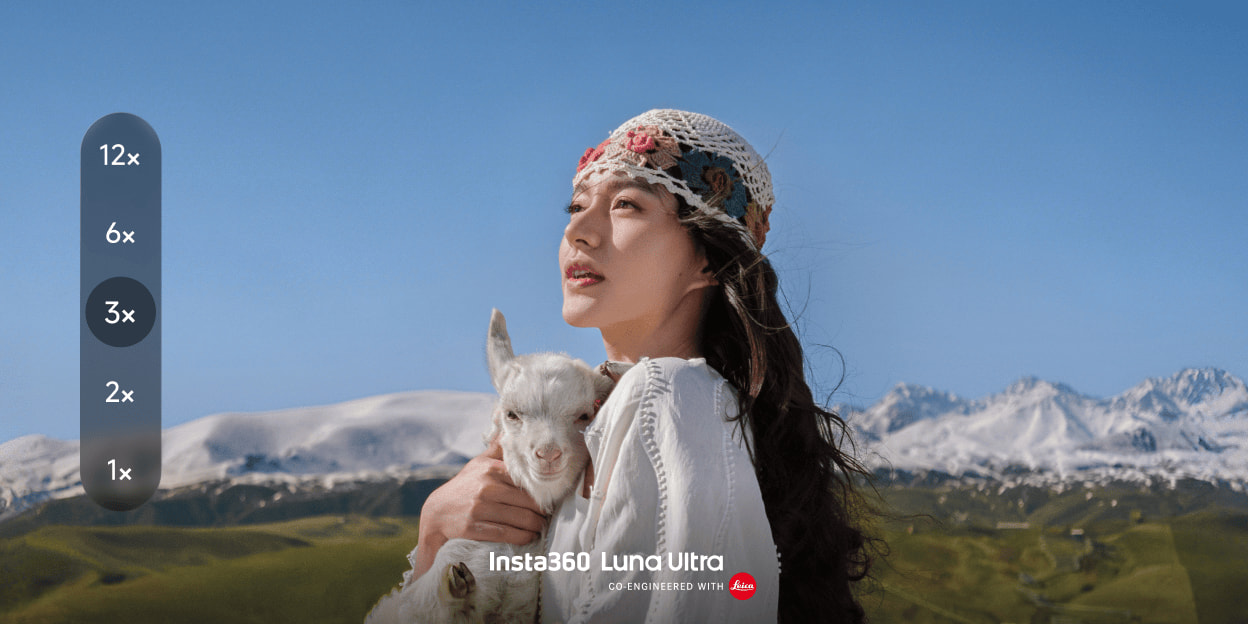
The main camera handles movement, context and low light. The telephoto camera handles portraits, details and background compression. These are distinct optical tools, not one camera with a heavy digital crop.

Show the world.
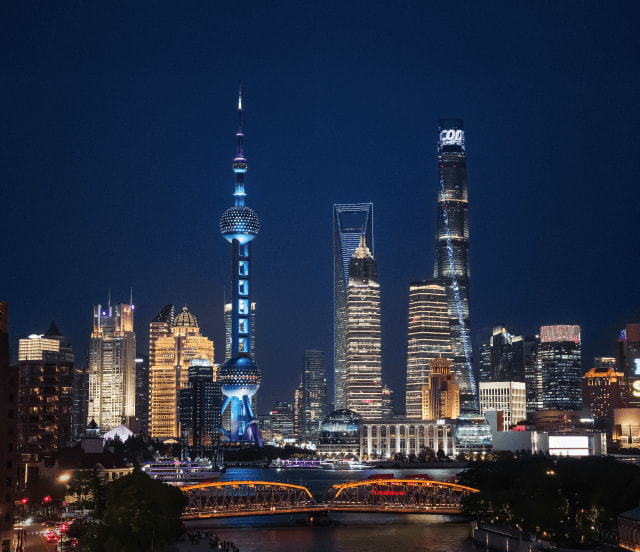
Best for travel, interiors, walking vlogs, landscapes, group scenes and PureVideo low-light work.
Show the point.
Best for portraits, products, food, architecture details and tighter B-roll with more natural perspective.
Main camera / 20mm
- Sensor1-inch
- ApertureF1.8
- Minimum focus9cm
- Maximum video8K30
- Low lightPureVideo
Telephoto camera / 60mm
- Sensor1/1.3-inch
- ApertureF2.0
- Minimum focus15cm
- Native position3×
- Maximum reach12×
Which zoom settings preserve the strongest quality?
Treat 1× as the native main-camera view and 3× as the native telephoto view. Insta360 markets up to 6× lossless or Clarity Zoom and up to 12× total zoom. Use 12× when reach matters more than maximum detail.
Why is 60mm better for portraits?
A longer focal length lets the camera sit farther from the face, reducing the exaggerated nose-and-forehead effect created by a very wide lens held close. It also compresses the background for a more deliberate portrait look.
Why does mode selection change zoom availability?
The official shooting table limits 4K120, 2.7K120 and 1080p high-frame-rate modes to fixed 1× and 3× positions. Supported standard video and PureVideo settings provide continuous zoom up to 12×.
The telephoto lens changes everyday footage.
It lets a creator film a face, product or architectural detail without pushing the camera directly into the subject's space.
The wide camera tells the audience where the story happens. The telephoto camera tells the audience what to notice.


Choose the mode for the delivery.
8K is not automatically the best setting. The right choice depends on movement, light, storage, editing hardware and how the final video will be published.
Daylight, landscapes, reframing and high-resolution masters.
Vlogging, travel, interviews and efficient editing.
Dedicated AI low-light processing up to 4K60.
| Mode | Official maximum | Best use | Important limit |
|---|---|---|---|
| Video | 8K30; 4K120; 3K vertical up to 60fps | General shooting from cinematic detail to social-first vertical capture | 8K and high-frame-rate modes do not support in-camera filters. |
| PureVideo | 4K60 in 16:9; 3K60 in 9:16 | Night streets, restaurants, interiors and low-light portraits | Cannot be combined with I-Log. |
| Slow Motion | 4K120; 1080p240 | Sports, movement and product action | Use strong light and fixed 1× or 3× positions. |
| Timelapse | 4K30 output | Sunsets, traffic, clouds and stationary long scenes | Use a tripod and enough external power. |
| TimeShift | Dynamic fast-motion mode | Walking tours and travel transitions | Continuous zoom is not supported. |
| Spin Shot / Dolly Zoom | Creative effect modes | Transitions and short stylized clips | These are creative modes, not 360-video capture. |
When should a creator choose 8K?
Use 8K when the subject is well lit, the camera movement is controlled and the extra resolution will be used for reframing, cropping or high-resolution delivery. Choose 4K when editing speed, storage and long recording time matter more.
What is the practical purpose of 4K120?
4K120 captures high-resolution motion that can be slowed in post. It is strongest in good light. High frame rates require faster shutter speeds, which can increase noise when the scene is dark.
Capture clean or build the look later.
Standard colour is the quickest route to publishing. Dolby Vision supports HDR delivery on compatible screens. I-Log preserves a flatter 10-bit file for grading and offers the official 14-stop dynamic-range claim.
A camera built for solo creators.
The detachable 2-inch OLED screen is both monitor and control surface. Insta360 states that HD transmission reaches up to 20 metres under test conditions.
- Frame tripod shots from across the room.
- Monitor low, high and mounted camera positions.
- Select subjects for Auto Tracking and Smart Framing.
- Confirm battery, focus and remaining storage.
- Use supported Insta360 wireless microphones for solo or two-person audio.
Tap or use the joystick to select a person, pet or supported object.
The official smart-tracking guide supports tracking up to eight people.
Place a tracked subject off-centre for more deliberate composition.
Still photography without the spec confusion.
Luna Ultra supports Standard Photo, UltraPhoto, Live Photo and Pano. The 360 option is a stitched still panorama, while the 200MP mode creates a high-resolution scenic panorama.
Fast everyday stills with efficient file sizes.
Higher-resolution stills with JPG or JPG+RAW options.
20224×10112 stitched output in the current official shooting table.
Power, storage and audio decide whether the shoot continues.
The hardware headline matters, but storage limits, charging, microphone setup and environmental protection determine whether Luna Ultra works for a full production day.
Official estimates are about 35 minutes at 8K30 or 104 minutes at 4K60 without a card.
Use UHS-I V30 or faster, formatted exFAT. Do not use UHS-II or UHS-III.
Up to 240 minutes only in the official 1080p24 screen-off and Wi-Fi-off lab test.
Charging and battery planning
The official manual lists about 23 minutes to 80% and 38 minutes to full under its stated 25°C powered-off charging test. Carry the battery handle or external power for long creator days.
Audio specification and microphone workflow
Luna Ultra records 48kHz 32-bit AAC audio and offers Auto Wind Noise Reduction, Voice Enhancement and Original Audio. It supports direct connection to Insta360 Mic Pro and Mic Air transmitters.
Weather and environmental limits
The camera's official operating range is 0°C to 40°C. It is not waterproof, splashproof or dustproof. Use a different camera for rain, water sports, blowing sand or mud.
Settings by creator scenario.
These are practical starting points rather than mandatory official presets. Adapt exposure, white balance and frame rate to the scene.
Buy the kit that solves your workflow.
Prices below were checked July 22, 2026. Availability, included accessories and promotions can change.
Camera, protective cover, wind guard, 1/4-inch thread handle and wrist strap.
Adds a Lexar 128GB Professional Silver Plus microSD card and mini tripod.
Adds creator-focused accessories including battery handle, carry bag, Mic Pro transmitter and wide-angle lens.
A pocket camera for creators who change framing often.
- You want wide travel shots and tighter portrait footage from one compact gimbal.
- You film yourself and value remote monitoring and AI tracking.
- You need 8K detail, 4K120 slow motion or PureVideo low-light capture.
- You use I-Log, Dolby Vision, filters or a managed creator colour workflow.
- You understand that Luna Ultra is not an action camera and will protect it from weather.
Luna Ultra FAQ
What is Insta360 Luna Ultra?
Luna Ultra is a dual-lens 8K gimbal camera co-engineered with Leica. It combines a 1-inch 20mm main camera, 1/1.3-inch 60mm telephoto, 3-axis stabilization, detachable OLED screen and AI tracking.
Is Luna Ultra a 360 camera?
No. It is not a dual-fisheye 360-video camera. It offers 360 Panorama as a stitched still-photo mode.
Is Luna Ultra waterproof?
No. The official manual says Luna Ultra is not dustproof, waterproof or splashproof.
What video resolutions are supported?
Luna Ultra supports 8K up to 30fps, 4K up to 120fps, PureVideo up to 4K60 and 1080p slow motion up to 240fps.
What is the difference between the two lenses?
The main camera uses a 1-inch 20mm F1.8 lens. The telephoto uses a 1/1.3-inch 60mm F2.0 lens for portraits, details and stronger background compression.
How much zoom is available?
Supported modes provide up to 12× total zoom, including up to 6× lossless or Clarity Zoom. High-frame-rate modes restrict zoom to fixed 1× and 3× positions.
What is PureVideo?
PureVideo is the dedicated low-light mode. It uses the Triple AI Chip system and supports up to 4K60.
Does Luna Ultra support I-Log?
Yes. It supports 10-bit I-Log with the official 14-stop claim and native DaVinci Resolve colour-space-transform support.
Can filters be used in 8K?
No. The official filter guide excludes 8K Video, high-frame-rate Video and Live Photo.
How large is the detachable screen?
The official screen size is 2.0 inches. It is OLED, 318×564 and reaches up to 1000-nit peak brightness.
How much storage is included?
Luna Ultra includes 47GB internal storage. The current English manual recommends UHS-I V30 or faster microSD cards and says not to exceed 1TB.
How long does the battery last?
The official 240-minute figure was measured at 1080p24 with the screen and Wi-Fi off at 25°C. Real 8K and remote-screen use will be shorter.
How much does Luna Ultra cost in Canada?
SpeedyDrone prices checked July 22, 2026 were CAD $949 for Standard, CAD $1,034.99 for Standard + Exclusive Kit and CAD $1,199 for Creator Bundle.
Where can I buy Luna Ultra in Toronto?
SpeedyDrone Canada offers Luna Ultra bundles with Canada-wide shipping and Toronto showroom pickup on eligible in-stock configurations.
Choose the bundle that matches the way you shoot.
Compare Luna Ultra Standard, Exclusive and Creator bundles, check current Canadian availability or ask the Toronto showroom which accessories fit your vlogging, travel, portrait or product workflow.
- Insta360 Luna Ultra official product page
- Official hardware specifications
- Official photo and video specifications
- Official filter compatibility guide
- Official Beautify compatibility guide
- Official I-Log guide
- Official English storage and memory-card guide
- Official smart-tracking guide
- SpeedyDrone Canada Luna Ultra collection and pricing
- SpeedyDrone Standard + Exclusive Kit
- SpeedyDrone Standard Bundle
- SpeedyDrone Creator Bundle
Information and Canadian pricing were checked July 22, 2026. Specifications, firmware, prices, inventory, accessories and package contents can change. Manufacturer maximum figures are laboratory or controlled-condition results, not guarantees.


