


Unitree G1 Developer Guide: SDK, ROS 2, Simulation and Your First Research Project
Understand the real G1 development stack—from Unitree SDK2 and Cyclone DDS to ROS 2, MuJoCo, Isaac Lab and sim-to-real validation—then complete a safe, useful first humanoid-robotics project without beginning with uncontrolled motion.
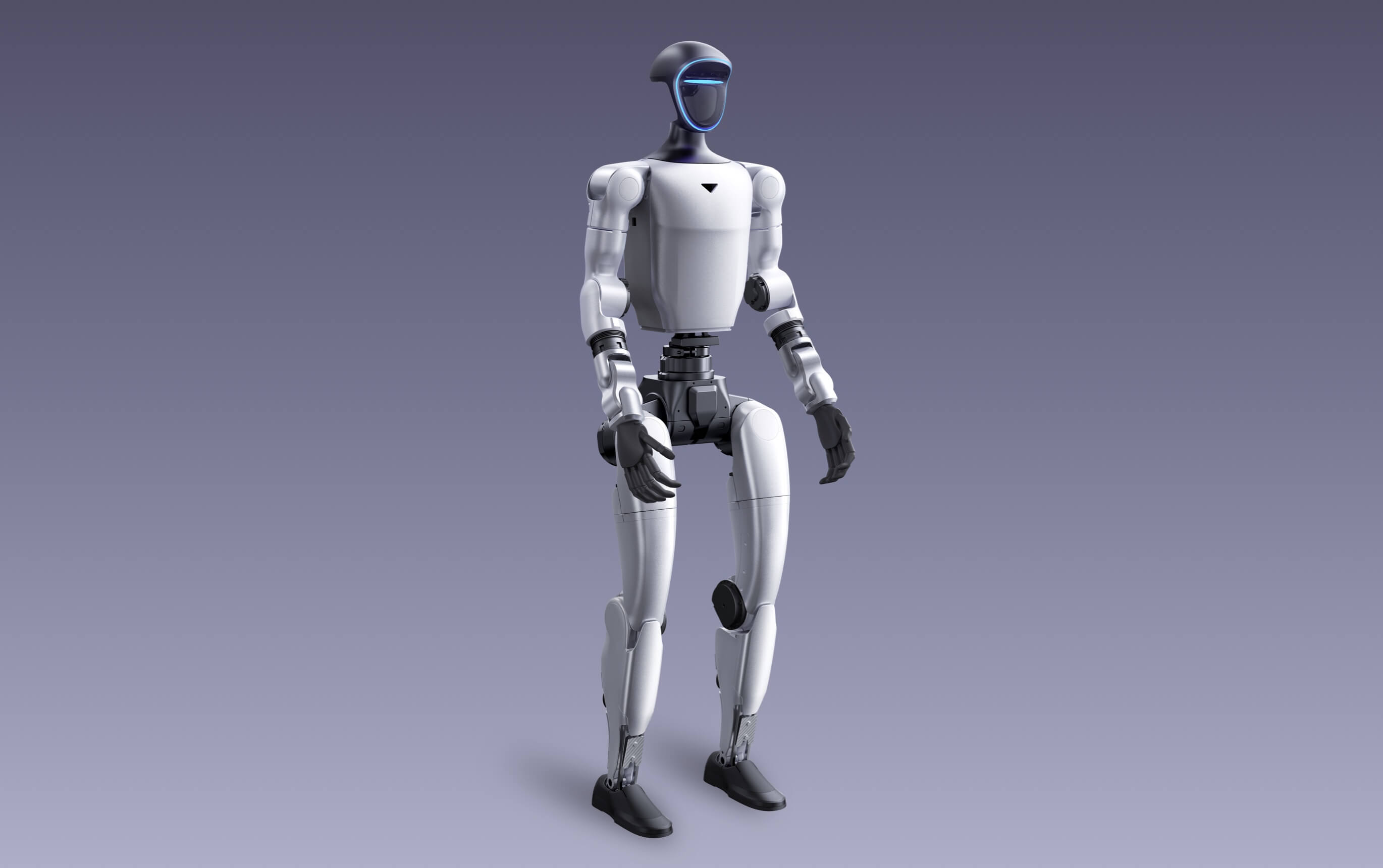
For serious G1 development, start with a confirmed G1 EDU configuration, build the communication layer with SDK2 and Cyclone DDS, use ROS 2 when your research needs ROS nodes and tooling, validate low-level control in MuJoCo, and use Isaac Lab or Unitree’s RL projects only after the basic data, model and safety pipeline works.
Choose the correct G1 hardware before writing code
Unitree’s public G1 comparison lists secondary development for G1 EDU and does not list it for standard G1. The two robots share the same general body dimensions and base sensing concept, but they are not interchangeable when SDK access, additional computing, expanded joints or dexterous hands are contractual research requirements.
On smaller screens, swipe the table left to compare standard G1, configurable G1 EDU and the current SpeedyDrone U2 listing.
| Development requirement | G1 Basic | G1 EDU official range | SpeedyDrone G1 EDU U2 listing |
|---|---|---|---|
| Secondary development | Not listed by Unitree | Supported | Development-oriented configuration |
| Total degrees of freedom | 23 | 23–43, configuration-dependent | 29 |
| Waist / arm profile | 1 waist DoF; 5 DoF per arm | Optional extra waist and wrist joints | 3 waist DoF; 7 DoF per arm |
| High-computing module | Not listed | Multiple options, including Orin-class modules | Listed 100-TOPS computing configuration |
| Dexterous hands | Not listed in official comparison | Optional; exact model and sensors vary | Often not included; confirm separately |
| Depth camera + 3D LiDAR | Listed | Listed | Listed |
| Official warranty period | 8 months | 18 months | Confirm final quotation and applicable terms |
| Current SpeedyDrone price* | CAD $25,699 | Configuration quote | CAD $76,980 |
| Best fit | Platform evaluation and supported demonstrations | University research, SDK work and custom integration | 29-DoF research with higher onboard compute |
*Prices were checked July 21, 2026 and may change. “G1 EDU U2” is a channel configuration name, not the complete Unitree EDU family. Confirm joint count, compute, controller, hands, sensors, charger, firmware access, SDK entitlement, warranty and delivery package before purchase.
Procurement rule: do not write “Unitree G1 for research” in a purchase order and assume the development package is understood. Name the exact EDU configuration, compute, degrees of freedom, hand model, software access and acceptance tests.
The Unitree G1 development architecture in one view
G1 development is not a single “ROS driver.” A practical system separates your research workstation, DDS communication, optional development computing, Unitree’s protected control environment and the physical robot. This separation matters for reliability, debugging and safety.
Research workstation
Source code, ROS 2 nodes, logging, visualization, model training and experiment management.
Cyclone DDS
Transport layer used by SDK2 and compatible ROS 2 message communication.
Development compute
User applications, perception, AI workloads and optional higher-compute modules on EDU configurations.
Control compute
Unitree motion-control services and protected platform functions. Do not treat it as a general workstation.
Robot hardware
Joint motors, encoders, IMUs, depth camera, 3D LiDAR, audio, battery and optional hands.
Keep platform control stable
Unitree’s motion-control environment should remain distinct from experimental user workloads. A research process should know which services must remain active and which interfaces are intended for development.
Define the messages you actually need
G1 low-level communication uses the unitree_hg message family. Typical research begins with state messages such as joint feedback and IMU data before any command publication.
Keep human override outside your experiment
Remote control, stop procedures, physical support, test-zone control and recovery plans should remain available even when the research node, network or learned policy fails.
Best-practice starting point: build a read-only data path first. Prove that the workstation can discover, timestamp, record and validate robot state before enabling command topics.
SDK2, ROS 2, MuJoCo and Isaac Lab are complementary—not interchangeable
Official C++ communication and control SDK
Use SDK2 when you want Unitree’s native C++ interfaces, direct DDS communication and the clearest alignment with official examples. The repository lists Ubuntu 20.04 LTS, x86_64 or aarch64 and GCC 9.4.
- Best for production-oriented C++ nodes
- CMake-based integration
- Official examples and message types
Fast prototyping and experiment scripts
The Python interface is useful for telemetry, rapid experiments and research tooling. It still relies on correct Cyclone DDS setup and should not be treated as a shortcut around robot safety.
- Fastest path for read-only prototypes
- Useful for data collection and orchestration
- Confirm API changes against the current release
ROS 2 messages over Cyclone DDS
ROS 2 can communicate using Unitree’s DDS-compatible messages. For G1, inspect the current unitree_hg package and G1 examples rather than assuming every Go2 or H1 example is drop-in compatible.
- Humble is the repository’s recommended tested ROS 2 path
- Useful for rosbag, RViz, composition and research ecosystems
- Version-pin message definitions
Low-level controller validation
Unitree’s MuJoCo simulator integrates with SDK2, ROS 2 and SDK2 Python. The current repository emphasizes low-level messages and sim-to-real verification rather than complete emulation of every built-in high-level G1 service.
- C++ simulator is recommended by the repository
- Python simulator supports rapid testing
- Use a separate DDS domain from the physical robot
Isaac Lab reinforcement learning
Unitree RL Lab provides Isaac Lab environments and currently lists support for the G1 29-DoF model. It is appropriate for large-scale RL experiments when the research team can manage GPU, simulator and version complexity.
- G1 29-DoF support is explicitly listed
- Suitable for vectorized training
- Requires careful Isaac Sim / Isaac Lab version matching
MuJoCo-based RL and sim-to-real
Unitree RL Mjlab uses MuJoCo as the physics backend and lists G1 support. Its published workflow is Train → Play → Sim2Real, making it a lighter alternative for some research programs.
- MuJoCo physics backend
- Modular RL research workflow
- Still requires hardware-specific validation
Recommended progression: SDK2 or ROS 2 telemetry → MuJoCo low-level verification → controlled hardware observation → simple commanded motion → only then reinforcement learning or imitation learning.
Plan the workstation, operating system and repository versions
Unitree SDK2’s repository lists Ubuntu 20.04 LTS, GCC 9.4, CMake 3.10+ and x86_64 or aarch64 as its prebuild environment.
Unitree’s ROS 2 repository lists Ubuntu 22.04 with ROS 2 Humble as recommended and Ubuntu 20.04 with Foxy as tested.
Record the operating system, compiler, ROS distribution, repository commit, robot firmware, message definitions and model configuration for every experiment.
A robotics lab should avoid one untracked workstation that everyone modifies. Create a documented development image or container for each stack and keep the robot-facing environment conservative. Simulation and RL stacks can use separate machines because their dependency requirements evolve more quickly.
- One robot-facing Linux workstation with a dedicated Ethernet interface
- One reproducible SDK2 / ROS 2 environment
- Separate simulation environment for MuJoCo
- GPU workstation for Isaac Lab when required
- Git commit hashes recorded in every experiment
- Offline copy of known-good repositories and dependencies
- Change log for firmware, models, hands and joint configuration
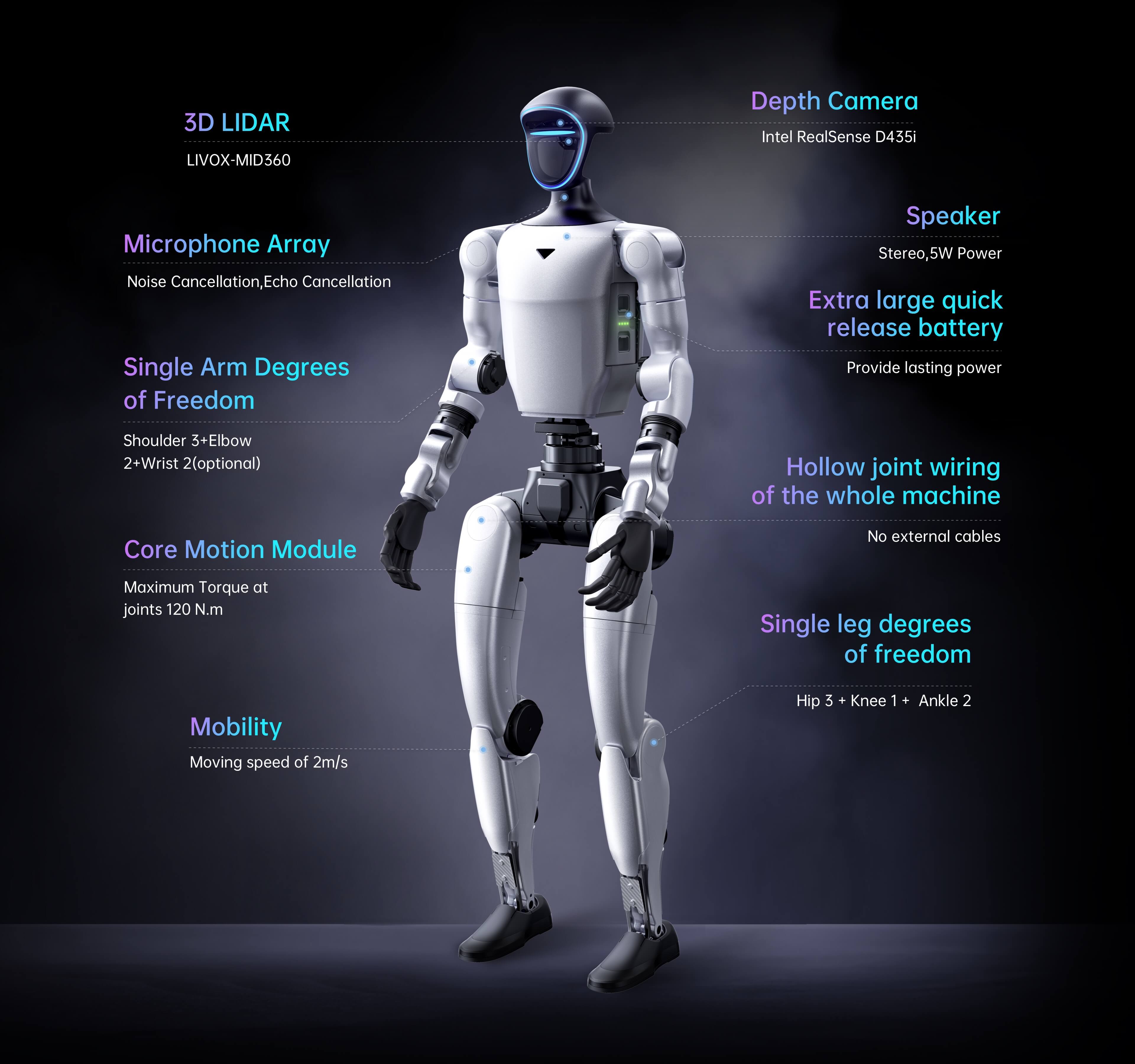
Do not assume the newest operating system is the easiest path. Robotics dependencies frequently lag desktop Linux releases. Use the combinations tested by the current official repository or a validated container, then upgrade deliberately rather than during a live robot experiment.
Configure the G1 network and Cyclone DDS deliberately
Unitree SDK2 uses Cyclone DDS. ROS 2 also uses DDS, which allows compatible message types to communicate directly. Correct interface selection, DDS domain separation and static network configuration are therefore foundational—not troubleshooting details.
Use a dedicated wired interface
Unitree’s general ROS 2 instructions use a workstation address such as 192.168.123.99/24. G1 documentation identifies the development board at 192.168.123.164 in relevant configurations.
Use loopback and a separate domain
Unitree MuJoCo recommends the local loopback interface lo for simulation and a DDS domain such as 1, distinct from the physical robot’s default domain.
Keep robot control isolated
Do not bridge the initial control network directly to public Wi-Fi or the broader enterprise network. Add routing, remote access and cloud services only after review and logging.
# Example only: replace enp3s0 with the actual wired interface.
# Confirm the current Unitree documentation for the delivered configuration.

ip link show
sudo ip addr flush dev enp3s0
sudo ip addr add 192.168.123.99/24 dev enp3s0
sudo ip link set enp3s0 up

source /opt/ros/humble/setup.bash
source "$HOME/unitree_ros2/cyclonedds_ws/install/setup.bash"
export RMW_IMPLEMENTATION=rmw_cyclonedds_cpp
export CYCLONEDDS_URI='<CycloneDDS><Domain><General><Interfaces>
  <NetworkInterface name="enp3s0" priority="default" multicast="default" />
</Interfaces></General></Domain></CycloneDDS>'

ros2 topic list
Never test simulation and hardware on an ambiguous DDS configuration. Use a different domain ID and interface for simulation, confirm the active interface before launching a publisher, and stop immediately if physical robot topics appear in the simulation workspace unexpectedly.
Install Unitree SDK2 before adding unnecessary complexity
SDK2 is the clearest starting point for understanding Unitree’s communication model. Build the official examples, verify a read-only state subscriber and preserve the exact repository commit before integrating ROS 2, perception or learned policies.
sudo apt update
sudo apt install -y \
  cmake \
  g++ \
  build-essential \
  libyaml-cpp-dev \
  libeigen3-dev \
  libboost-all-dev \
  libspdlog-dev \
  libfmt-dev

git clone https://github.com/unitreerobotics/unitree_sdk2.git
cd unitree_sdk2

git rev-parse HEAD

mkdir -p build
cd build
cmake .. -DCMAKE_INSTALL_PREFIX=/opt/unitree_robotics
make -j"$(nproc)"
sudo make installBuild without the robot
Prove that dependencies, headers, message definitions and examples compile before connecting to the G1 network.
Identify the G1 message family
G1 and H1-2 low-level communication use unitree_hg. Examples built around unitree_go require adaptation rather than simple renaming.
Subscribe before publishing
Begin with state messages such as rt/lowstate. Verify timestamps, joint count, IMU fields and data rate before sending commands.
Repository discipline: record the SDK2 commit in the lab notebook and in the generated dataset metadata. A later message-definition change can otherwise make old bags, Python scripts or analysis notebooks difficult to reproduce.
How ROS 2 fits into Unitree G1 development
ROS 2 is valuable when the project needs rosbag recording, node composition, visualization, lifecycle management, perception packages or multi-sensor integration. It does not replace understanding SDK2, DDS domains and the robot’s message definitions.
Your project is a system of nodes
- You need rosbag2 datasets
- You want RViz, TF or standard visualization tools
- You are integrating cameras, LiDAR or external sensors
- You need modular perception, planning or logging nodes
- Your research team already uses ROS 2 conventions
The experiment is small and timing-sensitive
- You need a focused C++ control process
- You are adapting official SDK examples
- You want minimal middleware abstraction
- You are debugging DDS or message-level behaviour
- You do not need the broader ROS ecosystem
# Install ROS 2 Humble separately using the official ROS documentation.
# Then install Unitree's listed ROS 2 dependencies.

sudo apt install -y \
  ros-humble-rmw-cyclonedds-cpp \
  ros-humble-rosidl-generator-dds-idl \
  libyaml-cpp-dev

git clone https://github.com/unitreerobotics/unitree_ros2.git
cd unitree_ros2/cyclonedds_ws

source /opt/ros/humble/setup.bash
colcon build --symlink-install
source install/setup.bash

ros2 interface list | grep unitree_hg
ros2 interface show unitree_hg/msg/LowState
Documentation nuance: the main unitree_ros2 README historically names Go2, B2 and H1, while the current repository includes unitree_hg messages and G1-related changes. Use Unitree’s G1-specific document pages and current repository contents together; do not infer G1 support from an older generic example alone.
Choose the right G1 simulation path
“Simulation” can mean model visualization, low-level controller verification, large-scale RL training or imitation learning. Choose the environment based on the research question rather than selecting the most visually impressive simulator.
On smaller screens, swipe the table left to compare G1 simulation paths.
| Tool | Best use | G1 support position | Main caution |
|---|---|---|---|
| unitree_mujoco | Low-level SDK2 controller and message verification | Includes G1 model and unitree_hg communication path | Current scope emphasizes low-level development, not all high-level services |
| unitree_rl_lab | Large-scale reinforcement learning in Isaac Lab | Official repository lists G1 29-DoF support | Isaac Sim, Isaac Lab, Python and GPU versions must match |
| unitree_rl_mjlab | MuJoCo-based RL and sim-to-real research | Official repository lists G1 support | Learned policies still require staged physical validation |
| unitree_rl_gym | Isaac Gym training with sim2sim and sim2real workflow | Official repository lists G1 | Treat as a version-sensitive research stack, not a turnkey deployment package |
| Generic URDF / visualization | Geometry, TF, collision and visualization | Useful for planning and software integration | Visualization alone does not validate dynamics or hardware control |
# Example simulation separation pattern.
# Check the current repository because file names and defaults may change.

robot: "g1"
robot_scene: "scene.xml"
domain_id: 1
interface: "lo"
print_scene_information: 1

# Keep simulation isolated from the physical robot's DDS domain.
# G1 low-level messages use the unitree_hg IDL family.Best for basic controller plumbing
Verify joint indexing, state messages, timing, controller output limits and failure behaviour before any hardware publisher is enabled.
Best for scalable RL
Use Isaac Lab after the robot model, observation space, action space, reward design and deployment interface are already understood.
Detect simulator dependence
Testing a policy in a second simulator can expose overfitting to one physics engine before the robot carries the risk.
Simulation is not a safety certificate. Unmodelled latency, actuator limits, contact behaviour, battery voltage, joint friction, payloads, calibration and floor conditions can destabilize a policy that looks reliable on screen.
Build a G1 posture and stability telemetry pipeline
The best first project is useful, publishable and low risk. Instead of commanding walking or training a policy immediately, build a read-only pipeline that records joint and IMU state in simulation and on the physical G1, then measures whether the two data sources are consistent enough for later control research.
Can one telemetry pipeline describe G1 posture consistently in simulation and hardware?
Collect synchronized joint position, joint velocity and torso IMU data during defined static or supported poses. Compare message structure, rate, drift, missing samples and signal ranges across simulation and the physical robot.
- No learned policy required
- No low-level command publisher required
- Produces a reusable dataset and data dictionary
- Validates ROS 2, DDS and model configuration
- Creates a foundation for balance or anomaly research
Lock the configuration
Record whether the robot is 23, 29 or another EDU joint configuration. Export the joint map and confirm message definitions.
Record simulation
Use domain 1 and loopback. Record rt/lowstate and the G1 secondary IMU topic while the model is supported and stationary.
Validate the dataset
Check message rate, timestamps, joint count, missing fields, signal range and consistency before moving to hardware.
Repeat on hardware
With trained staff, physical support and no command publisher, collect the same short observation protocol on the real robot.
Step 1: inspect the current G1 message definition
source /opt/ros/humble/setup.bash
source "$HOME/unitree_ros2/cyclonedds_ws/install/setup.bash"
export RMW_IMPLEMENTATION=rmw_cyclonedds_cpp

ros2 interface show unitree_hg/msg/LowState
ros2 topic list | grep -E 'lowstate|secondary_imu'
ros2 topic info /rt/lowstate --verbose
ros2 topic hz /rt/lowstate
Step 2: record a short simulation dataset
# In the simulation environment, use loopback and a non-hardware DDS domain.
source "$HOME/unitree_ros2/setup_local.sh"
export ROS_DOMAIN_ID=1

mkdir -p "$HOME/g1_research/bags"
cd "$HOME/g1_research/bags"

ros2 bag record \
  /rt/lowstate \
  /rt/secondary_imu \
  --output g1_static_pose_sim_01
Topic availability can vary by repository release and configuration. Confirm with ros2 topic list before recording. Unitree MuJoCo documents rt/secondary_imu as a G1 torso IMU topic in its supported-message description.
Step 3: create a read-only CSV logger
#!/usr/bin/env python3
"""Read-only Unitree G1 telemetry logger.

Verify the current unitree_hg LowState definition before use.
This node subscribes only; it does not publish robot commands.
"""

import csv
from pathlib import Path

import rclpy
from rclpy.node import Node
from unitree_hg.msg import LowState


class G1TelemetryLogger(Node):
    def __init__(self) -> None:
        super().__init__("g1_telemetry_logger")
        output = Path.home() / "g1_research" / "g1_lowstate.csv"
        output.parent.mkdir(parents=True, exist_ok=True)

        self._file = output.open("w", newline="", encoding="utf-8")
        self._writer = csv.writer(self._file)
        self._header_written = False

        self.create_subscription(
            LowState,
            "/rt/lowstate",
            self._on_state,
            10,
        )
        self.get_logger().info(f"Logging read-only state to {output}")

    def _on_state(self, msg: LowState) -> None:
        motor_positions = [float(motor.q) for motor in msg.motor_state]
        motor_velocities = [float(motor.dq) for motor in msg.motor_state]
        rpy = [float(value) for value in msg.imu_state.rpy]

        if not self._header_written:
            header = ["ros_time_ns", "roll", "pitch", "yaw"]
            header += [f"q_{index}" for index in range(len(motor_positions))]
            header += [f"dq_{index}" for index in range(len(motor_velocities))]
            self._writer.writerow(header)
            self._header_written = True

        timestamp = self.get_clock().now().nanoseconds
        self._writer.writerow([timestamp, *rpy, *motor_positions, *motor_velocities])
        self._file.flush()

    def destroy_node(self) -> bool:
        self._file.close()
        return super().destroy_node()


def main() -> None:
    rclpy.init()
    node = G1TelemetryLogger()
    try:
        rclpy.spin(node)
    except KeyboardInterrupt:
        pass
    finally:
        node.destroy_node()
        rclpy.shutdown()


if __name__ == "__main__":
    main()
The example assumes the generated ROS 2 Python message exposes motor_state, motor q and dq, plus IMU rpy. Confirm the exact current interface with ros2 interface show and adjust if the repository release differs.
Step 4: define the analysis before collecting hardware data
Measure the data path
- Observed message rate
- Timestamp monotonicity
- Dropped or duplicate samples
- Expected joint count
- NaN or out-of-range values
Create simple interpretable metrics
- Mean roll and pitch
- Roll and pitch RMS
- Joint-position variance
- Joint-velocity noise floor
- Pose-to-pose repeatability
Make the result reproducible
- Robot model and joint configuration
- Firmware and repository commits
- DDS domain and network interface
- Floor, support and pose description
- Operator and test timestamp
Publishable outcome: the project can produce a short methods report, a versioned G1 telemetry dataset, a simulation-versus-hardware comparison and a validated data pipeline for later balance, anomaly-detection or control work.
Use explicit gates before sim-to-real deployment
Sim-to-real should be a sequence of approvals, not one launch command. Each gate should have evidence, an owner and a stop condition. The higher the robot energy and motion complexity, the stronger the gate must be.
Joint count, motor IDs, limits, coordinate frames and inertial model match the delivered G1 configuration.
Repository commits, dependencies, message types and command limits are locked and reproducible.
The controller remains stable across disturbances, delays, parameter variation and a second simulator when appropriate.
The physical robot is restrained or supported, the area is controlled and only low-energy motion is enabled.
Low-speed operation begins only after the stop procedure, operator roles and recovery plan are verified.
Vary the assumptions
Test mass, friction, delay, actuator strength, sensor noise and contact conditions instead of training against one perfect model.
Constrain energy before intelligence
Bound target position, velocity, torque, rate of change and experiment duration outside the learned policy or planner.
Define failure behaviour
Communications loss, invalid observations, stale commands and software exceptions need deterministic safe responses.
Unitree’s own warning matters: the G1 is a powerful humanoid with a complex structure. Maintain sufficient distance, avoid hazardous modification and use trained supervision during development.
Design experiments that survive peer review and procurement review
State what should change
Define the expected relationship between algorithm, observation, environment and measured outcome before collecting data.
Compare against something credible
Use a fixed controller, no-policy condition, previous algorithm or supported Unitree behaviour as a clearly documented baseline.
Measure success and failure
Track task success, intervention rate, falls, energy use, latency, tracking error and recovery—not only average reward.
Repeat the same test
Define start pose, floor, payload, command sequence, number of trials, stop condition and exclusion rules.
Link every result to software
Store code commit, model checkpoint, configuration, firmware, calibration and dataset identifiers with each run.
Document where it breaks
Failure boundaries often provide more deployment value than a polished demonstration under one ideal condition.
What to build after the first telemetry project
Joint-state anomaly detection
Learn the normal relationship between joint position, velocity and IMU state during known poses, then flag unusual drift or vibration.
Pose repeatability benchmark
Measure how consistently supported or built-in poses reproduce joint and torso state across batteries, temperatures and test days.
External perception fusion
Add motion capture or an external camera and compare independent pose estimates with G1 onboard state under controlled motion.
Low-energy arm trajectory study
After supported validation, compare trajectory smoothness, endpoint repeatability and current or torque estimates within conservative limits.
Sim-to-real locomotion policy
Use Unitree RL Lab, RL Mjlab or RL Gym only after the joint map, observation pipeline, controller interface and hardware gates are validated.
Dexterous-hand dataset
For a confirmed hand package, collect synchronized hand state, tactile data, object pose and task outcome for grasp research.
Human-robot interaction study
Evaluate distance, motion predictability, audio cues and participant comfort under ethics, privacy and controlled-area approval.
Energy-aware task planning
Model battery use against posture, movement duration, compute load and task completion to support realistic deployment planning.
Reproducible humanoid benchmark
Create a documented test suite that another lab can reproduce using the same G1 configuration, messages, metrics and safety rules.
Why G1 development environments fail—and how to diagnose them
Check interface and DDS first
Confirm the wired NIC, IP subnet, Cyclone DDS interface, ROS domain, sourced workspace and whether the robot or simulator is actually publishing.
Check package and release alignment
G1 uses unitree_hg. A stale workspace or mismatched SDK2 and ROS 2 message definitions can break compilation or deserialization.
Compare assumptions systematically
Review motor IDs, joint configuration, command topic, DDS domain, built-in service state, calibration, limits and model version.
Separate environments
Multiple sourced ROS distributions, local Cyclone DDS builds and stale overlays can create difficult-to-see runtime conflicts.
Pin the simulator stack
Isaac Sim, Isaac Lab, Python, GPU drivers and the Unitree repository evolve independently. Reproduce an official tested combination before modifying tasks.
Treat it as a system failure
Stop, isolate publishers, recover the robot safely and preserve logs. Do not repeatedly rerun the command until the cause is understood.
Debugging order: model → network → DDS → message type → subscriber → logger → simulator → command interface. Changing all layers at once makes successful results difficult to reproduce and unsafe failures difficult to explain.
Laboratory safety, cybersecurity and research governance
Design for a fall
Use a clear zone, operator, spotter, physical support when appropriate, low-energy tests and a recovery procedure that avoids active joints.
Segment robot control
Keep the control network isolated, document remote-access paths, restrict credentials and log software or model changes.
Protect camera and microphone data
Establish consent, access, storage, retention and deletion rules before recording identifiable people or sensitive spaces.
Use institutional review
Human-robot interaction studies may require ethics, privacy, accessibility and safety approvals before recruitment begins.
Know what policy is running
Record model provenance, training data, checkpoint hash, observation normalization, command limits and rollback method.
Define who can enable motion
Limit hardware command access to trained personnel and separate code review from permission to run on the physical robot.
Budget for a research program—not only a humanoid robot
Specify the complete platform
- Exact G1 EDU configuration
- Compute module
- Hands and tactile sensors
- Batteries, charger and controller
- Replacement and wear components
Build the lab around the robot
- Linux workstation and wired network
- GPU training workstation when required
- Test area and support equipment
- Data storage and backup
- Versioned development environments
Fund the full lifecycle
- Operator and developer training
- Commissioning and acceptance tests
- Software maintenance
- Warranty and service logistics
- Insurance and institutional administration
Capital discipline: define the first three publishable or commercially useful milestones before buying optional hardware. A clear telemetry, simulation and safety plan creates more research value than an expensive configuration with no validated experiment pipeline.
Configure the G1 research platform before you place the order
SpeedyDrone Canada supports universities, colleges, robotics laboratories, innovation teams and institutional buyers evaluating Unitree G1 and G1 EDU. Send your intended research, joint configuration, SDK requirement, compute workload, hand requirement, simulation stack, budget and target timeline for a configuration and deployment assessment.
G1 systems are special-order, configuration-sensitive products. Confirm software access, hardware version, compute, hands, sensors, package contents, warranty, lead time and commissioning requirements before purchase.
Unitree G1 SDK, ROS 2 and simulation FAQ
Does Unitree G1 Basic support secondary development?
Unitree’s official G1 comparison does not list secondary development for standard G1. It lists secondary development for G1 EDU. Buyers who need SDK access or custom integration should specify a confirmed G1 EDU configuration in writing.
What is Unitree SDK2?
Unitree SDK2 is Unitree’s official version-two robot SDK for DDS-based communication and control. The repository provides C++ libraries, message definitions, examples and CMake integration guidance.
Can I develop for Unitree G1 with Python?
Yes. Unitree maintains the unitree_sdk2_python repository. Python is useful for telemetry, data collection, orchestration and rapid research prototypes, provided the correct Cyclone DDS environment and G1 message types are used.
Does Unitree G1 use ROS 2?
G1 communication is based on Unitree SDK2 and Cyclone DDS. ROS 2 also uses DDS, allowing compatible Unitree message types to be used in ROS 2 workflows. G1 low-level messages use the unitree_hg family.
Which ROS 2 distribution should I use for Unitree?
Unitree’s current unitree_ros2 repository lists Ubuntu 22.04 with ROS 2 Humble as recommended and Ubuntu 20.04 with Foxy as tested. Confirm the repository’s current requirements and keep the environment version-pinned.
What is the difference between unitree_go and unitree_hg messages?
Unitree’s simulator documentation states that Go2, B2 and several related platforms use the unitree_go IDL family, while G1 and H1-2 use unitree_hg for low-level communication. Examples must use the correct robot message family.
Can Unitree MuJoCo simulate the G1?
Yes. Unitree’s MuJoCo repository includes G1 model support and unitree_hg communication. Its current documented scope emphasizes low-level messages and sim-to-real controller verification rather than complete reproduction of every built-in high-level robot service.
Should I use MuJoCo or Isaac Lab for G1 research?
Use Unitree MuJoCo for lower-level controller and SDK communication validation. Use Isaac Lab when the project needs large-scale reinforcement-learning training and the team can manage the GPU and version requirements. Many programs use both.
Does Unitree RL Lab support every G1 configuration?
The official unitree_rl_lab repository currently lists G1 29-DoF support. Do not assume a 23-DoF or other configuration can use the same task, motor map or policy without adaptation and validation.
What should my first Unitree G1 research project be?
A read-only posture and stability telemetry project is an excellent start. Record joint and IMU state in simulation, validate the dataset, then repeat a controlled observation protocol on the physical robot without publishing motion commands.
What DDS domain should I use for simulation?
Unitree MuJoCo recommends separating simulation from the physical robot’s default domain. A domain such as 1 with the loopback interface is a common simulation pattern, but confirm the active configuration before launching any publisher.
Why can I not see G1 ROS 2 topics?
Common causes include the wrong wired interface, incorrect subnet, unsourced workspace, wrong ROS domain, Cyclone DDS not selected, stale message definitions or the robot/simulator not publishing the expected service.
Can a policy trained in simulation be deployed directly to G1?
It should not be deployed without staged validation. Use model checks, sim2sim testing, command limits, supported physical testing, trained operators, a controlled area and a verified stop procedure before free motion.
How much does a Unitree G1 research platform cost in Canada?
On July 21, 2026, SpeedyDrone listed G1 Basic at CAD $25,699 and G1 EDU U2 at CAD $76,980. A complete research budget may also include computing, hands, batteries, training, integration, safety equipment and software labour.
Where can a Canadian university request a Unitree G1 EDU quote?
Canadian universities and research organizations can contact SpeedyDrone Canada for configuration guidance, Toronto evaluation options, special-order pricing, financing questions and deployment planning.
- Unitree G1 official product page and G1 versus G1 EDU comparison
- Unitree G1 official developer guide
- Unitree G1 quick-development guidance
- Unitree G1 startup and debug-mode guidance
- Unitree G1 basic service and low-level communication interface
- Unitree G1 DDS service and topic reference
- Unitree G1 ROS 2 communication routine
- Unitree SDK2 official GitHub repository
- Unitree SDK2 Python official GitHub repository
- Unitree ROS 2 official GitHub repository
- Unitree MuJoCo official simulator repository
- Unitree RL Lab official Isaac Lab repository
- Unitree RL Mjlab official MuJoCo reinforcement-learning repository
- Unitree RL Gym official reinforcement-learning repository
- SpeedyDrone Canada Unitree G1 collection
- SpeedyDrone Canada G1 Basic product listing
- SpeedyDrone Canada G1 EDU U2 product listing
Information and Canadian prices were checked July 21, 2026. Repositories, documentation, message definitions, firmware, simulation support, joint configurations, compute modules, hands, package contents, prices and warranty procedures can change. Examples in this article are educational starting points and must be verified against the exact delivered robot and current official documentation. Unitree warns that humanoid robots are powerful and complex, asks users to maintain sufficient distance and advises against hazardous modification or use.


