


Unitree G1 EDU U2 vs U3 vs U4 vs U5 vs U6 vs U7 vs U8: Full Canada Comparison
Compare the G1 EDU configurations commonly sold as U2 through U8 across body articulation, computing, three- and five-finger hands, tactile sensing, research fit, procurement risk and Canadian buying context.

U2 is the development body without functional manipulation hands. U3 and U4 are commonly mapped to three-finger Dex3-1 packages. U5 and U6 move to five-finger Inspire packages. U7 and U8 are commonly mapped to BrainCo five-finger packages, with U8 positioned for richer tactile research.
U2–U8 are useful market labels—but the hardware specification matters more
Unitree’s official public G1 page compares two broad platforms: G1 and configurable G1 EDU. It lists G1 EDU at 23–43 total degrees of freedom, optional wrist and hand expansion, secondary-development support and multiple possible high-computing modules. It does not publish one universal public U2–U8 comparison table.
G1 vs configurable G1 EDU
Unitree officially distinguishes the standard 23-DoF G1 from a configurable G1 EDU platform that can add articulation, compute and dexterous hands.
U1, U2, U3 and higher
Resellers often use U-numbers and “Plus” or “Ultimate” letters to organize bundles. These labels help shopping, but mappings can differ between sellers.
Buy the bill of materials
The purchase order should state the body DoF, wrists, hand model, tactile sensors, compute module, SDK access, controller, battery and warranty—not only “U7.”
Why this matters: one current Canadian U7 page describes the same product using conflicting total-DoF figures and explicitly notes that U-number-to-letter mappings vary across distributors. This guide therefore treats U2–U8 as common market mappings and separates confirmed platform facts from configuration-specific reseller claims.
What each Unitree G1 EDU configuration is trying to solve
Development body without functional hands
Commonly listed with 29 body DoF, three waist axes, seven axes per arm, EDU development access and a high-computing configuration—but without active dexterous hands.
Best for locomotion, perception, whole-body control, HRI and teams adding their own end effectors.
Three-finger manipulation entry
Commonly mapped to dual Unitree Dex3-1 three-finger hands without a tactile-array package being explicitly included in the listing.
Best for force-position control, grasp planning and object manipulation where three fingers are sufficient.
Three-finger manipulation with tactile sensing
Commonly positioned as the U3 body-and-hand package with the optional Dex3-1 tactile-sensor arrays explicitly included.
Best for contact-rich grasping, pressure feedback and manipulation research that needs tactile data.
Five-finger kinematics without tactile emphasis
Commonly mapped to dual Inspire five-finger hands for human-like grasp shapes and broader finger geometry, without the higher tactile package.
Best for human-grasp taxonomy, gesture, tool-shape studies and five-finger motion research.
Five-finger Inspire tactile package
Commonly listed with dual Inspire five-finger hands and tactile sensors, creating a richer package for contact and manipulation studies.
Best for five-finger tactile research when the Inspire hand ecosystem matches the project.
BrainCo five-finger kinematic package
Commonly mapped to BrainCo Revo 2 Basic five-finger hands, emphasizing human-like grasp geometry without the Touch model’s multimodal tactile package.
Best for five-finger kinematics, HRI and tool-use research where tactile sensing is not the core requirement.
BrainCo five-finger tactile package
Commonly mapped to BrainCo Revo 2 Touch hands with richer contact sensing for pressure, direction, friction or proximity-oriented research.
Best for advanced five-finger manipulation and multimodal tactile experimentation.
Task software and proven workflows
A higher configuration adds hardware capability. It does not arrive trained for every household, industrial or laboratory task.
Budget for integration, data, software engineering, validation, maintenance and operator training.
Buy the lowest model that meets the research requirement
Do not pay for tactile hands when the project only studies locomotion. Do not buy a body-only U2 when manipulation is a funded deliverable.
Start from the experiment, then select the body, compute and hand package.
Unitree G1 EDU U2 vs U3 vs U4 vs U5 vs U6 vs U7 vs U8 table
The table below compares the hardware packages commonly associated with these labels in current Canadian and international reseller listings. Rows marked “confirm” are not safe to assume from the U-number alone.
On smaller screens, swipe left to compare all seven G1 EDU configurations.
| Specification | U2 | U3 | U4 | U5 | U6 | U7 | U8 |
|---|---|---|---|---|---|---|---|
| Common market name | EDU Plus | Ultimate A | Ultimate B | Ultimate C | Ultimate D | Ultimate E* | Ultimate F* |
| Body articulation | Commonly 29 DoF | Commonly 29 body DoF | Commonly 29 body DoF | Commonly 29 body DoF | Commonly 29 body DoF | Confirm exact body | Confirm exact body |
| Waist / arm pattern | 3 waist / 7 per arm | Often 3 waist / 7 per arm | Often 3 waist / 7 per arm | Often 3 waist / 7 per arm | Often 3 waist / 7 per arm | Confirm quotation | Confirm quotation |
| Hand package | No functional dexterous hands in many listings | Dual Dex3-1 three-finger hands | Dual Dex3-1 three-finger hands | Dual Inspire five-finger hands | Dual Inspire five-finger hands | Dual BrainCo Revo 2 Basic five-finger hands | Dual BrainCo Revo 2 Touch five-finger hands |
| Active hand DoF | 0 | 7 per hand | 7 per hand | Commonly 6 per hand | Commonly 6 per hand | 6 per hand | 6 per hand |
| Tactile package | No | Not explicitly included in common U3 mapping | Dex3-1 tactile arrays specified | Not the defining feature | Inspire tactile package specified | Basic version commonly listed without tactile sensing | Multimodal Touch package |
| Published total DoF | 29 in current SpeedyDrone listing | Commonly 43 | Commonly 43 | Commonly 41 | Commonly 41 | Public listings conflict; confirm exact count | Often listed 41–43; confirm exact count |
| High-computing module | 100-TOPS configuration currently listed by SpeedyDrone | High-computing Orin-class configurations are commonly listed; confirm the exact processor, memory and performance in the quotation | |||||
| Secondary development | Yes | Yes | Yes | Yes | Yes | Yes | Yes |
| Perception platform | G1 EDU commonly uses the official depth-camera and 3D-LiDAR sensing platform; confirm sensor models in the final configuration | ||||||
| Published knee-joint maximum | G1 EDU official maximum for the largest joint motor: 120 N·m; not a guaranteed task output in every pose | ||||||
| Published arm maximum load | About 3 kg for G1 EDU; actual usable load changes significantly with arm extension and posture | ||||||
| Battery | 9000mAh quick-release smart battery; about two hours listed, with real runtime dependent on movement, compute and accessories | ||||||
| Best research fit | Locomotion, perception, control | Three-finger manipulation | Tactile three-finger manipulation | Five-finger kinematics | Tactile five-finger manipulation | BrainCo five-finger kinematics | Advanced BrainCo tactile research |
*Ultimate-letter mappings are reseller terminology and can vary. Unitree’s official public page specifies G1 EDU as a configurable 23–43 DoF platform rather than publishing this exact U2–U8 table. Confirm every configuration element in writing. Total-DoF counts can be calculated differently depending on whether body, wrist and hand joints are included.
Dex3-1 vs Inspire vs BrainCo: which G1 hand architecture fits your lab?
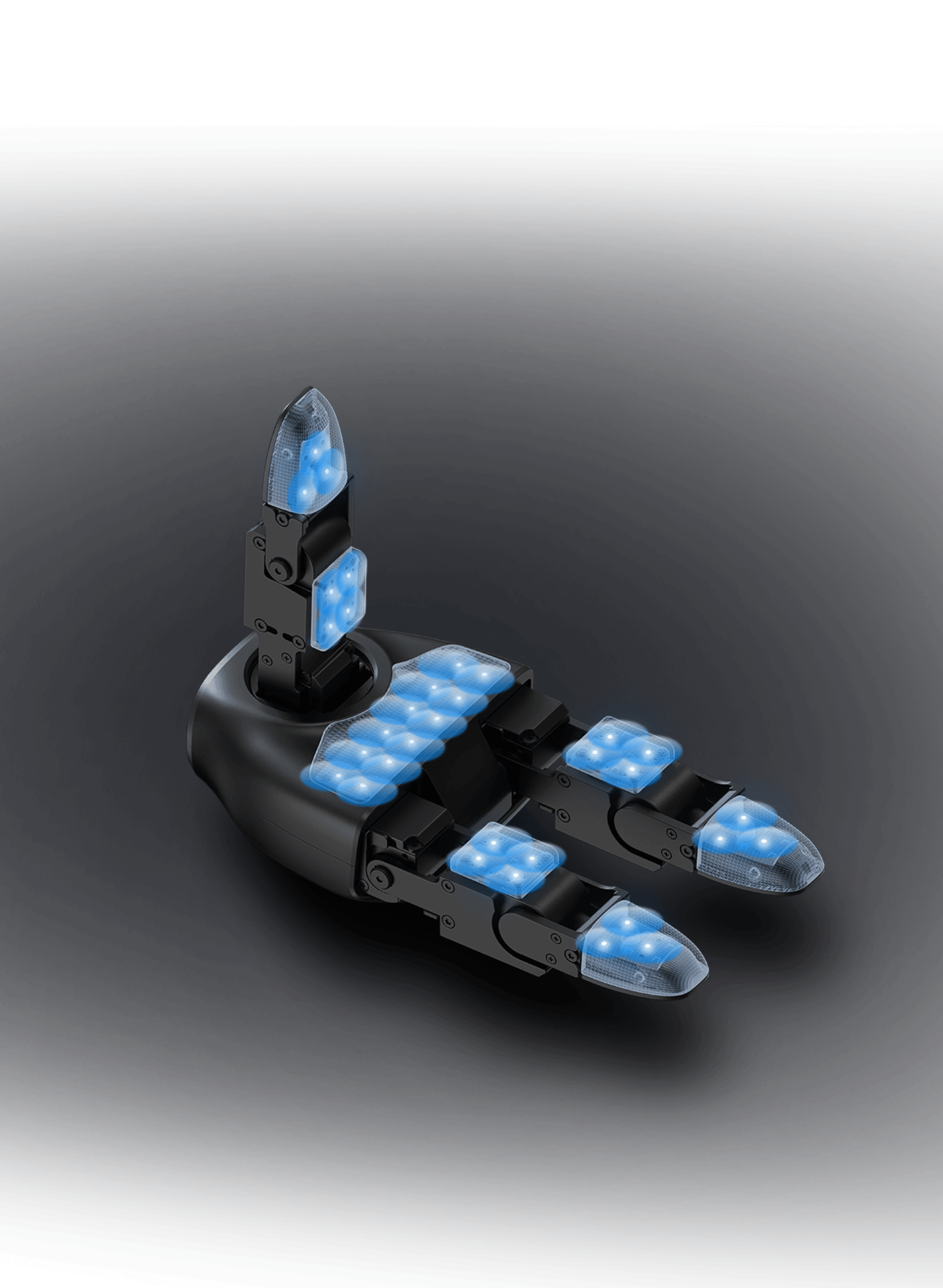
Unitree Dex3-1: compact three-finger force-control research
Unitree officially describes Dex3-1 as a three-finger hand with seven active degrees of freedom: three at the thumb, two at the index finger and two at the middle finger. The current official product page also describes pressure-sensor capability and force-position hybrid control.
- Seven active degrees of freedom per hand
- Three-finger geometry
- Force-position hybrid control
- Optional or package-dependent tactile arrays
- Strong fit for grasp control, contact and object manipulation
Choose for compact precision
Three fingers reduce mechanical complexity while still supporting many pinch, cylindrical and force-control experiments. U3 and U4 are commonly differentiated by tactile-array inclusion.
Choose for five-finger human-like form
Unitree’s developer documentation supports an Inspire five-finger hand with six active DoF and twelve motion joints. U5 and U6 are commonly differentiated by tactile hardware.
Choose for BrainCo’s five-finger ecosystem
Unitree’s official developer documentation supports a second-generation BrainCo five-finger hand with six DoF. Current reseller mappings commonly separate Basic-style kinematics from a richer Touch package.
Five fingers are not automatically “better.” Dex3-1 may be the more efficient choice for controlled grasp research. Five-finger packages are justified when human-like grasp geometry, gesture, tool use or a specific hand ecosystem is central to the funded project.
What U2–U8 generally share before the hand package changes

Across the EDU family, buyers are generally starting from the same compact humanoid platform: about 132 cm standing height, approximately 35 kg or more with battery, depth-camera and 3D-LiDAR sensing, Wi-Fi 6, Bluetooth 5.2, a microphone array, speaker and a quick-release battery.
- 1320 × 450 × 200 mm standing dimensions
- 690 × 450 × 300 mm folded dimensions
- Approximately 35 kg+ with battery
- Up to 120 N·m official maximum for the largest joint motor
- About 3 kg published arm maximum load
- 9000mAh quick-release battery
- About two hours of listed battery life
- Secondary-development support on G1 EDU
Shared chassis does not mean identical research capability. The practical difference between a U2 and a tactile U8 is not primarily walking speed—it is whether the robot can manipulate objects, sense contact and support the exact data and control interfaces required by the project.
Which Unitree G1 EDU configuration should you buy?
The research is not hand-dependent
- You study locomotion, navigation or whole-body control
- You need EDU compute and development access
- You plan to add a custom end effector later
- You want to avoid paying for unused hands
Three-finger manipulation is enough
- You need active grasping without a premium tactile package
- Your objects suit pinch or three-point grasp strategies
- You want Unitree’s Dex3-1 ecosystem
- You can validate contact using force and position data
Contact data is a research requirement
- You need Dex3-1 tactile arrays explicitly included
- You study slip, grasp pressure or object contact
- You need richer manipulation feedback than U3
- Three fingers still cover the task set
Human-like hand geometry matters
- You study five-finger grasp taxonomies
- You need gesture or tool-shape research
- Tactile sensing is not the primary deliverable
- The Inspire interface fits the software stack
You need Inspire five-finger tactile research
- You need five-finger geometry and contact sensing
- You are building data-driven manipulation experiments
- You need tactile capability identified in the purchase order
- Your lab can support the added integration complexity
You prefer BrainCo five-finger kinematics
- You need five-finger form without the Touch premium
- Human-like grasp shape matters more than tactile data
- Your team prefers the BrainCo control ecosystem
- The seller confirms the exact body and DoF count
Multimodal tactile sensing drives the project
- You need advanced BrainCo Touch sensing
- You study friction, direction, pressure or proximity
- You need rich contact data for learning or control
- The research budget supports top-tier hand hardware
The project has no defined first experiment
A vague goal such as “use AI to make the robot work” is not enough to choose a package. Define the task, objects, sensing, data, control level and success metric first.
Specify the outcome and the hardware
The strongest quotation connects each component to a project requirement. Every extra wrist axis, sensor and hand should have a reason to exist in the experiment.
Best G1 EDU package by research workflow
Start with U2
Hands add cost and risk without helping a locomotion-first project. Prioritize compute, interfaces, data capture and a protected test area.
U3 or U4
Three-finger Dex3-1 packages can cover many controlled grasping experiments. Choose U4 when tactile feedback is a funded requirement.
U5, U6 or U7
Five-finger geometry better supports human-like grasp categories. The correct choice depends on tactile needs and the preferred hand ecosystem.
U4, U6 or U8
Tactile packages matter when the algorithm must reason about pressure, contact location, slip or object interaction beyond joint position alone.
U2 for interaction; U5/U7 for hand gesture
Audio, perception and whole-body interaction may not need active hands. Gesture and natural hand-shape studies justify five-finger packages.
U6 or U8 after task definition
Household objects vary in shape, friction and fragility. Tactile five-finger systems may help, but only with substantial software and validation work.
Unitree G1 EDU pricing in Canada
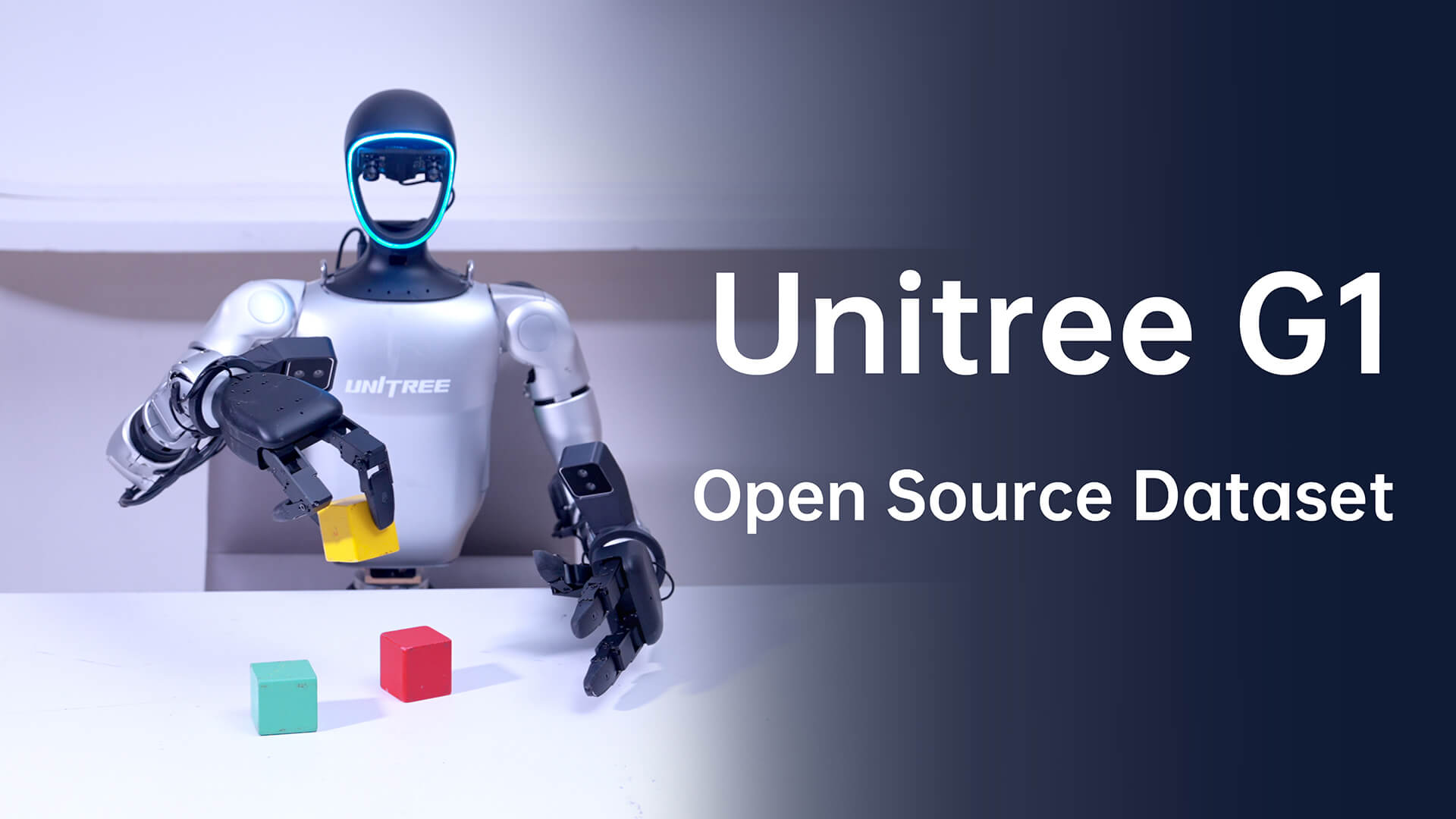
Higher G1 EDU pricing is driven less by the shared chassis and more by articulation, compute, dexterous hands, tactile sensors, integration and support. A hand package can change the research value—and the landed project cost—by tens of thousands of dollars.
Robot, hands and compute
The model code should be tied to an exact bill of materials. A low headline price is not comparable if hands, tactile arrays or compute are omitted.
Commissioning and laboratory readiness
Budget for operator training, test-zone preparation, workstation, networking, storage, acceptance testing and internal approvals.
Engineering time and maintenance
Software development, data collection, replacement parts, shipping, batteries and research staff usually matter more than the initial demo.
Do not compare U7 prices without comparing the exact U7. Current public listings show inconsistent naming and DoF descriptions. A valid comparison requires the body configuration, hand model, tactile capability, compute module, warranty and included accessories.
SpeedyDrone price checked July 21, 2026. Prices, taxes, freight, exchange rates, package contents, warranty route and lead times can change. Contact SpeedyDrone Canada for a current institutional quotation.
G1 EDU configuration checklist for universities and robotics labs
Write the full configuration code
Record G1 EDU U2, U3, U4, U5, U6, U7 or U8 together with the seller’s complete product description.
Separate body DoF from hand DoF
List waist, arm, wrist and hand axes individually so the total cannot be interpreted differently after delivery.
Name the left and right hands
Specify Dex3-1, Inspire or BrainCo, exact variant, quantity and whether mounting hardware and cables are included.
Do not accept “tactile capable”
State whether tactile sensors are physically installed, which sensing modes are available and how data is accessed.
Identify processor and memory
“100 TOPS” alone does not specify the exact module. Confirm processor, RAM, storage, cooling, interfaces and operating environment.
Put SDK access in the contract
Confirm credentials, documentation, development computer, permitted interfaces, examples, support and any regional restrictions.
List every physical component
Confirm controller, battery, charger, cables, transport case, spare parts, tools, adapters and protective accessories.
Confirm the applicable route
Unitree lists 18 months for G1 EDU, but reseller pages can differ. State the controlling warranty, exclusions and shipping responsibility.
Define pass and fail tests
Verify serial numbers, joints, sensors, hands, tactile data, compute, battery, controller and development interfaces before institutional acceptance.
Recommended purchase-order wording: “Final acceptance is conditional on verification of the quoted body articulation, left and right hand models, installed tactile sensors, compute module, SDK access, controller, battery, charger and listed accessories.”
Safety matters more as manipulation capability increases
Unitree warns that humanoid robots are structurally complex and powerful and instructs users to maintain sufficient safety distance. Active hands add pinch, grasp and contact risks on top of whole-body motion and fall hazards.
Prepare a protected test zone
Remove fragile objects, mark boundaries, restrict access and provide space for a fall without striking people or equipment.
Use an operator and spotter
One person controls the system while another monitors the robot, hands, cables, environment and stop condition.
Start with soft, replaceable objects
Validate open-close motion, limits, sensor data and force settings before testing valuable, sharp, hot or fragile objects.
Add one risk at a time
Test stationary systems, then isolated joints, then supported motion, then manipulation, and only later combined walking and handling.
Verify before every test session
Every operator should know how to stop motion, isolate power and recover the robot without reaching into active joints or fingers.
Control cameras, microphones and research data
Establish consent, access, storage, retention and deletion rules when identifiable people or sensitive laboratory data may be captured.
Never treat a viral demonstration as an operating procedure. Dynamic motion and manipulation videos may use trained operators, controlled environments, specialized software and hardware configurations that differ from the delivered robot.
Request a Unitree G1 EDU configuration assessment
SpeedyDrone Canada helps universities, colleges, AI laboratories, innovation centres and enterprise teams compare G1 Basic, G1 EDU U2 and higher hand-equipped G1 EDU configurations. Send your research objective, required hand type, tactile requirement, compute workload, development needs, budget and target delivery date for a configuration review.
G1 systems are configuration-sensitive special-order products. Confirm final specifications, package contents, lead time, deposit, warranty and service pathway before purchase.
Unitree G1 EDU U2–U8 FAQ
What is the main difference between Unitree G1 EDU U2 and U3?
U2 is commonly sold as a 29-DoF development body without functional dexterous hands. U3 is commonly mapped to the same higher-articulation EDU body with two Unitree Dex3-1 three-finger dexterous hands.
What is the difference between G1 EDU U3 and U4?
Both are commonly mapped to dual Dex3-1 three-finger hands. U4 is positioned as the tactile package, while common U3 listings do not explicitly include the optional tactile-sensor arrays.
What is the difference between G1 EDU U5 and U6?
Both are commonly mapped to five-finger Inspire hand packages. U6 is positioned as the tactile version, while U5 emphasizes five-finger kinematics without the higher tactile package.
What is the difference between G1 EDU U7 and U8?
Current reseller mappings commonly associate U7 with BrainCo Revo 2 Basic five-finger hands and U8 with Revo 2 Touch hands. U8 is positioned for richer tactile research, while U7 emphasizes five-finger kinematics without the Touch package.
Are U2–U8 official Unitree model names?
They are widely used reseller and channel labels, but Unitree’s public product page presents G1 EDU as a configurable 23–43 DoF platform rather than publishing one universal U2–U8 table. Exact mappings should be confirmed with the seller.
Why do different websites show different degrees of freedom for G1 EDU U7?
Public listings can count body, wrist and hand joints differently, and some sellers map the U7 label to different body-and-hand combinations. Buy against an itemized joint configuration rather than relying on one total number.
Which G1 EDU model is best for locomotion research?
U2 is usually the most efficient choice when the project focuses on locomotion, perception, whole-body control or navigation and does not require active manipulation hands.
Which G1 EDU model is best for tactile manipulation research?
U4, U6 and U8 are the configurations most commonly positioned for tactile research. The right choice depends on whether the project needs three-finger Dex3-1, five-finger Inspire or five-finger BrainCo hardware.
Does every G1 EDU include a 100-TOPS computer?
No universal assumption should be made. SpeedyDrone’s current U2 listing specifies a 100-TOPS computing configuration, while Unitree’s official page says multiple high-computing modules are available. Confirm processor, memory and storage in writing.
How long does the Unitree G1 EDU battery last?
Unitree lists about two hours using the 9000mAh quick-release battery. Actual runtime varies with movement, hand use, computing load, accessories, temperature and battery condition.
How much does Unitree G1 EDU cost in Canada?
SpeedyDrone listed G1 EDU U2 at CAD $76,980 when checked on July 21, 2026. Higher hand-equipped packages require a current configuration quote because hand, tactile and computing options materially affect price.
What should be included in a G1 EDU quotation?
The quotation should identify the exact model code, body DoF, waist, arms, wrists, hand models, tactile sensors, compute module, SDK access, controller, battery, charger, accessories, warranty, delivery and acceptance criteria.
Can G1 EDU perform useful manipulation immediately after delivery?
The hardware can support manipulation research, but useful task performance still requires compatible software, data, calibration, object-specific testing, safety controls and trained operators.
Where can Canadian universities request a G1 EDU quote?
Canadian institutions can contact SpeedyDrone Canada for configuration guidance, special-order pricing, financing questions, Toronto evaluation options and Canada-wide institutional support.
- Unitree G1 official product page and G1 versus configurable G1 EDU specifications
- Unitree Dex3-1 official hand specifications
- Unitree official G1 developer documentation
- Unitree G1 Inspire dexterous-hand developer documentation
- Unitree G1 BrainCo hand developer documentation
- SpeedyDrone Canada Unitree G1 collection
- SpeedyDrone Canada G1 EDU U2 product listing and Canadian price
- Canada Satellite U7 listing used only as a market-naming and configuration reference
Information was checked on July 21, 2026. Unitree is the primary source for shared G1 and G1 EDU platform specifications. U2–U8 mappings, Ultimate-letter names and package contents are reseller-level market terminology and may differ. Confirm the exact Canadian configuration before purchase. Unitree warns users to maintain sufficient safety distance, avoid dangerous modifications and comply with applicable laws and institutional requirements.


