


Powerline and Utility Inspection with DJI Matrice 400, Zenmuse H30T and Dock 3
Build a two-layer inspection program: scheduled Dock 3 patrols with Matrice 4D or 4TD, plus detailed Matrice 400 and H30T follow-up for zoom, thermal and laser-assisted evidence.
 DJI Matrice 400Deep inspection aircraft
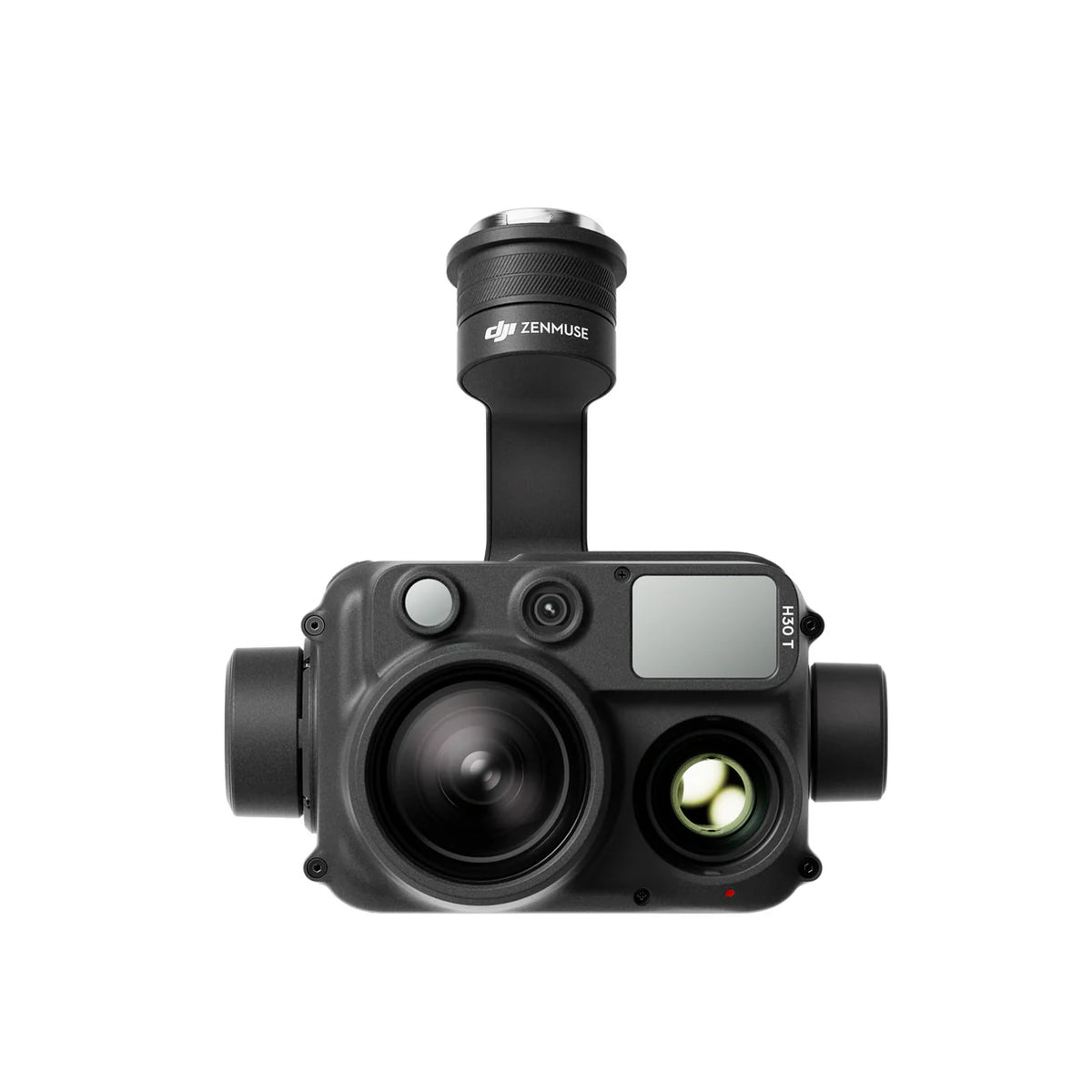 Zenmuse H30TZoom + thermal + laser
 DJI Dock 3Recurring patrol layer
Matrice 400 + H30T should handle detailed, high-value inspection missions. Dock 3 + Matrice 4TD/4D should handle repeatable patrols and rapid triage. Dock 3 does not house Matrice 400, and H30T is not a Dock 3 payload.
Use a layered fleet—not an incorrect all-in-one assumption
DJI lists H30T as compatible with Matrice 400, Matrice 350 RTK and Matrice 300 RTK. Dock 3 is built for Matrice 4D or Matrice 4TD.
| System | Compatible aircraft or payload | Primary role | Not designed for |
|---|---|---|---|
| Matrice 400 | H30/H30T, L3, L2, P1 and supported payloads | Detailed field inspection and long corridor missions | Automatic landing inside Dock 3 |
| Zenmuse H30T | Matrice 400, M350 RTK and M300 RTK | Visible zoom, radiometric thermal and laser rangefinding | Mounting on Matrice 4D/4TD |
| DJI Dock 3 | Matrice 4D or Matrice 4TD | Scheduled and remote patrol | Housing Matrice 400 |
| Matrice 4TD | Dock 3 or RC Plus 2 Enterprise | Recurring thermal and visible triage | Replacing H30T where higher thermal detail is mandatory |
Buyer protection: any proposal showing Matrice 400 landing in Dock 3, or H30T mounted on Matrice 4TD, is technically incorrect.
What each component contributes
DJI Matrice 400
59-minute manufacturer test maximum carrying H30T, up to 6kg payload, IP55 protection, LiDAR, vision and six-direction mmWave radar.
Zenmuse H30T
34× optical zoom, 400× digital zoom, 1280×1024 thermal, 3–3000m laser rangefinder, wide camera and NIR illumination.
Dock 3 + Matrice 4TD
Scheduled or event-triggered patrol, thermal triage, visible capture and automatic upload through FlightHub 2.
Matrice 4D or L3 workflow
Matrice 4D supports detailed visible inspection and mapping. Matrice 400 can carry Zenmuse L3 for advanced corridor modelling.
DJI FlightHub 2
Centralizes routes, docks, livestreams, alerts, media, mapping, AI inspection and integrations.
Thermal and asset systems
Thermal Analysis Tool 3, GIS and CMMS/EAM turn evidence into reviewed findings and work orders.
Build a defect library by asset type
Sag, strand damage and surface anomalies
Use validated oblique and side views. Small defects require sufficient standoff, focal length and image quality.
Cracks, contamination and flashover evidence
Capture multiple angles of strings, arcing horns and attachment hardware.
Clamps, splices and hot joints
Thermal imagery can identify abnormal heating when load and environmental conditions are documented.
Corrosion, hardware and structure
Inspect crossarms, bolts, foundations, guy wires, grounding, nests and visible structural changes.
Clearance and encroachment
Use repeatable corridor views and optional LiDAR or mapping data to identify growth and access risks.
Thermal and visible condition
Inspect bushings, disconnects, transformers, arresters and bus connections from approved safe positions.
Observe, patrol, detect, investigate, act and verify
Model
Asset inventory, GIS and optional LiDAR baseline.Patrol
Dock 3 repeats approved routes.Detect
Human or validated AI identifies anomaly.Investigate
M400 + H30T captures detail.Analyze
Qualified visible and thermal review.Act
Create work order and priority.Verify
Post-repair flight and closure.Highest-value design: use Dock 3 to increase inspection frequency and identify where attention is needed. Use Matrice 400 + H30T when the cost of a wrong conclusion is high.
Matrice 400 and H30T for high-confidence follow-up
Stand-off detail
The 40MP zoom camera offers up to 34× optical zoom. Use validated optical zoom before extreme digital zoom.
1280×1024 radiometric evidence
Spot, area and centre-point measurement, alerts and multiple gain modes support utility inspection.
Distance and target context
The 3–3000m rangefinder supports location, distance and asset documentation within approved procedures.
NIR and enhanced imaging
Night-scene capability can extend inspection windows when utility procedures approve the conditions.
Power-line-level sensing
Vision, rotating LiDAR and mmWave radar assist the pilot. They do not replace route survey or safe separation.
One aircraft, multiple workflows
Matrice 400 can also carry L3, L2, P1, S1, V1 and supported third-party payloads.
Digital zoom caveat: the 400× digital maximum does not preserve the same target detail or measurement confidence as optical zoom.
Dock 3 for frequency and response speed
Daily, weekly or seasonal routes
Use approved repeated routes for distribution lines, substations and known high-risk sections.
Matrice 4TD screening
The 640×512 thermal sensor can identify areas requiring review. It is not equivalent to H30T detail.
Wide, medium tele and tele
Matrice 4D/4TD provides repeatable views for known components and viewpoints.
Event-triggered dispatch
FlightHub 2 can support scheduled and triggered workflows subject to authorization and human confirmation.
Fast multi-site review
Results upload for remote review, annotation, comparison and integration.
Vehicle-mounted Dock 3
Useful for temporary incidents and long corridors after correct mounting, calibration, power, network and approvals.

Temperature measurement requires a controlled method
A bright colour does not prove a fault. Electrical loading, emissivity, reflected temperature, solar effects, weather, distance and viewing angle all affect apparent temperature.
Define conditions
- Record circuit load and operating state
- Set weather limits
- Choose gain mode and range
- Define thresholds
Control geometry
- Use sufficient target pixels
- Record distance and ambient conditions
- Capture visible and thermal pairs
- Retain R-JPEG
Use qualified interpretation
- Correct emissivity where applicable
- Compare like components
- Review delta-T and trend
- Separate reflections from heating
Link to the asset
- Asset ID and location
- Settings and assumptions
- Severity and confidence
- Recommended action
Do not issue maintenance decisions from screenshots alone. Preserve the radiometric file and document settings, load, environment and reviewer qualification.
Obstacle sensing does not replace utility flight planning
Maintain approved stand-off
Use the utility’s minimum approach distances, energized-work rules, switching status and qualified personnel.
Treat sensing as assistance
Thin, wet, angled, low-contrast or complex conductors may be harder to detect.
Validate the corridor
Review towers, crossings, roads, rail, aerodromes, settlements, terrain, RF conditions and alternate sites.
Set utility-specific limits
Use limits for wind, precipitation, icing, visibility, temperature and thermal-validity conditions.
Define responsibilities
Assign authority for flight, electrical coordination, asset identification, thermal review and emergency response.
Abort weak data
Blur, poor angle, unknown load or invalid thermal conditions should trigger reinspection.
Move from imagery to an auditable asset record
Organize by region, line and asset
Use controlled naming such as CA-ON-LINE12-TOWER0045-H30T-V03.
Version every mission
Record aircraft, payload, standoff, speed, camera settings, thermal settings and review date.
Prioritize human attention
Validate missed detections and false alerts before using AI to trigger response.
Preserve radiometric data
Keep original R-JPEG, analysis settings, reports and reviewer identity.
Close the work loop
Link asset ID, evidence, severity, work order, repair date and verification flight.
Protect utility information
Apply access, cloud/on-premises, retention, privacy and incident-response controls.
Authority depends on the operation—not the equipment
Registration and pilot certification
Register and mark the aircraft, use the required certificate and obtain controlled-airspace authorization where applicable.
Lower-risk BVLOS
Qualifying operations require the correct pilot certificate, an RPOC, registered aircraft, required declarations and qualifying airspace and population conditions.
Higher-complexity missions
Operations outside Basic, Advanced or Level 1 Complex can require an SFOC-RPAS.
Corridor reality: routes cross roads, settlements, aerodromes and controlled airspace. Each route needs a local assessment.
Electrical authorization is separate: RPAS certification does not replace utility permission, energized-work rules, right-of-way access or contractor safety requirements.
Budget the inspection system, not the aircraft body
Checked July 2026 Canadian prices are references only and are not a complete system quote.
Do not add these four references as a proposed bundle. Quote the Dock 3 aircraft configuration, batteries, charging, Care, site infrastructure, FlightHub and regulatory work as one architecture.
Request a utility inspection system assessment
SpeedyDrone Canada can help scope Matrice 400, Zenmuse H30T, Dock 3, Matrice 4D/4TD, FlightHub 2, batteries, training and deployment partners.
Powerline and utility inspection FAQ
Can Matrice 400 use Zenmuse H30T?
Yes. DJI lists H30T as compatible with Matrice 400.
Can Matrice 400 land in DJI Dock 3?
No. Dock 3 supports Matrice 4D or 4TD.
Why combine Matrice 400 and Dock 3?
Dock 3 supports recurring patrol and triage; Matrice 400 with H30T supports higher-detail follow-up.
What is the H30T optical zoom?
DJI lists up to 34× optical zoom and 400× digital zoom.
What is the H30T thermal resolution?
1280×1024.
Is Matrice 4TD thermal the same as H30T?
No. Matrice 4TD uses 640×512 thermal; H30T provides 1280×1024.
How long can Matrice 400 fly with H30T?
DJI lists up to 59 minutes in a controlled forward-flight test. Real missions require reserve and will be shorter.
Can Matrice 400 detect powerlines?
DJI publishes controlled-condition sensing performance. It remains an assistance feature.
Does a thermal colour prove a fault?
No. Load, emissivity, weather, distance and angle must be considered.
Can Dock 3 perform BVLOS inspections in Canada?
Only within the applicable Level 1 Complex or SFOC-RPAS framework and other requirements.
What software supports the workflow?
FlightHub 2, Thermal Analysis Tool 3, Terra, GIS and utility work-management systems.
Where can utilities request a quote?
Contact SpeedyDrone Canada with the line type, mission frequency, thermal needs, BVLOS goal and procurement timeline.
- DJI Powerline Inspection
- DJI Matrice 400
- Matrice 400 specs
- Zenmuse H30 Series
- H30 specs
- DJI Dock 3
- DJI FlightHub 2
- Transport Canada Level 1 Complex
- Transport Canada special operations
- SpeedyDrone Matrice 400
- SpeedyDrone H30T
- SpeedyDrone Dock 3
This article is general planning information, not aviation, electrical-safety, thermography, engineering or legal advice.


