


How to Use Unitree Go2 Pro: Setup, Safety & 12 Real-World Applications
A practical guide to operating Unitree Go2 Pro safely, choosing the right control mode, planning battery time and turning a quadruped robot into an effective tool for events, education, research, demonstrations and content creation.
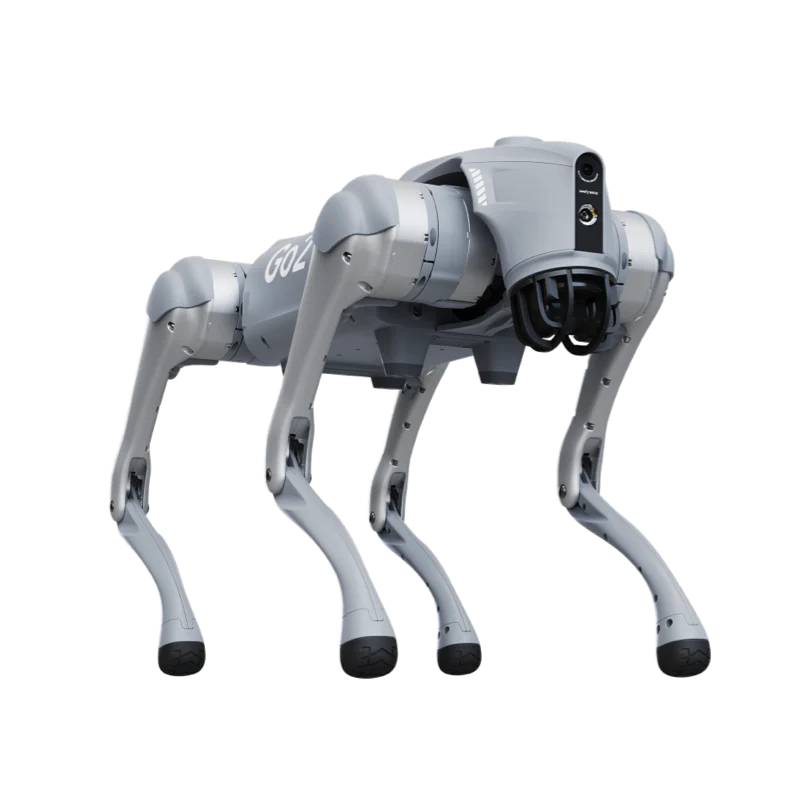
Unitree Go2 Pro is most valuable when it is operated as a supervised interactive robotics platform—not as an unattended industrial robot. Its strongest uses are live demonstrations, education, embodied-AI experimentation, content creation and controlled mobility tests.
What Unitree Go2 Pro can do—and what the specifications mean
Go2 Pro is a compact quadruped robot weighing about 15 kg. Unitree lists an 8-core processor, 4D LiDAR, an HD wide-angle camera, ISS 2.0 side-follow capability, voice functions, graphical programming, OTA updates and app-based control. The Pro model is listed at up to 3.5 m/s with an approximately 8 kg working payload and a maximum listed payload near 10 kg.
Configuration matters: the controller is optional on many Go2 Pro packages, regional 4G support may vary, and some functions depend on firmware, account region, accessories or the selected Go2 version. Confirm the exact package before purchase.
How to set up and use Unitree Go2 Pro for the first time
Start indoors in a large, dry, level and uncluttered area. Keep the robot in a low-speed mode until the operator can confidently stop, turn, lower and recover it.
Inspect before power-on
Check the legs, joint covers, foot ends, battery lock, sensor window and body for looseness, cracks, dirt or moisture.
Prepare a clear operating zone
Remove cables, glass, loose fabric and unstable objects. Keep children, pets and uninvolved people outside the test area.
Install and verify the battery
Use the correct Unitree battery and charger. Confirm the battery is properly seated before moving the robot.
Connect the international Go2 app
Add the robot, confirm the network connection and review the live camera, battery, temperature and status indicators.
Update firmware before a paid deployment
Apply OTA updates early enough to allow a full test afterward. Never update immediately before guests arrive.
Bind and test the controller
If using the handheld controller, confirm direction, speed response and emergency stop behaviour before walking the robot.
Practise basic commands
Stand, lower, walk, turn, stop and recover should become automatic before attempting dances, jumps or advanced modes.
Run a low-speed rehearsal
Complete the exact planned route and interaction sequence with a spotter before using Go2 Pro near an audience.

12 practical Unitree Go2 Pro uses in Canada
The best application is not necessarily the most technically complex one. Go2 Pro creates value when its mobility, personality and visual impact solve a clear engagement, education or demonstration need.
Corporate events and year-end parties
Use choreographed entrances, greeting actions, dances and photo moments to create a clear entertainment segment without requiring advanced development.
Mall and showroom traffic generation
A scheduled robot walk, interaction zone and QR-code offer can turn curiosity into store visits, contact capture and social sharing.
Product launches and trade shows
Program a short branded sequence, use the audio player for announcements and end with a photo or video call to action.
STEM classes and robotics camps
Students can learn quadruped movement, sensors, control logic and block-based programming through a physical platform that produces immediate results.
Assemblies and technology workshops
Combine a safe performance with a structured lesson on LiDAR, balance, motors, AI and human–robot interaction.
Human–robot interaction studies
Researchers can study attention, trust, motion perception, social responses and interface design in controlled experiments.
Embodied-AI and behaviour prototyping
Use available app functions, AI modes and supported development pathways to test robot behaviours before moving to a deeper EDU or industrial platform.
Short-form video and campaign content
Robot reactions, follow shots, dances and point-of-view footage can support Reels, TikTok, Xiaohongshu, ads and behind-the-scenes videos.
Supervised guest greeting
At a controlled entrance or reception zone, Go2 Pro can welcome guests, perform a short action and direct attention to staff or signage.
Mobility and teleoperation practice
Teams can practise remote driving, route planning, camera awareness, point-cloud interpretation and operator–spotter communication.
Facility-inspection concept demos
Go2 Pro can demonstrate the concept of mobile sensing in a safe mock environment, but production inspection usually requires a more suitable EDU or industrial configuration.
Cultural and technology showcases
Robot performances can provide a memorable technology element for community events, government receptions, trade delegations and cultural programs.
Highest-conversion deployment: pair the live robot interaction with a dedicated content station. A Pocket or Osmo camera captures guest reactions, while a QR code leads to the client’s offer, event page or registration form.
When to use the app, controller, ISS 2.0 and graphical programming
| Control method | Best use | Main advantage | Operational caution |
|---|---|---|---|
| Go2 mobile app | Setup, status, camera view, actions and feature access | Fastest all-purpose interface | Phone notifications, weak networks and touch controls can distract the operator |
| Handheld controller | Live movement, rehearsed routes and public demonstrations | More tactile and predictable steering | Controller may be optional and must be bound and tested before use |
| ISS 2.0 side-follow | Controlled companion walking and demonstrations | Natural-looking follow behaviour | Not a substitute for an operator, spotter or clear route |
| Graphical programming | STEM lessons and simple behaviour sequences | Accessible drag-and-drop logic | Test every sequence at low speed before an audience |
| 3D point-cloud view | LiDAR education, mapping demonstrations and route awareness | Makes robot perception visible | Perception output is not a guarantee that every obstacle will be detected |
| Voice and AI modes | Interactive demonstrations and guided experiences | Creates a more social robot experience | Language, region, network and firmware availability may vary |
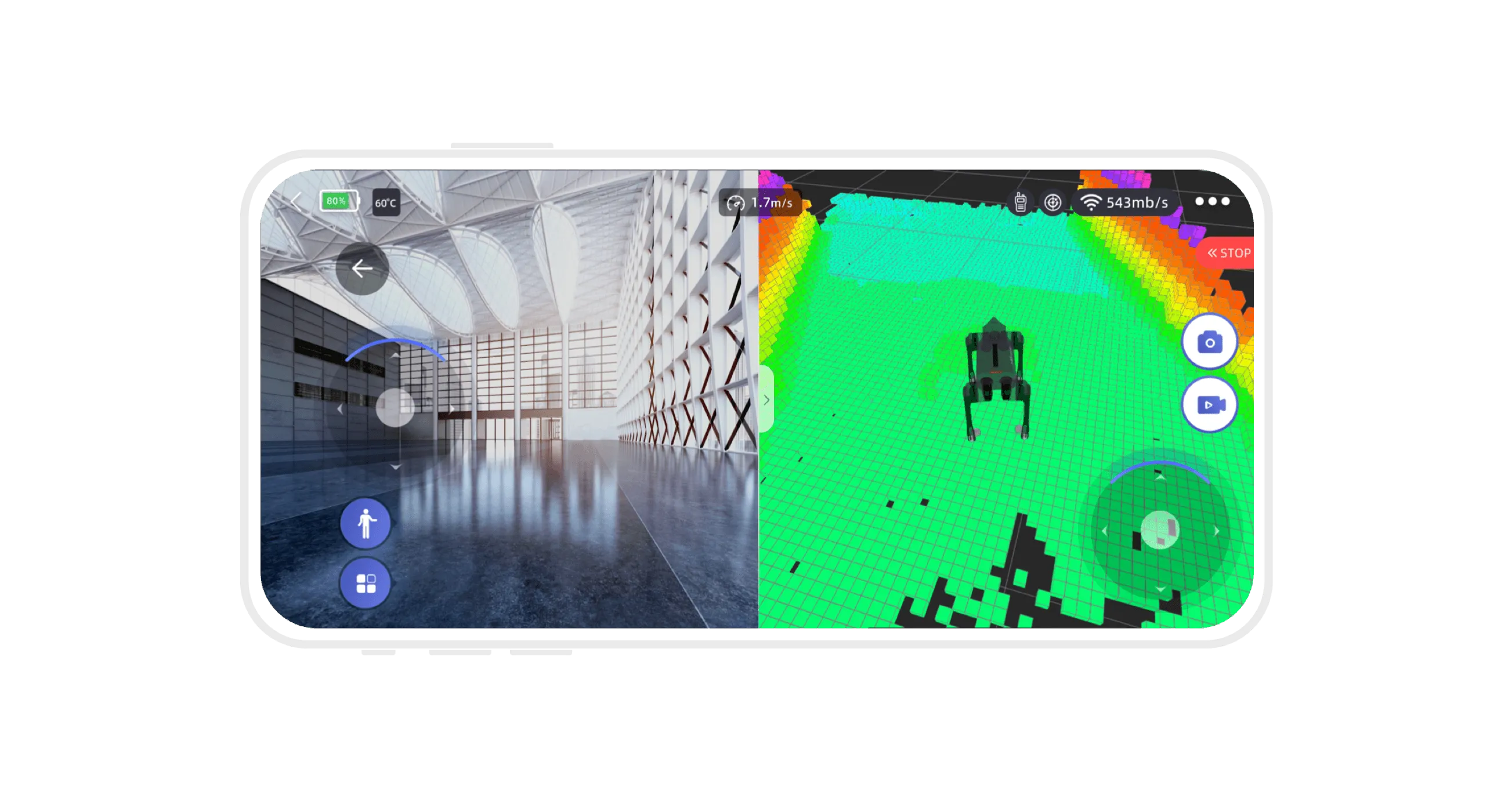
3D LiDAR mapping makes perception visible
The Go2 app can show camera and LiDAR information, helping users understand how the robot interprets floors, walls and obstacles. This is valuable for teaching and teleoperation practice.
It should not be treated as a safety guarantee. Transparent surfaces, narrow objects, reflective materials, moving people and changing light can still create risk.
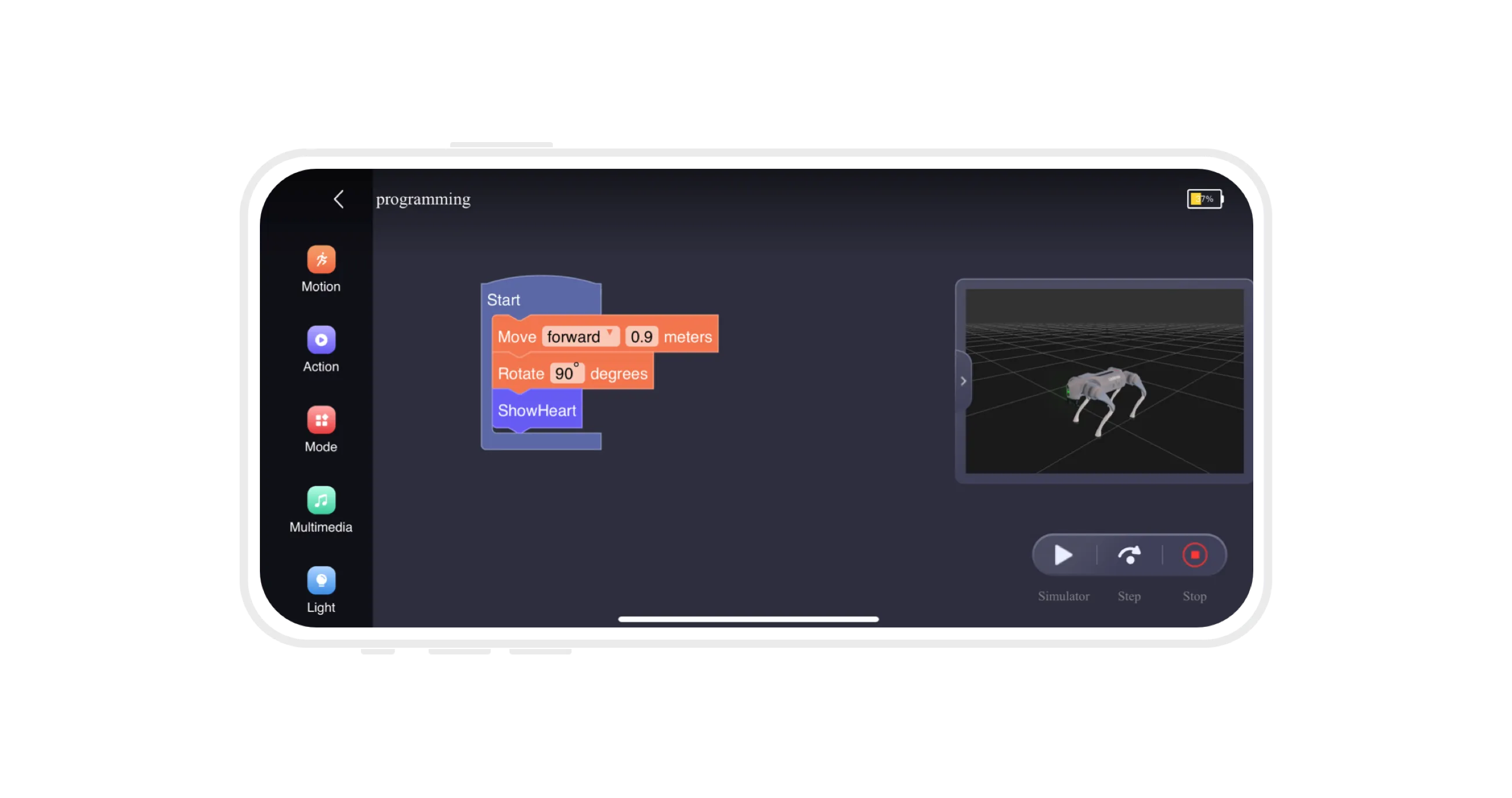
Graphical programming is ideal for visible learning outcomes
A short sequence can combine movement, rotation, lighting, photos and preset actions. Students can predict the outcome, run the program, identify errors and refine the logic.
- Begin with one movement and one action
- Add pauses between actions for safer, clearer demonstrations
- Save a tested event program and keep a manual-control fallback
Unitree Go2 Pro event operating SOP
| Stage | Operator action | Safety action | Commercial action |
|---|---|---|---|
| 24–48 hours before | Charge batteries, update early, inspect feet and rehearse all actions | Confirm floor, stairs, crowd flow and emergency exit paths | Approve logo, QR code, speaking points and filming permission |
| Arrival | Run a complete low-speed route test in the actual venue | Create a buffer zone and identify the emergency-stop operator | Position camera, backdrop and lead-capture sign |
| Performance | Use rehearsed actions only; keep manual control ready | One operator + one spotter; stop whenever a guest enters the route | End each sequence with photo, video or QR-code CTA |
| Interaction | Use seated or stationary actions for close guest contact | Children interact one at a time with guardian supervision | Collect approved guest content and tag the client or venue |
| After the session | Power down, cool, inspect, clean and record any faults | Store battery and robot away from public access | Send a short highlight package and propose the next activation |
30-second content formula: 0–4s robot entrance → 5–10s crowd reaction → 11–18s signature action → 19–25s guest photo or handshake → 26–30s client logo and booking CTA.
What Go2 Pro should not be used for
Go2 Pro is a civilian consumer/education quadruped, not a certified substitute for an industrial inspection, fire-rescue, law-enforcement or safety-critical robot. Production deployments need a formal risk assessment, suitable hardware, integration, communications, operating procedures and insurance.
Unsupervised public roaming
A 15 kg mobile robot should not be allowed to move through crowds without an operator, spotter and controlled route.
Wet or hazardous environments
Do not assume consumer Go2 Pro has the environmental protection, certification or redundancy required for hazardous work.
Riding or lifting people
Payload numbers are not permission to carry people. Never allow a guest or child to sit, stand or climb on the robot.
High-speed operation near guests
The published maximum speed is not an event target. Use the lowest practical speed around people and property.
Blind reliance on obstacle avoidance
LiDAR and camera systems assist the operator but do not eliminate blind spots, sensor errors or route hazards.
Last-minute firmware changes
An update can change behaviour or require calibration. Freeze the tested configuration before a paid deployment.
Choose the right Go2 Pro path
Robot platform
Go2 Pro, standard smart battery, charger, app access and basic setup guidance.
Best for buyers already certain that app control fits the workflow.
Robot + controller setup
Go2 Pro with handheld controller option, pairing, firmware check, movement test and operator orientation.
Recommended for events, schools and live demonstrations.
Event or institutional package
Robot, trained operator, safety spotter, rehearsed interactions, content capture and optional STEM workshop.
Send the date, venue, audience size and desired outcome for pricing.
Cross-business package: combine a Go2 Pro performance with Pocket/Osmo content capture and a STEMAX robotics workshop. Event clients receive stronger social content; schools receive a clear learning outcome and a path from demonstration to paid programming.
Buy, demo or deploy Unitree Go2 Pro in Canada
SpeedyDrone Canada supports Go2 Pro purchases, Toronto showroom evaluation, controller selection, basic onboarding and commercial event deployments. Send your use case—event, school, university, research lab, content production or business demonstration—and receive the recommended configuration.
For a fast quote, send: date, location, indoor/outdoor venue, audience size, performance length, photo/video requirement and whether the client needs a purchase, rental, performance or workshop.
Unitree Go2 Pro usage FAQ
What is Unitree Go2 Pro best used for?
Its strongest practical uses are interactive events, robotics education, research demonstrations, content creation, teleoperation practice and controlled embodied-AI experiments.
Is Unitree Go2 Pro suitable for public events?
Yes, when the route is controlled and the robot is supervised by a trained operator and safety spotter. Use low speed and stop whenever an uninvolved person enters the operating zone.
Does Unitree Go2 Pro include a controller?
The controller is commonly offered as an optional configuration for Go2 Pro. Confirm whether the selected package is “no controller” or “with controller” before purchase.
How long does the Go2 Pro battery last?
Unitree lists approximately one to two hours for the standard 8000mAh battery. Actual runtime depends on gait, speed, payload, temperature, network use and action intensity.
How fast can Unitree Go2 Pro move?
Unitree lists the Pro configuration at up to approximately 3.5 m/s. Public and indoor operations should use a much lower speed.
Can Go2 Pro avoid every obstacle automatically?
No. LiDAR and camera perception assist navigation but cannot guarantee detection of every object or situation. The operator remains responsible for the route and emergency stop.
Can children use Unitree Go2 Pro?
Children can participate in supervised STEM lessons and simple programming activities. An adult instructor should control power, movement speed, battery handling and the operating zone.
Can Go2 Pro be programmed without traditional coding?
Yes. Unitree provides a graphical programming interface for simple movement and action sequences. Deeper development requirements should be matched to the correct Go2 configuration.
Can Unitree Go2 Pro be used for industrial inspection?
It can demonstrate inspection concepts in controlled environments, but production industrial inspection normally requires a more suitable EDU or industrial platform, payloads, communications and formal safety integration.
Does Go2 Pro support 4G in Canada?
Unitree lists 4G hardware on Go2 Pro, but regional service and compatibility can vary. Confirm Canadian support before making 4G central to the deployment.
How much weight can Go2 Pro carry?
Unitree lists an approximate 8 kg working payload and a maximum near 10 kg for the Pro configuration. Payload figures vary by movement, balance, terrain and configuration and should never be used to justify carrying a person.
How should Go2 Pro be transported to an event?
Power it down, remove or secure the battery according to the transport plan, protect the joints and sensors, and use a stable case or padded container that prevents movement during transit.
What staff are needed for a robot performance?
Use at least one trained operator and one safety spotter. Larger crowds, complex routes, content production and stage coordination may require additional staff.
Where can I see Unitree Go2 Pro in Toronto?
Contact SpeedyDrone Canada to confirm current showroom demonstration availability and arrange an appointment before visiting.
- Unitree Go2 official product page and configuration table
- Unitree Go2 official app, mapping and programming guide
- Unitree Go2 official battery information
- Unitree Go2 official charger information
- SpeedyDrone Canada Unitree Go2 Pro product page
Specifications, package contents, functions, firmware, network compatibility, pricing and availability may change. Confirm the exact Canadian configuration before purchase. Some proposed applications are practical deployment examples and require independent risk assessment, permissions, insurance and trained supervision.


