


Construction companies can reuse one set of drone imagery for project meetings, client reports, proposals and public updates by making a different selection for each audience. Keep the original files, explain what each chosen view shows, and approve the intended use before sharing it.
An image cleared for an owner’s report may still need a separate review before it appears on a website or in a bid presentation. The useful starting point is the recipient’s question: what should this person understand or decide after seeing the image?
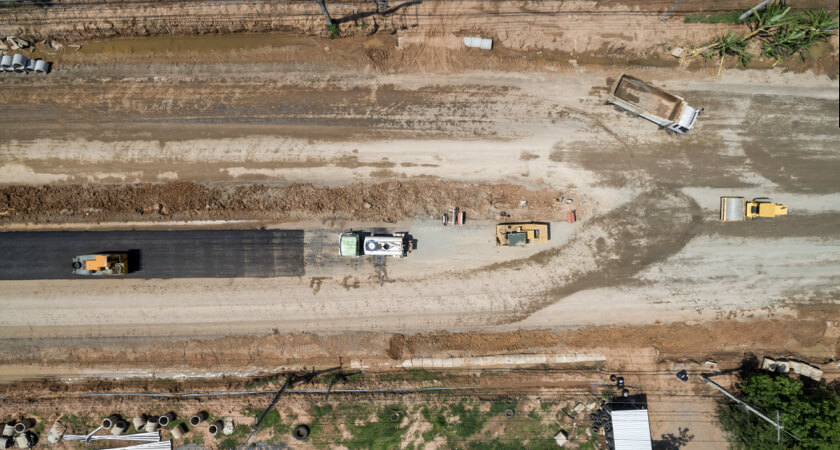
A project manager may need a view that locates an unresolved issue. The owner may need a short account of the month’s visible milestones. A business development team may later use an approved image to explain relevant experience. These uses can draw on the same capture, but each requires its own context, selection and distribution decision.
This guide begins after the imagery exists. It offers a practical editorial process for general contractors, developers and engineering firms that already collect site photos but struggle to turn them into useful communications. The report sizes, examples and approval stages below are suggested working methods, not contractual standards or a description of a SpeedyDrone client project.
One Drone Capture, Different Business Audiences
Start each request with three fields: recipient, purpose and intended channel. “Photos for the project” leaves too much unanswered. “Six selected views for the owner’s monthly progress meeting, shared through the project portal” gives the editor something concrete to prepare and the approver something specific to assess.
Scroll horizontally to read every column.
| Audience | Most useful content | Usually unnecessary |
|---|---|---|
| Internal project team | Area labels, dated comparisons and context for issues | A cinematic edit for a routine coordination meeting |
| Client / owner | Selected milestone views, short captions and a status summary | Hundreds of unexplained raw files |
| Executive | A brief visual overview tied to decisions or exceptions | Technical capture details and every work-area image |
| Business development / sales | Approved project visuals with an accurate account of the firm’s role | Routine records unrelated to the prospective client’s needs |
| Marketing | Clear, approved imagery and a publishable project story | Sensitive operational details or unreviewed claims |
| Public / community | Recognizable context, dated progress and plain-language explanation | Proprietary information and site-security details |
The audience matrix is a selection tool. It does not establish who is legally entitled to receive a file. A subcontractor, lender or external consultant may need a different permission level even when their information needs resemble those of the internal team. Confirm access before sharing the folder.
Internal Project Updates
For the project team, choose images that make a location or change easy to recognize. A broad site view can orient the meeting, followed by selected work areas, a milestone and any item requiring discussion. Use the project’s established area names so people can connect the photograph to the agenda and other records.
Before-and-after images help only when the comparison is understandable. Check that they show the same area, label both capture dates and explain differences in framing, obstructions or lighting. If the available images cannot support a fair comparison, show them separately. An attractive side-by-side arrangement is not a reason to imply equivalent coverage.
Keep annotations limited to what the meeting needs: an area label, a reference number or an arrow directing attention. Distinguish a visible observation from a proposed explanation. “Material staging visible beside the east elevation” is different from “delivery delays are affecting the programme.” The second statement needs confirmation from the responsible team.
Keep the issued meeting selection linked to the underlying records. When a question becomes an action item, record it in the project’s established process, with an owner and a reference. An annotated image can make the discussion clearer, but the image folder should not become an untracked substitute for the issue log.
Client & Owner Reporting
An owner report should explain what changed, why it matters and whether the recipient needs to do anything. Begin with a short visual status summary, then use selected images to support it. For a concise update, five to ten images can be a useful starting range; adjust it to the project and reporting agreement rather than treating the number as a rule.
Make the selection cover distinct questions. Include an orienting overview, the main visible milestone, a relevant comparison and any exception needing explanation. Several near-identical images consume attention without adding evidence. If the owner requests detailed access, provide it through an appropriate supporting archive while keeping the report itself focused.

Give each image enough context to stand alone
A useful caption identifies the capture date, area, construction phase and reason the image is included. Add the report date separately when it differs. Without those distinctions, an older photograph can be mistaken for current conditions after it is copied into another presentation.
For example, an illustrative caption might read: “East elevation, captured 6 October: façade installation is visible across the central bays; the southern end is outside this frame. Included for the owner’s exterior-progress review.” That describes the image’s purpose and limits without claiming a measured completion percentage.
Have the project lead confirm milestone and schedule wording. A photograph of a roof or façade does not establish that the associated package is complete, accepted or ready for payment. Where status comes from another record, identify that record or responsible person. Keep the visual observation and the reported status understandable as separate pieces of information.
Don’t Send the Client 300 Drone Photos
A large capture folder is useful source material, but it transfers the selection and interpretation work to the recipient. Prepare a report that answers the agreed questions, and retain a route back to the originals for people who need more detail. The sequence below describes editorial preparation after capture, not a flying or mapping procedure.
- Capture receivedKeep the original files and their known dates.
- SelectChoose the views that answer this audience’s questions.
- OrganizeGroup by area, milestone or report topic.
- AnnotateAdd only the labels needed to orient the reader.
- ExplainCheck captions, status statements and limitations.
- DeliverApprove the version, recipients and channel.
A short PDF or presentation is often sufficient when the owner needs a fixed monthly account. An access-controlled gallery can suit a team that wants to inspect individual images. Choose a format the recipient can open and understand; an interactive experience adds little if the reader cannot find the relevant date or requires an account they do not have.
Preview the delivered file on a phone and a normal laptop. Check that labels remain readable, images retain useful detail, links open for the intended recipients and the report date is clear. Export settings should follow the receiving channel’s requirements. Sending the largest possible files can make an otherwise useful update difficult to download or circulate.
Suggested report structure
A concise owner update
Adapt these contents to the reporting agreement. This is a format example, not a completed project report.
- Cover and reporting periodProject, recipient, issue date and capture dates.
- Visual status summaryMain visible changes, confirmed milestones and decisions needed.
- Selected evidenceOverview, milestone views and clearly dated comparisons.
- Exceptions and next reviewMissing coverage, unresolved questions and supporting references.
Business Development & Proposal Content
A construction image can remain useful after the project ends. Selected photographs can support a completed-project portfolio, capability deck, tender response, case study or future client meeting. The question changes from “what happened this month?” to “what relevant experience can we demonstrate?”
Pair each image with an accurate description of the firm’s role. A photograph of a whole development does not mean the company delivered every visible element. State whether the work covered a particular building, phase, discipline or package, and verify any project names, dates or outcome claims before including them in proposal copy.
Build a small selection around the prospective client’s problem. A complex urban site may illustrate constrained working conditions; a sequence may help explain phased delivery. Choose the evidence that supports the stated experience. Do not add a cost, schedule or safety success claim simply because the photograph looks impressive.
Check reuse rights for the proposal’s actual recipients. Permission for a named owner update may not cover a tender submission, an agency-produced deck or an unrestricted portfolio. A confidential proposal still leaves the original project team. Keep its approval and distribution record with the images used in that version.
At closeout, ask the project lead to identify a small set of strong, accurate views and supply the missing context while it is still easy to recover. Marketing staff should not have to reconstruct the company’s role months later from filenames and photographs alone.
Marketing & Project Storytelling
For B2B construction marketing, begin with a publishable event or useful story: a project launch, topping-out milestone, completed phase, handover or approved account of the work. Choose imagery that helps a website visitor or LinkedIn reader understand that story without requiring knowledge of the project’s internal terminology.
A website project page may benefit from an establishing image and a short, captioned sequence. A milestone post may need one clear view with an approved explanation. Recruiting content may focus on the work environment and the people involved, where their participation and the intended use are appropriately cleared. Investor communications should use the organization’s existing review route for the accompanying statements.
Prepare each export deliberately. Check the crop at its final display size, leave room where a website layout places text, and make sure a vertical adaptation still shows the subject. A technically sharp record image can be unsuitable when the central feature becomes tiny or the crop removes the context that made the original understandable.
Keep the story honest during editing. Preserve an original and work on a derivative. Colour and exposure adjustments should not turn unfinished work into an apparent finished condition. Do not remove a material feature merely because it weakens the narrative. If a view cannot be published without creating a misleading impression, choose another image or wait for a suitable one.
Public & Community Communications
Public updates should help people who are not on site understand what is happening. Use recognizable landmarks, clear dates and plain-language descriptions of the relevant phase. A municipal project webpage or community newsletter may need a broader view than an internal coordination meeting, with fewer annotations and no proprietary detail.
Where an image accompanies a road-closure or access update, have the responsible team verify the actual notice and dates. A photograph supplies context; it does not establish that a route is currently open or closed. Link the image-led communication to the authoritative project notice when that is what residents need.
Worked example · not a client project
A Small Commercial Site: One Clear Public Update
Assume the owner of a single-building commercial development needs a short website update for neighbouring businesses. The task is to explain the visible construction stage without releasing the internal report, making a completion claim or issuing an unverified access notice.

- Brief: one public-facing overview and a short caption for the project webpage. Keep detailed coordination images in the controlled project archive.
- Selection: choose a view that shows the building, perimeter and immediate context. In this illustration, masonry walls and partial roof decking are visible; the image cannot establish acceptance or percentage complete.
- Suggested caption: “Masonry walls and part of the roof deck are visible in this illustrative overview. Open bays and the fenced work area show that construction is still underway.” For a real release, add the verified project name and capture date, and have the project lead confirm the wording.
- Release check: confirm image rights, the owner's approval, neighbouring-property details and any accompanying access statement before publication.
- Reusable output: keep the approved image, caption, source reference and release record together. Review any later LinkedIn or proposal version separately instead of assuming the website approval covers it.
The reusable asset is not just the picture: it is the picture with a checked caption and a clear release record. Keeping those together helps the next editor understand the context before preparing another version.
Operational Imagery Is Not Automatically Marketing-Ready
Review the proposed public version at full resolution, including its caption, video sequence and any visible overlays. A useful internal view can reveal more than the public story needs. The following checks help the project, communications and privacy leads decide what to retain, revise or withhold.
Confirm permission for this purpose
Check the client agreement, photographer’s terms and any project restrictions. Paying for capture or receiving a file does not, by itself, settle every right to publish or reuse it. Confirm the permitted audience, channels, attribution and any expiry or embargo. Client approval and the rights of identifiable individuals need separate consideration.
For Canadian organizations, the Office of the Privacy Commissioner’s guidance on meaningful consent emphasizes understandable purposes and disclosures. It also addresses obtaining consent for significant changes, including a new purpose that was not originally anticipated. Identify the law and obligations applicable to the organization and project; the review checklist here is a recommended workflow, not a universal legal clearance test.
Inspect people, property and sensitive detail
- Workers and other individuals: look for identifiable faces, licence plates, name badges and personal information. Consider whether they are needed for the story and whether the proposed use is cleared.
- Neighbouring properties: check for unrelated private areas, windows, yards and activities captured beyond the intended subject.
- Security-sensitive information: review access points, temporary security arrangements and equipment locations before distributing detailed views.
- Drawings and site information: enlarge visible boards, screens, documents and signage. Small details can become legible in a high-resolution download.
- Logos and names: confirm that client, tenant and subcontractor branding can appear in this context without implying an unapproved relationship or endorsement.
Check the impression created by the final edit
Label unfinished work and avoid presenting a temporary condition as final quality. Check that the caption remains accurate after cropping and that a video’s sequence does not imply an unsupported chronology. Blurring a face may address one detail while leaving another identifying feature or confidential location visible. Review the finished derivative again instead of treating an edit as automatic clearance.
Create an Approval Workflow Before Public Release
Assign reviewers to the decisions they can actually make. The project lead confirms location, phase and factual statements. The person responsible for client or contractual permissions checks the intended reuse. A privacy or security lead reviews sensitive content where needed. Communications checks the final presentation and distribution channel.
Approval should identify a file version and a use. “Looks good” on an earlier contact sheet is ambiguous when the exported video has changed, the caption names a tenant or the proposed destination has moved from a private report to paid advertising. Record the final file, accompanying text, approver and permitted channel together.
- Editorial selectionImages, captions and proposed audience
- Project reviewFacts, context and sensitive detail
- Use approvalRights, recipient and release conditions
- Final exportVersion checked in its destination format
- Release recordWhere, when and what was shared
Build a correction route as well. If a caption proves wrong or permission changes, identify the affected exports, tell the distribution owner and replace or withdraw them where appropriate. Keep the record of what was issued. Changing a library filename alone does not correct a PDF already emailed to a client or an image already published elsewhere.
Build a Reusable Project Media Library
A searchable archive preserves both the image and the information needed to use it responsibly. Keep source files separate from working edits and issued exports. Staff looking for a proposal image should be able to find an approved selection without browsing unrestricted operational material.
Use the project’s existing document system if it can support the necessary access and version controls. The folder names are less important than clear ownership, usable search fields and a reliable link from an exported image back to its source and approval record. Appoint someone to maintain those relationships when staff or agencies change.
Keep three kinds of file separate
- Originals: source imagery and known capture information.
- Working selections: annotations, crops and drafts awaiting review.
- Issued exports: approved versions linked to the specific audience and use.
Record the context beside the asset
- Project, area, capture date and construction phase
- Creator or source and the original file reference
- Internal-use, client-issued or public-use status
- Approval record, permitted channels and restrictions
- Version, publication location and review owner
A filename such as Project-EastElevation-2026-10-06-OwnerUpdate-v02.jpg helps identification, but it cannot carry the complete permission history. Keep that in associated metadata or a linked record. “Final” is particularly weak as a status: a final owner-report image may still be unsuitable for a public project page.
Make approval status searchable, and prevent ordinary users from confusing a working draft with an issued asset. Restrict access to originals that contain sensitive detail. Set retention and deletion arrangements with the people responsible for contractual, privacy and project-record obligations; there is no single retention period that this communications workflow can prescribe for every project.
Before reusing an old image, check that its context and permissions still fit. The client may have changed, a tenant name may now be public, or a temporary restriction may remain in force. Keeping a reusable library means preserving the reasons an image can be used, not assuming yesterday’s approval covers every future request.
What Drone Imagery Cannot Replace
Selected photographs can explain visible conditions, but an edited report is not automatically a survey deliverable, engineering verification or certified inspection. Do not derive a dimension, completion percentage or acceptance conclusion from an attractive view unless the relevant evidence and review support that claim.
Keep required project records in their designated process. A marketing selection cannot replace documentation required by the contract, and an image showing a finished exterior does not establish acceptance of concealed work. Where recipients need professional conclusions, identify the appropriate deliverable and responsible reviewer rather than extending the caption beyond what the image supports.
Need the Underlying Drone Program?
Teams still establishing their aircraft, mapping, software and operator workflow can refer to our guide to building a construction drone program in Canada.
For staff who also need practical flight or photography development, AlteX droneHUB’s current training catalogue is a useful starting point; confirm the course content against the team’s filming goals.
Frequently Asked Questions
Can one image appear in both a client report and a proposal?
Yes, when the proposed reuse is appropriate and covered by the relevant permissions. Keep the original, make a separate proposal export if needed, and review its caption in the new context. A proposal should accurately describe your company’s role and the work shown. Record which version and recipients were approved. The fact that an owner already received the image does not establish permission to distribute it to prospective clients.
What if a client specifically asks for all the raw photos?
Check the agreed deliverables and provide the appropriate access through the project’s controlled process. You can still supply a concise report that helps the client navigate the larger collection. Explain how files are organized, identify missing or uncertain dates, and distinguish originals from edited selections. Do not quietly replace a promised archive with a highlight reel. Conversely, a request for a useful update does not necessarily require distributing every source file.
Can we make a before-and-after story from different viewpoints?
Only if the presentation explains the difference and remains fair. Label the capture dates and areas, and avoid alignment or cropping that suggests the two views are directly equivalent when they are not. If a change in angle hides relevant work, use separate images with explanatory captions. Do not invent missing dates or arrange photographs from unrelated projects into an apparent timeline. The reader should understand what the comparison can actually show.
Does blurring faces make an image ready for public use?
Not by itself. Recheck the complete export for other identifying details, neighbouring property, sensitive site information and the accuracy of its caption. Confirm the rights and permissions for the intended channel. A person may remain identifiable from contextual details even after a face is blurred, and an image without people may still contain confidential material. Treat blurring as one possible edit within the review, followed by inspection of the finished version.
How should we share images with a marketing agency?
Give the agency a defined selection, a written brief and the applicable use restrictions. Specify the project description, permitted channels, attribution, approval contact and whether derivatives need review. Avoid sending an unrestricted operational archive when only a few approved images are needed. Ask the agency to return final versions for the agreed approval process, and record where they are published so future corrections can reach the right person.
Can an older construction image support a current company profile?
It can illustrate past experience if its date, project status and your role are clear. Avoid placing an old construction image beside wording that implies it shows today’s conditions or a newly completed project. Check that the permission still covers this use and that named clients or tenants can appear. Retaining a photograph in the archive is useful, but does not remove the need to review its context before a new publication.
Who should own the project media library?
Assign a named owner with access to project context and the ability to maintain permissions and versions. That might be a project-information lead working with communications, rather than the person who happened to capture the files. Define who can add originals, approve selections, issue exports and change a release status. A shared folder becomes more dependable when those responsibilities remain clear through project closeout and staff handover.
Sources & Editorial Basis
Sources checked 6 October 2026. The reporting templates, suggested image count, archive fields and review sequence are editorial recommendations. The Canadian privacy discussion draws on the linked OPC guidance. The small commercial-site worked example is hypothetical, and its image is AI-generated; neither is a record of a SpeedyDrone client project.
The genuine construction photographs are credited to DJI Enterprise’s construction article and DJI’s Dickies Arena case study. They illustrate separate published examples, not SpeedyDrone's work or a before-and-after series.
Planning a Construction Drone Content Workflow?
Tell SpeedyDrone what your team already captures, who needs the imagery and which outputs are difficult to produce. Bring one example of a current update and the desired use—an owner report, proposal, project page or community announcement—so the conversation starts with a concrete requirement.
Contact SpeedyDrone

