


Select a subject. Keep the shot.
Install the Enhanced Tracking Module, choose one subject on the RS 5 screen, then use gestures or the gimbal controls to track and reframe—without confusing gimbal tracking with lens autofocus.

Quick answer
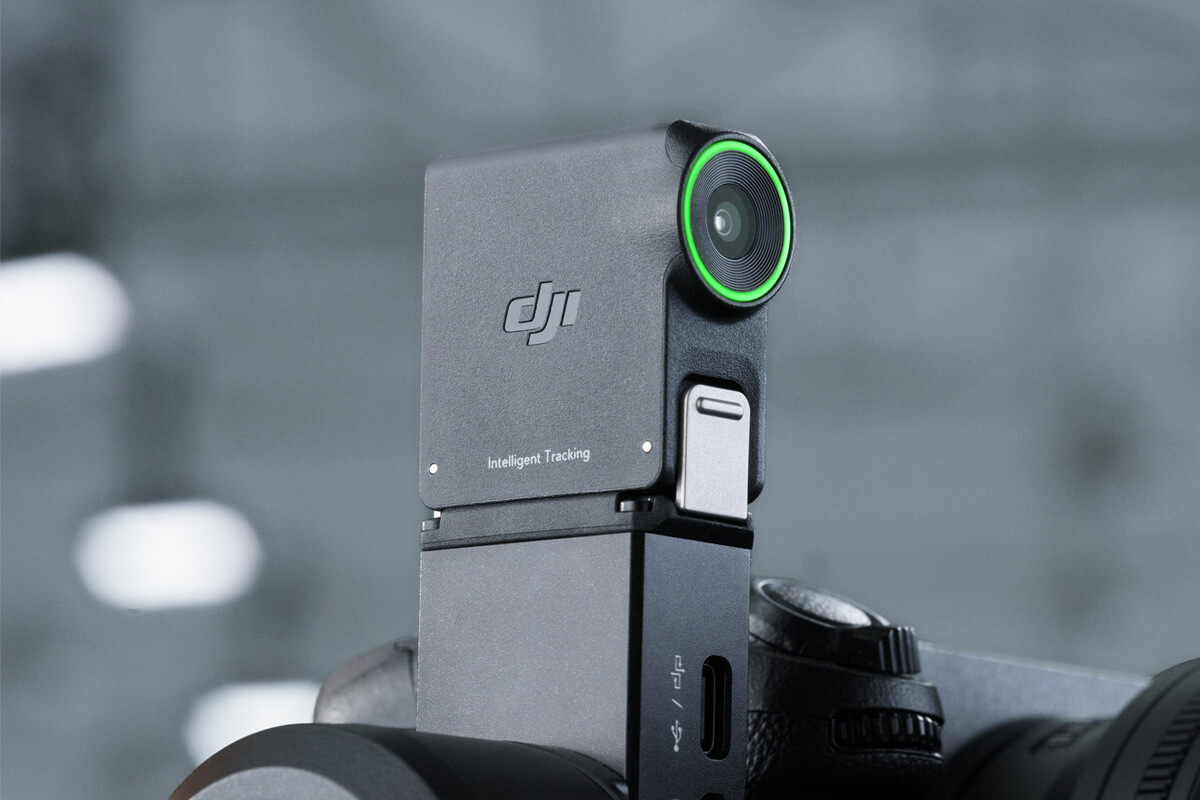
The RS Enhanced Intelligent Tracking Module adds a live tracking view and subject selection to the RS 5 touchscreen. It can follow one person, vehicle, pet or other selected subject. The module keeps the gimbal aimed and the subject framed; your camera and lens still handle autofocus separately. Start with a balanced camera, attach the module, select a grey-framed subject, then track.
Set up the Enhanced module on RS 5
DJI describes a magnetic quick-release mount at the RS 5 tilt axis. The module weighs approximately 19 g, but that is not permission to skip balancing. A poorly balanced camera rig can still strain a gimbal even if tracking identifies a target correctly.
- Mount and balance the camera and lens. Check the normal pan, tilt and roll clearance with your actual cables and accessories.
- Lock the relevant axis before attaching the module. DJI recommends doing this for mounting; press the module’s latches and seat it magnetically on the tilt axis.
- Power on or wake the RS 5 and confirm the module is detected. If your unit is not recognized, reseat it and check current DJI firmware guidance before a shoot.
- Swipe right from the gimbal home screen into ActiveTrack. With the Enhanced module, RS 5 displays the tracking view on its own touchscreen.
- Choose a visible subject and test the framing. Check the actual camera image as well as the module view before recording a take.
Tracking is not autofocus. ActiveTrack tells the gimbal where to point and how to hold composition. Sharp focus still depends on your camera, lens, autofocus mode and any supported camera-control connection. For body and lens fit, use the separate RS 5 camera and lens compatibility guide.
Enhanced versus original Intelligent Tracking Module
“Tracking Module” is not precise enough for the RS 5. DJI says the older Intelligent Tracking Module can track a person on RS 5, but it cannot show the tracking view on the RS 5 screen or gain Enhanced functions through firmware. The table below is specifically about use on RS 5.
On a phone, swipe within the table to see both modules.
| On RS 5 | Original Intelligent Tracking Module | Enhanced Intelligent Tracking Module |
|---|---|---|
| Human tracking | Yes | Yes |
| Vehicle, pet and other selected subjects | No | Yes, within DJI’s subject conditions |
| Tracking view on RS 5 touchscreen | No | Yes |
| Frame or select a subject on RS 5 touchscreen | No Enhanced touchscreen selection | Yes |
| Firmware upgrade to Enhanced functions | No | Already Enhanced |
If you bought a previous-generation module, check its exact name and DJI documentation before expecting the RS 5 interface shown here. The original module is not a lower-firmware version of the Enhanced one.
Detect, select, track, then reframe
The Enhanced module marks trackable subjects with grey frames on the RS 5 view. Turn the dial to move between detected subjects, then tap the desired frame to select it and begin tracking. DJI also allows you to draw a box around a subject on the touchscreen. One subject is tracked at a time; a crowd is not a multi-person tracking scene.
Three ways to start and stop
Touchscreen
Tap a detected grey frame or draw a box around a subject in the RS 5 tracking view. Confirm the selected target before moving the rig.
Gimbal trigger
Press once to enable or disable tracking. Press twice to stop ActiveTrack and recenter the gimbal.
Gesture
The person in front of the camera can use the default Palm gesture to start or stop tracking without returning to the handle.
Before each take
Watch the camera’s actual composition and focus. A correctly detected subject in the module view does not prove the lens is sharp or recording.
Gesture controls: Palm, V and Double L
DJI’s default mapping is simple, but the actions do different jobs. Palm controls subject following; V sends a record command; Double L changes composition while a person is being tracked.
On a phone, swipe within the table to see the full gesture explanation.
| Gesture | Default action | Important condition |
|---|---|---|
| Palm | Start / stop tracking | Confirm the subject is recognized and within a usable range. |
| V sign | Start / stop recording | The camera must have a working control connection to the gimbal. |
| Double L, both hands | Pause for composition change, then resume at a new position | Use while tracking a person; repeat after moving to the new frame position. |
DJI lets you customize Palm, OK and V for tracking or recording functions. Check the current mapping on the gimbal before relying on a remembered gesture. If V is recognized but the camera does not record, inspect camera-control pairing or cable support, not just the tracking module. A Bluetooth or cable connection must actually support the requested record command for your camera.
Use Double L to reframe yourself
- Start person tracking and position yourself in the shot.
- Show Double L with both hands. DJI says tracking pauses for composition adjustment.
- Move to the desired place in the frame. For example, leave negative space for a product on one side.
- Show Double L again. RS 5 resumes tracking with the new composition.
This is most useful when the operator is also the presenter: you can change the shot without walking back to the gimbal after every take.
Centre the subject—or keep the current composition
In ActiveTrack Settings → Composition, choose Center Tracking Subject for a straightforward presenter follow. Choose Keep Current Framing when the person belongs off-centre, such as the right third of a product demonstration. DJI also describes using the RS 5 joystick to adjust composition while tracking, especially with Keep Current Framing selected.
Centre
Good starting point for a talking head, simple walk-and-talk or solo take where subject placement is not part of the visual story.
Keep current framing
Use when a product, vehicle, sign or environment needs space beside the subject. Set the composition first and verify it in the camera image.
If the subject is centred in the module view but not in the actual camera frame, do not keep fighting the joystick. Open ActiveTrack Settings → Camera View Calibration and use the joystick to align the tracking-module framing to the camera. DJI lists this as the first fix for a persistent offset.
Four shot types worth trying first
Fixed talking head or product demonstration
Put a properly balanced RS 5 on a stable tripod, select yourself, choose Centre or Keep Current Framing, and use Palm to begin tracking. If you need room for a product on a table, use Keep Current Framing or Double L to reset the composition. Test V recording with the camera-control connection before the real take.
Walking presenter
Use the module to reduce the operator’s framing workload during a controlled walk or backward follow. Keep an operator aware of footing, obstacles, subject distance and camera focus; tracking is not obstacle avoidance and does not make a walk safe by itself.
Vehicle orbit or reveal
The Enhanced module can identify a vehicle, so an operator can move around a parked or slowly moving car while the gimbal keeps pointing toward the selected vehicle. DJI does not recommend high-speed vehicle tracking; a single vehicle with limited occlusion is the better case.
Controlled pet shot
Try one cat or dog moving predictably in a clear, well-lit area. Fast sprints, sharp direction changes and other similar pets in view can defeat the assumption behind a clean tracking take.

These are workflow ideas, not a SpeedyDrone hands-on performance test. DJI’s stated operating range is 0.5–10 m with illuminance above 20 lux; treat those as operating conditions, not a guarantee that a backlit, obstructed or fast subject will track reliably.
What the module will not solve
DJI limits tracking to one subject. Similar clothing, overlapping people, complex outfits, vigorous motion or occlusion can confuse person tracking. For vehicles, DJI calls for one vehicle, less than roughly 30% obstruction and no high-speed movement. For pets, expect better results with one animal moving predictably than with a fast, erratic chase.
DJI’s short reacquisition claim—when a subject leaves the frame for around two seconds—applies to person tracking. Do not assume the same return-to-frame behaviour for vehicles or pets. The stated range and lighting thresholds still apply, and good camera autofocus remains a separate requirement.
FPV mode is a hard boundary. DJI says intelligent tracking and composition are supported in PF (Pan Follow) and PTF (Pan and Tilt Follow), not FPV. If ActiveTrack appears unavailable, check the gimbal mode switch before remounting the module.
Why RS 5 tracking may not be working
No tracking view on the screen
Verify you have the Enhanced module, not the original. Check the magnetic mount, module detection and current firmware, then return to the RS 5 ActiveTrack view.
ActiveTrack unavailable in FPV
Switch to PF or PTF. DJI does not support this intelligent tracking/composition function in FPV follow mode.
V gesture works, camera does not record
Check a supported camera-control connection and the camera’s recording state. Gesture recognition alone cannot create a control path to an unconnected camera.
Subject drifts off the desired camera position
Confirm Centre versus Keep Current Framing, then use Camera View Calibration if module and camera views do not align.
Tracking drops near the floor
DJI says an axis arm may block the module in low-angle shots. Power off, invert the gimbal, power on so the roll motor sits behind the lens; reverse the power-off/reposition/power-on sequence to return upright. Fold a side flip-screen back if it interferes.
Lost subject in a busy scene
Reduce overlapping or lookalike subjects, improve illumination, work within 0.5–10 m and reselect the one intended target. Avoid planning a take around fast cars or unpredictable pets.
RS 4 Pro, RS 4 and RS 4 Mini are compatible—with caveats
The Enhanced module mounts directly on RS 5 and RS 4 Mini. RS 4 and RS 4 Pro need DJI’s Adapter Mount. On RS 4, RS 4 Pro and RS 4 Mini, update firmware and use a single recognizable person, vehicle, cat or dog in a scene without similar interfering subjects. DJI says these older gimbal screens do not display the tracking view.
On RS 4 or RS 4 Pro, the Adapter Mount occupies the RSS Camera Control Port. A wired camera-control cable cannot also use that port in this configuration. Plan that connection before promising gesture recording or camera control on an older rig. This is a compatibility note, not a substitute for a full body-and-cable check.
Do you need RS 5 Standard or Combo?
SpeedyDrone listed RS 5 Standard at C$659 and RS 5 Combo at C$815 when checked on 21 September 2026. The Combo includes the Enhanced Intelligent Tracking Module and Electronic Briefcase Handle; the current Standard box contents do not list them. Prices, contents and availability can change, so verify the live product pages before ordering.
Choose Standard if you already have a reliable operator-led framing workflow and do not need these included accessories. Combo is the straightforward package if you expect frequent solo presentation, touch-selected subject tracking or hands-free composition changes. For the full package-value question, use the separate RS 5 Standard versus Combo buyer guide.

DJI RS 5 Standard
C$659 as checked. Core gimbal package; Enhanced module and Electronic Briefcase Handle are not in the current written box contents.
View RS 5 Standard at SpeedyDrone →
DJI RS 5 Combo
C$815 as checked. Includes the Enhanced Tracking Module and Electronic Briefcase Handle for this tracking-first workflow.
View RS 5 Combo at SpeedyDrone →Both SpeedyDrone pages displayed Available on Backorder when checked. Ask for a current ETA before planning a time-sensitive shoot. We did not verify a standalone Enhanced module listing at SpeedyDrone; do not assume an add-on price or availability from this article. If you are instead choosing between gimbal generations, read the RS 5 versus RS 4 Pro workflow guide.
DJI RS 5 Tracking Module FAQ
Can DJI RS 5 track more than one person at a time?
No. DJI specifies one tracking subject at a time. A multi-person scene, overlapping people or similar clothing can make subject selection less reliable.
Can the RS 5 Enhanced module track a car?
Yes, it can select a vehicle. DJI recommends a single vehicle with less than about 30% occlusion and does not recommend high-speed vehicle tracking.
Can DJI RS 5 track pets?
Yes, the Enhanced module can track a pet, especially a single cat or dog moving in a controlled scene. Fast, abrupt movements and similar animals in frame are less favourable conditions.
Does the RS 5 Tracking Module control camera autofocus?
No—the module’s tracking job is to direct the gimbal and hold composition. Camera/lens autofocus is a separate camera function; check focus and any camera-control connection independently.
Does ActiveTrack work in FPV mode on RS 5?
No. DJI supports intelligent tracking and composition in PF and PTF follow modes, not FPV. Switch the gimbal mode if tracking is unavailable.
What does the Double L gesture do?
While tracking a person, Double L pauses for composition adjustment. Move to the new place in the frame and show Double L again to resume tracking with that framing.
Why does the V gesture not start recording?
The camera must have a working control connection to the gimbal for a gesture to start or stop camera recording. Check the camera model, cable or Bluetooth pairing, supported record function and current gesture mapping.
Can the original Intelligent Tracking Module be upgraded to Enhanced?
No. DJI says firmware cannot add the Enhanced module’s functions to the original module. On RS 5, the original is person-only and does not show the tracking view on the gimbal screen.
What is the Enhanced module’s tracking range?
DJI lists 0.5–10 m and an operating environment above 20 lux. These are stated operating conditions, not a guarantee of tracking through occlusion, darkness or rapid movement.
Can I use the Enhanced module on RS 4 Pro?
Yes, with DJI’s Adapter Mount and updated firmware. The RS 4 Pro screen will not show the Enhanced tracking view, and the adapter occupies the RSS Camera Control Port, so plan wired camera control separately.
DJI guidance behind this workflow
DJI RS 5 FAQ: Enhanced versus original, subject selection, gestures, composition, follow-mode limits, calibration, low-angle steps and older-gimbal restrictions.
DJI ActiveTrack help: physical mounting, trigger and gesture operation, recording-control prerequisite and Double L sequence.
DJI Enhanced module product details and DJI RS 5 product details: manufacturer operating conditions and subject-specific limits. These are manufacturer claims, not SpeedyDrone field-test results.
SpeedyDrone RS 5 Standard and SpeedyDrone RS 5 Combo: Canadian package, price and visible backorder information checked 21 September 2026.
Want the module in your RS 5 box?
RS 5 Combo includes the Enhanced Intelligent Tracking Module and Electronic Briefcase Handle. Check the current SpeedyDrone listing and ask about the backorder ETA before scheduling a shoot around it.
View DJI RS 5 Combo at SpeedyDrone →

