


Drone-like shots without actual flight
Can DJI Osmo 360 II Replace a Drone for Some Shots? Invisible Selfie Stick & 2.5m “Fake Drone” Shots Explained
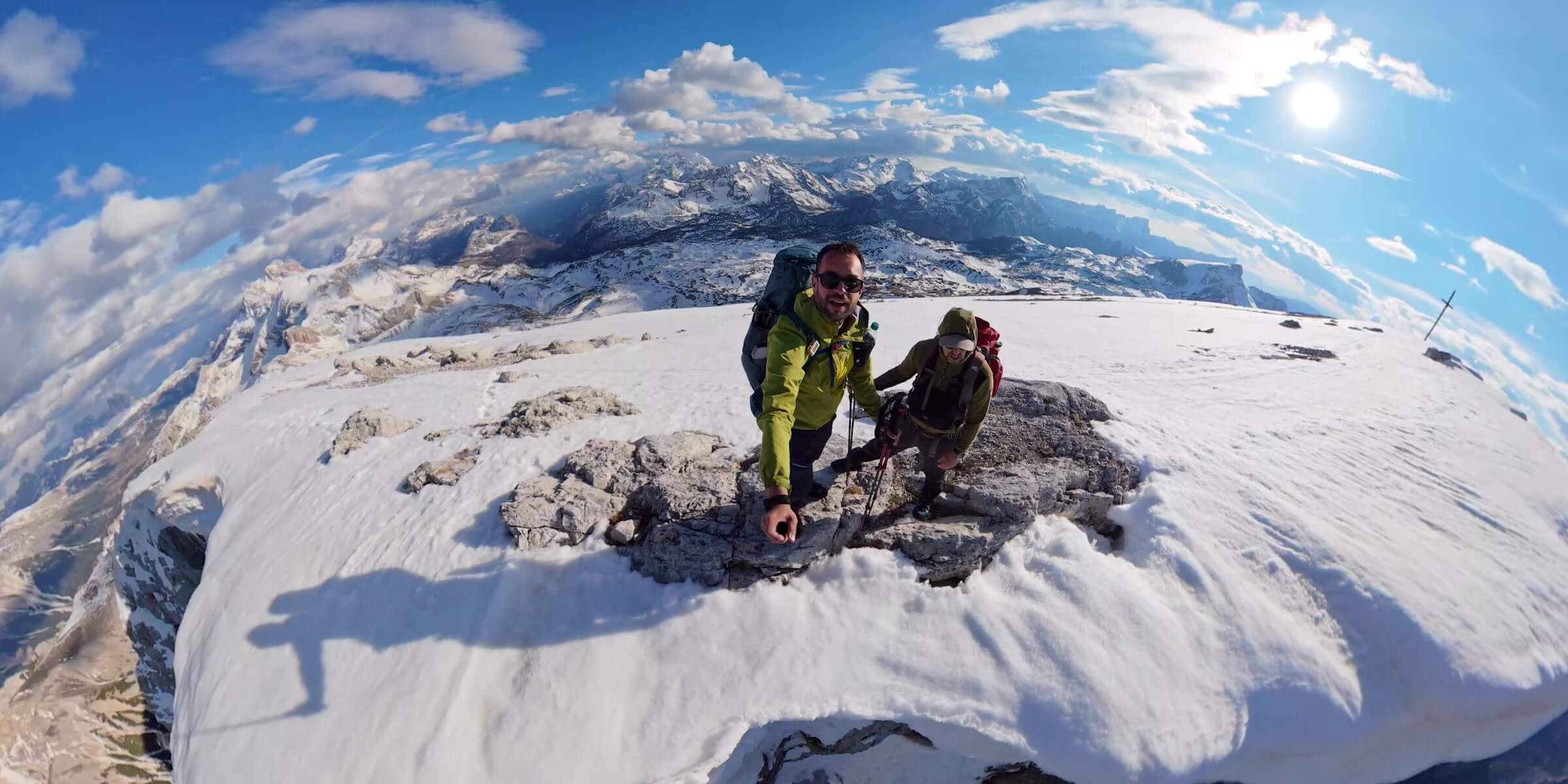
Yes—for some close-range shots. Osmo 360 II can replace a drone when the result you want is a floating third-person view, a low crane movement, a short orbit or an elevated travel angle. It cannot replace true flight: high-altitude establishing shots, long remote moves, large top-down views and aerial landscape parallax still require a drone or another elevated camera system.
The honest substitution test
Quick Answer: Can Osmo 360 II Replace a Drone?
It replaces a camera position only when the operator and stick can physically reach that position safely.
Swipe to see every column.
| Shot | Osmo 360 II | Real drone | Decision |
|---|---|---|---|
| Close third-person follow | Strong fit with an aligned invisible stick | Possible, but adds flight setup and clearance | Osmo can replace it |
| Low side tracking | Strong fit with careful operator movement | Useful when more distance or separation is needed | Often replaceable |
| Short crane or reveal | Works within the pole’s reach | Works across a much larger height and path | Partly replaceable |
| Tight virtual orbit | Reframe a short, controlled circle around a nearby subject | Can fly a larger remote path | Partly replaceable |
| High establishing view | No true altitude beyond physical reach | Core drone job | Drone required |
| Large top-down landscape | Cannot reach or separate far enough | Core drone job where legal and safe | Drone required |
| Long remote tracking | Operator remains connected to the camera position | Can move independently over distance | Drone required |
Bottom line: the camera can imitate some low-altitude drone movements. It does not turn a selfie stick into an aircraft, and it should not be purchased as a replacement for every aerial job.
Stitching, not literal invisibility
How the Invisible Selfie Stick Creates a Floating-Camera Look
Osmo 360 II records through two fisheye lenses, each covering more than 180°. Software combines their overlapping views into a sphere and removes the narrow support area directly below the camera. When an official invisible selfie stick stays in that stitch zone, the finished image can look as if the camera is floating beside or above you.
The effect is geometric. The stick does not become transparent, and the camera is not reconstructing a scene that it never saw. A bent connection, angled adapter, wide accessory, hand placed too close to the camera or subject crossing the stitch line can all make the support or stitching error visible. DJI lists a safe stitching distance of at least 0.75 m, so faces, hands and important details should stay farther away when possible.
Best practice: keep the camera and stick in one straight line, use the official connection, keep the lenses clean, and review a short reframed test before an important take.
Reach changes the type of shot
1m / 1.2m Invisible Selfie Stick vs 2.5m Extended Carbon Fiber Stick
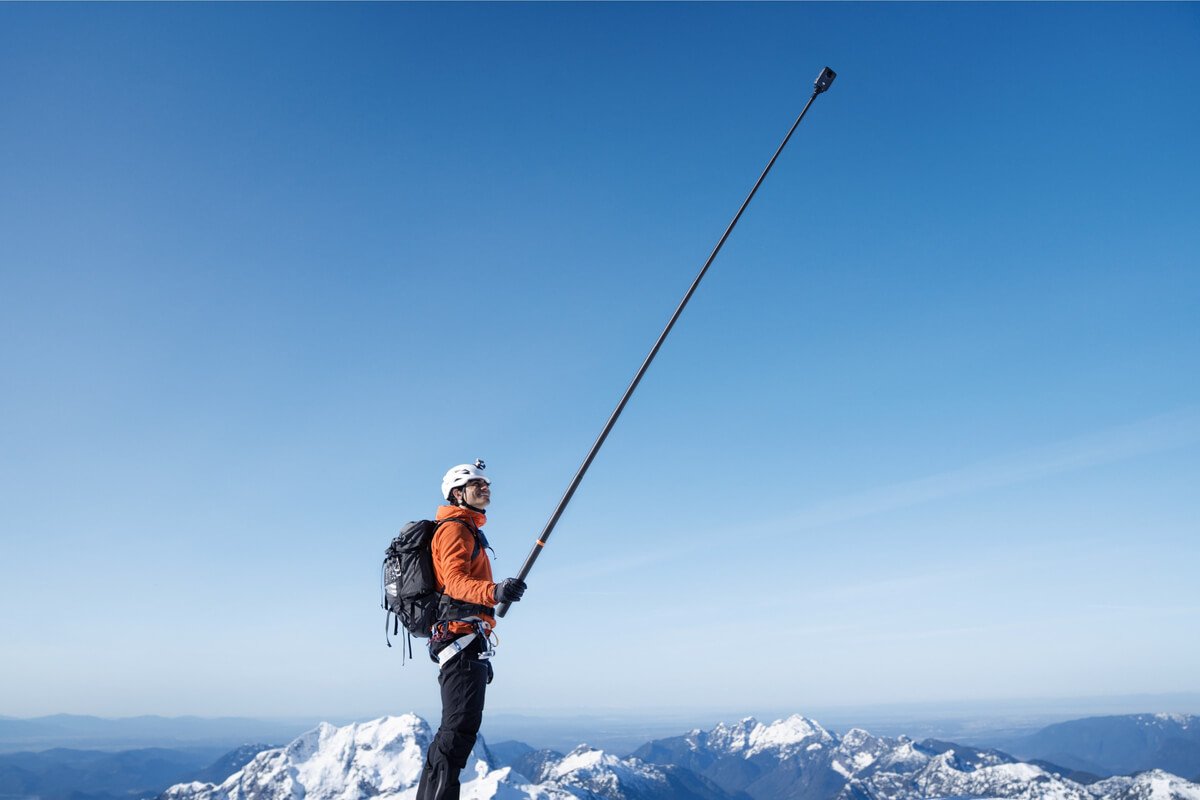
A shorter pole mainly creates a detached third-person view. A 2.5 m pole moves the camera high or far enough to suggest a low drone or jib.
Swipe to see every column.
| Option | Best for | What changes | Main caution |
|---|---|---|---|
| 1m high-strength carbon fibre | Compact third-person action and travel | Approx. 1,000 mm extended; strong reach-to-portability balance | Use only with an appropriate handheld or stabilized mounting plan |
| 1.2m handheld kit | Walking, vlogging and wider handheld framing | Approx. 1,200 mm extended and includes an adjustable quick-release adapter | DJI recommends handheld use only and warns against strong vibration |
| 2.5m extended carbon fibre | Elevated side tracking, short reveals and low “fake drone” views | Approx. 2,500 mm extended; approx. 428 g | Greater leverage, swing radius and impact risk; needs open space and deliberate movement |

Choose Compact Reach for Routine Third-Person Shots
DJI lists Osmo 360 II compatibility for this exact 1 m high-strength carbon-fibre stick. Its approximately 1,000 mm extended length is easier to manage for routine travel and close action than the 2.5 m option, while still supporting the aligned invisible-stick effect.
DJI’s 1.2m kit and 2.5m extended stick are included here as manufacturer-reference options; confirm current local availability and exact compatibility before ordering.
What “drone-like” actually means
It Describes Perspective, Not Flight
DJI describes the 2.5 m stick as producing side-tracking views reminiscent of drone footage. That is a useful description when the camera sits above eye level, tracks beside a subject or rises through a short reveal.
The visual similarity ends where altitude and independent movement begin. A pole-mounted camera follows the operator’s position and arm path. A drone can separate from the operator, change height over a much larger range, cross terrain and reveal scale through true aerial parallax. Viewers may accept both as cinematic, but they are not technically equivalent.
Seven repeatable ideas
Drone-Like Shots You Can Create with Osmo 360 II
Record the full sphere, move the camera smoothly and build the final virtual-camera path during reframing.
A convincing close-range follow
Movement Matters More Than Maximum Height
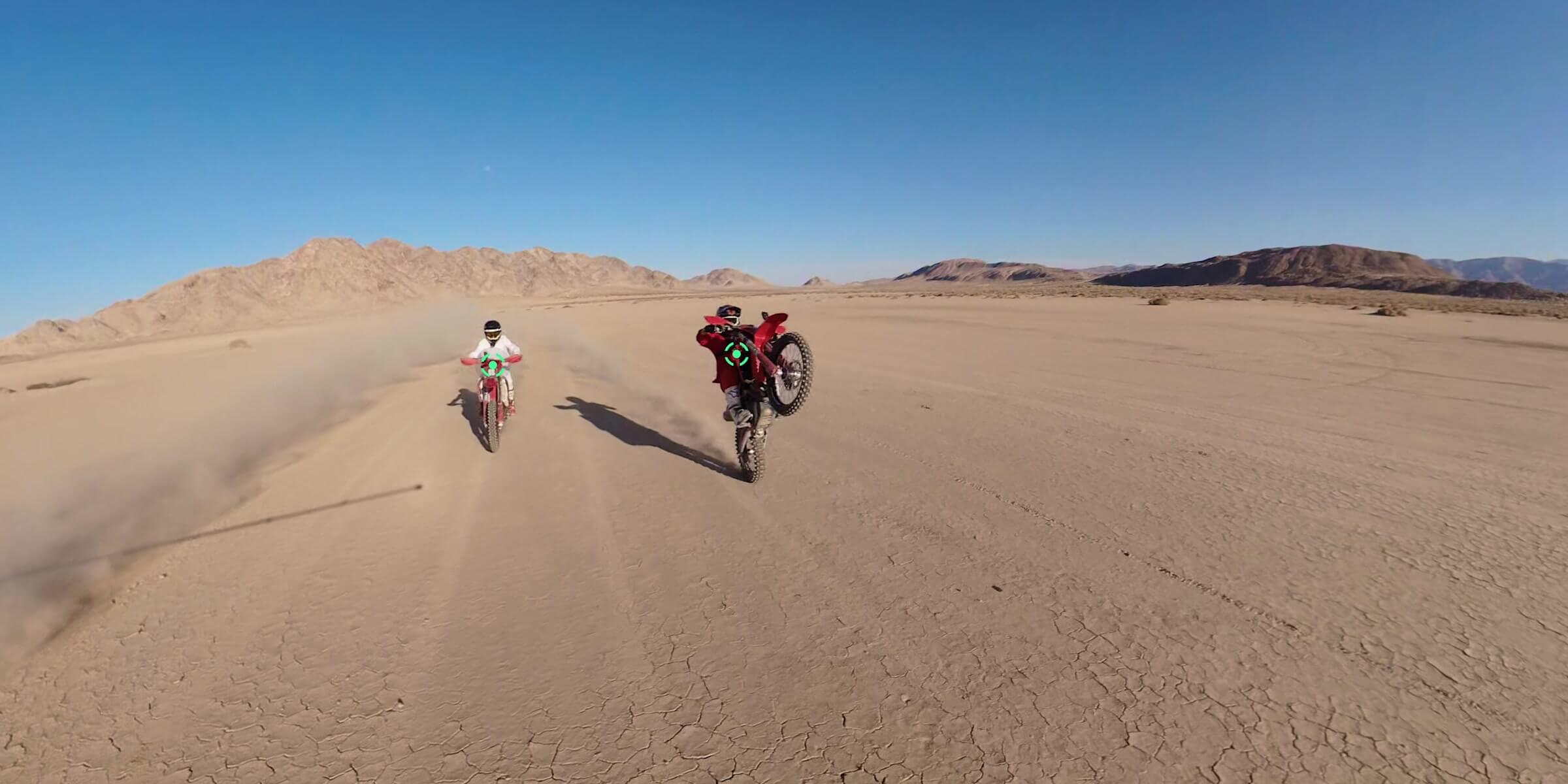
The strongest “fake drone” clip is usually a controlled five- to ten-second move, not a long sequence with the pole pushed to its limit. A consistent walking pace, stable camera height and one clear subject give the editor a usable path.
For skiing, running or cycling, control comes first. Do not operate a long pole while that removes a hand you need to steer, brake or balance. Use a second operator, a documented secure setup appropriate to the activity, or a stationary pass-by. The dedicated Osmo 360 II Winter Guide and Single-Lens vs 360° Mode Guide cover those separate decisions.
One short move, four decisions
How to Shoot a 2.5m “Fake Drone” Angle
Plan the final flat shot before extending the pole. More coverage is useful only when it supports a deliberate edit.
Start with a five-second test at partial extension. Inspect the stitch line, horizon and subject distance. Only then repeat at greater reach. The Osmo 360 II Editing Guide explains the mobile and desktop post-production routes.
Protect the illusion
How to Keep the Selfie Stick Invisible
- Align the stick directly under the camera. The stitching software expects the support to sit in the narrow area between the two lens views.
- Avoid angled hardware for 360 capture. Tilting the camera away from the stick can move the support into a visible lens area.
- Keep hands and subjects away from the camera. DJI’s listed safe stitching distance is at least 0.75 m; more separation can make edge transitions easier to hide.
- Check both lenses. A fingerprint, water drop or scratch affects a large part of the sphere and can make stitching differences more obvious.
- Test the final crop. A stick may be hidden in one direction while an accessory, shadow or operator remains visible after reframing.
The stick’s shadow can still appear on the ground. Change the sun angle, camera height or framing rather than trying to promise a completely artifact-free result.
Two tools, different jobs
When Is Osmo 360 II Better Than a Drone—and When Is It Not?
The best tool is the one whose physical operating method matches the shot.
Choose Osmo 360 II
Close, fast and operator-connected
- Walking, hiking and compact travel kits
- Third-person shots beside the subject
- Low elevated angles under physical control
- Indoor or covered locations where filming is permitted
- Fast deployment without batteries, controller and takeoff workflow
- One 360 master for several reframed social outputs
Choose a real drone
Altitude, distance and independent movement
- High establishing views of a destination
- True top-down scenes and large-scale patterns
- Long reveals across terrain or architecture
- Remote tracking beyond a pole’s reach
- Large orbits with meaningful subject separation
- Aerial parallax that communicates real landscape scale
This is not an “avoid drone rules” strategy. Use a pole camera because its close-range movement fits the creative job. If the shot requires an aircraft, plan the flight under current rules instead of forcing the wrong tool into the scene.
Travel decision
Osmo 360 II vs a Drone for Travel Creators
For a creator travelling light, Osmo 360 II can cover more daily moments per minute of setup. It works while walking, at a lookout, on a trail and in many spaces where launching an aircraft would be impractical or inappropriate. A shorter stick also packs more easily and attracts less attention than a 2.5 m pole.
A drone still owns the destination-scale image: coastline, valley, city edge, mountain road or property seen from genuine altitude. If those establishing shots define your work, the best answer may be both tools—Osmo for the close narrative and a drone for the aerial geography. Use the Osmo 360 II Travel Guide for packing, storage and destination workflow, or browse SpeedyDrone’s DJI consumer camera drones when true flight is part of the brief.
Canada: the operating method matters
What About Drone Rules in Canada?
A handheld camera on a selfie stick is not being flown as a remotely piloted aircraft. A drone is.
Transport Canada defines a microdrone as a drone with an operating weight below 250 g. Microdrone pilots do not need to register the aircraft or hold a drone pilot certificate, but they must not fly recklessly or negligently, must stay away from emergency sites, cannot enter restricted airspace without permission, and still have to respect privacy and trespassing laws. Flying any drone at an advertised event requires a Special Flight Operations Certificate, including for a microdrone.
Drones from 250 g through 25 kg enter the small-drone registration and pilot-certificate framework, with the category and operating environment determining further requirements. Always check the current aircraft weight, location, airspace and operation before flight.
Practical distinction: a camera held on a pole does not use the drone registration, pilot-certificate or airspace workflow because it is not flying. That does not remove property permission, venue policy, privacy, crowd, road, lift, electrical-line or general safety concerns. This is practical planning information, not legal advice.
Avoid preventable failures
Common “Fake Drone” Shot Mistakes
Most weak results come from asking the equipment to hide unsafe or uncontrolled movement.
Build by shot priority
Which Selfie Stick Should You Buy?
Start with the camera and the shortest reach that creates the angle you will use regularly.
Choose the 1 m high-strength carbon-fibre stick when compact third-person action is the priority and you want a verified SpeedyDrone option. Choose a 1.2 m handheld kit when walking and vlogging flexibility matter more than vibration-heavy use. Consider the 2.5 m stick only when elevated side tracking or short crane-like moves are frequent enough to justify its size and handling demands.
If your shot list includes real altitude, long remote paths or true top-down coverage, do not solve that with a longer pole. Compare a camera drone instead.

Start with the Camera, Then Add the Right Reach
Choose the camera when reframing, third-person perspective and fast close-range setup matter more than true altitude. The Standard Combo is the starting point; the appropriate stick or mount is a separate shot-specific decision.
Frequently asked
FAQ
Short answers to the purchase and shooting questions behind this guide.
Can DJI Osmo 360 II replace a drone?
It can replace a drone for some close-range third-person, side-tracking, low crane, short reveal and tight-orbit shots. It cannot replace true aerial altitude, large top-down scenes, long remote flight paths or landscape-scale parallax.
How does the Invisible Selfie Stick disappear?
The two fisheye lenses capture overlapping views, and stitching software removes the narrow area directly below the camera. The stick must remain aligned under the camera in that stitch zone; angled hardware, hands or nearby subjects can still create visible artifacts.
Does the 2.5m selfie stick disappear from Osmo 360 II footage?
It can be removed by the 360 stitching workflow when the camera and compatible stick are correctly aligned. The result is not guaranteed in every angle: attachments, shadows, bending, a tilted connection or nearby subjects can remain visible.
How high can a 2.5m selfie stick place the camera?
The DJI stick extends to approximately 2.5 m. The actual lens height depends on how it is held, the operator’s height, pole angle and safe clearance; it should not be described as genuine flight altitude.
What drone-like shots work best with Osmo 360 II?
High third-person walking, low side tracking, short crane moves, foreground reveals, small controlled orbits and carefully planned skiing or cycling follow shots are the strongest candidates.
Is a 1m or 2.5m selfie stick better for travel?
A 1 m or 1.2 m option is usually easier to pack, control and use for everyday third-person travel footage. Choose 2.5 m only when elevated side tracking and low drone-like perspective are important enough to justify the extra length and leverage.
Can I use the 2.5m stick while skiing?
Only in a conservative, controlled setup with clear space and permission. A long pole increases leverage and collision risk around lifts, trees and other people; never use it in a way that interferes with balance or control.
Can I hold a long selfie stick while cycling?
Do not hold a long pole if it takes a hand away from steering or braking. Use a second operator, a documented compatible mounting setup appropriate to the surface, or a stationary pass-by instead.
Does using Osmo 360 II avoid Canadian drone rules?
A handheld camera on a pole is not being flown as an RPAS, so the drone registration, certificate and airspace workflow does not apply to that handheld setup. Property, venue, privacy, road, crowd and general safety rules still matter. Use this distinction for accurate planning, not as a reason to evade rules.
When do I still need a real drone?
Use a real drone, where legal and safe, for genuine altitude, large top-down compositions, long remote tracking, wide orbits and landscape reveals where the camera must move independently of the operator.
Sources and Verification Notes
Invisible-stick geometry, the 0.75 m safe stitching distance and Osmo 360 II stabilization were checked against DJI’s current FAQ and specifications. Selfie-stick length, weight, handling guidance and “drone-like” side-tracking language were checked against DJI’s current accessory pages and Osmo 360 II launch information. Canadian drone categories and microdrone rules were checked against Transport Canada.
DJI Osmo 360 II FAQ
DJI Osmo 360 II Specifications
DJI Osmo 360 II launch information
DJI Osmo 1m High-Strength Carbon Fiber Invisible Selfie Stick
DJI Osmo 1.2m Invisible Selfie Stick Kit
DJI Osmo 2.5m Extended Carbon Fiber Selfie Stick
Transport Canada: Drone operation categories
Transport Canada: Microdrone rules and best practices
Shot recommendations are SpeedyDrone editorial analysis, not a claim that a pole-mounted camera and a drone are technically equivalent. Accessory availability, venue policy, regulations and manufacturer compatibility can change. Recheck the exact product page and current rules before purchase or operation.
Close narrative or true aerial scale?
Build Your Osmo 360 II Creator Kit in Canada
Choose Osmo 360 II for flexible close-range third-person capture, then add the shortest suitable stick. If the brief needs true altitude or remote flight, compare a camera drone instead.
Explore the DJI Osmo 360 II Collection
Compare DJI camera drones


