


Hypershell • Battery planning
Plan the outing, not just the kilometres.
Understand the range reference, choose a workable battery reserve and leave enough time—and the right conditions—to recharge.
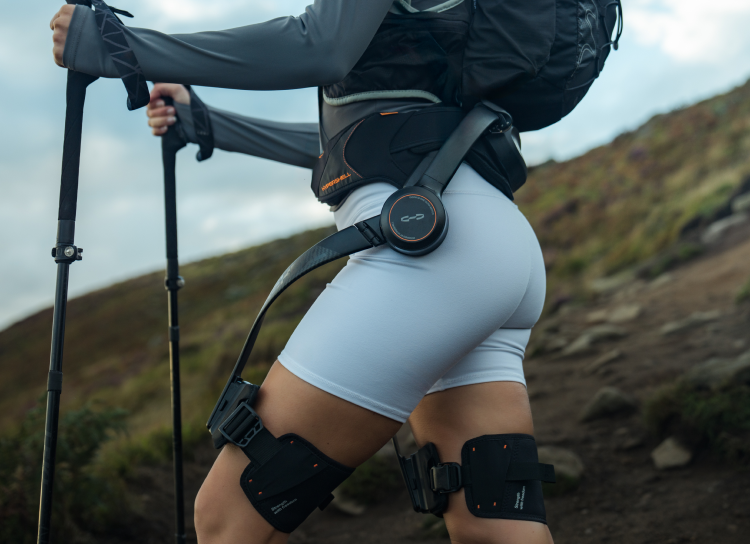
Hypershell’s 17.5km and 30km ratings are manufacturer range references, not fixed walking allowances. Plan around terrain, assistance, time outdoors, temperature and a return reserve. The current accessory pages quote roughly 88 minutes for a 72Wh battery with a supported 65W setup, and about 90 minutes per battery through the 4-Port Charging Hub. The Hub charges sequentially; its 0°C–40°C charging range is separate from a battery’s below-freezing operating rating.
This guide focuses on the newer X Series S and the practical battery routine around it. It is not another model-upgrade verdict: use our X Pro S, X Max S and X Ultra S buying comparison for that decision. Here, the question is whether the energy and recharge plan fit the whole outing, including the return.
Documentation and current SpeedyDrone packages checked September 30, 2026. Manufacturer test references and our illustrative planning examples are identified separately. These are not SpeedyDrone field-test results.
The X Series S battery starting point
Pro S and Max S currently include one Intelligent Battery. Ultra S includes two Anti-Cold Batteries and the 4-Port Charging Hub. All three current packages include a 65W charger. That gives Ultra S two separate packs to manage, not one continuously installed 144Wh battery.

Hypershell X Pro S Powered Exoskeleton
One 72Wh Intelligent Battery; up to 17.5km in the manufacturer’s Eco 30 reference.
View X Pro S at SpeedyDrone
Hypershell X Max S Powered Exoskeleton
One 72Wh Intelligent Battery; up to 30km in the manufacturer’s Eco 30 reference.
View X Max S at SpeedyDrone
Hypershell X Ultra S Powered Exoskeleton
Two 72Wh Anti-Cold Batteries, up to 30km per battery, plus the included Hub.
View X Ultra S at SpeedyDroneThese are package and maximum-reference distinctions, not recommended route distances. Confirm the exact current offer and supported spare pack before buying accessories. A shared brand name or 72Wh label does not establish that a particular battery fits every original and S-generation device.
What do 17.5km and 30km actually mean?
Hypershell’s current Canadian model comparison labels those ranges Eco 30. They describe performance under a stated reference, rather than a distance remaining regardless of how you move. A full battery at the trailhead is useful information; it is not proof that any route shorter than the headline number is covered.
The manufacturer’s new-series activity examples and footnotes make the distinction clear. Walking is advertised at up to 30km and 7.5 hours; Mountain at approximately 13.8km and 160 minutes; Cycling at approximately 35km and 102 minutes. These use different activities and assistance settings under controlled laboratory conditions. They are not identical outdoor tests of all three models.
Nor is 72Wh a kilometre measurement. It describes stored energy. Different systems, settings and movement patterns use that energy differently, so equal capacity does not force equal range. Do not turn the model ratings into an exact energy-per-kilometre formula or assume a shorter, steeper outing must use less assistance than a longer easy walk.
Build a route plan that includes more than distance
Consider an illustrative 18km gentle route and a 12km route with repeated climbs, loose ground and frequent changes in pace. The second route is shorter, but that alone cannot establish which uses less battery. These are planning examples, not measured consumption results. Elevation gain and loss, expected assistance and time on the route belong beside the kilometre total.
Start with a route worksheet rather than dividing distance by the manufacturer’s maximum. The following is our planning framework, not a Hypershell operating rule. It helps identify information you still need before deciding whether one charged pack, a supported spare or a shorter route makes sense.
| Outing | Record alongside distance | Question to resolve |
|---|---|---|
| City walk | Pace, stops and expected assistance time | Can the ordinary routine finish with a return reserve? |
| Gentle trail | Assistance setting, surface and exit points | Have comparable shorter outings shown a workable battery pattern? |
| Mountain route | Elevation gain/loss, repeated climbs and carried equipment | Is the plan based on demanding sections, not just total kilometres? |
| Winter trail | Forecast temperature, snow conditions and device limits | Are both outdoor use and the later charging environment suitable? |
| Multi-day trip | Supported charging access and available charge windows | Can the required packs actually recharge before the next departure? |
| Remote outing | Return, detours, exit options and spare-pack compatibility | Can the outing remain suitable if powered assistance ends early? |
On a phone, scroll this worksheet sideways. It does not calculate a safe route or prescribe a battery quantity.
Learn your own battery pattern on suitable shorter outings. Note the model and pack, starting and ending charge indication, assistance setting, approximate temperature, route profile and elapsed use. A flat walk is a poor calibration for a cold climb. Compare similar conditions rather than treating a percentage reading as an exact distance gauge.
One battery or two? Plan reserve and the return first
One pack may fit predictable urban walks or short outings with straightforward exits and reliable charging afterwards. A second supported pack becomes more useful when the day is longer, charging access is absent, or terrain and weather make the assistance requirement less predictable. There is no verified universal “one pack per X kilometres” rule.
Keep a return, detour and weather reserve rather than planning a remote outing around consuming the entire manufacturer maximum. We are not assigning an official 20% reserve or any other fixed percentage. The appropriate margin depends on conditions and the consequences of assistance ending; extra batteries do not turn an unsuitable route into a suitable one.
Ultra S’s two included packs provide two independent 72Wh energy supplies. A swap is required; the advertised per-pack maxima do not establish a guaranteed 60km hike. Check both packs before departure rather than assuming the spare is full. Follow the manufacturer’s fitting and safety requirements: Hypershell is not a certified medical device and requires independent walking, leg lifting and balance.

How long does 65W charging take?
Hypershell’s current Intelligent Battery specifications give a normal full-charge reference of about 88 minutes using a 65W adapter and a standard Type-C fast-charge cable. The table covers its 72Wh Standard and Anti-Cold accessory batteries. Newer S packages include a 65W charger, but a shared charging ecosystem is not proof of an identical timer for every pack and condition.
Use the supported charger-and-cable combination and the instructions for your exact pack. The battery page also lists 88 minutes per pack through the Hub, while the dedicated Hub page lists 90 minutes. Treat these as approximate manufacturer references with their respective source context—not a two-minute performance guarantee. Older partial-charge figures are not a verified charging curve for every S kit.
A 65W rating does not mean the battery receives a constant 65W for the whole session. The idealized calculation 72Wh ÷ 65W gives about 66.5 minutes, but assumes constant power with no losses. Actual charging includes power regulation and a changing charge stage. That arithmetic is not a replacement for the manufacturer’s normal-time reference, nor a reason to bypass charging controls.
The 4-Port Hub charges a queue, not four packs at once
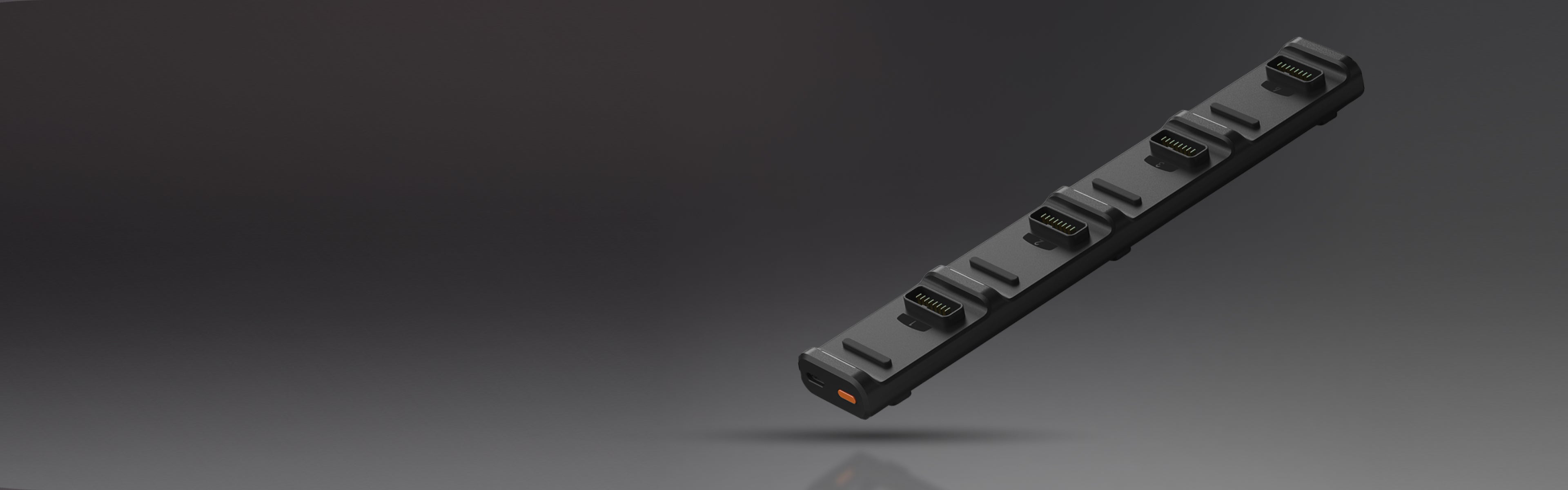
The current 4-Port Charging Hub page specifies Intelligent Sequential Charging: it starts with the connected battery that has the most charge, fills it to 100%, then moves to the next. Four slots provide queue management; they do not mean four simultaneous full-speed charges. Use that dedicated current specification rather than older promotional descriptions of parallel charging.
How the charging queue works
- Highest remaining chargeThe Hub selects this connected pack first.
- Fill that pack to 100%The next pack waits its turn.
- Move to the next packThe sequence continues through the connected packs.
The Hub’s roughly 90-minute reference is per battery with the supported 65W charger, not for the whole four-pack queue. For two equally depleted packs under comparable conditions, two 90-minute cycles suggest roughly three hours as a simple scheduling illustration. Different starting charge, temperature and supported power can change the actual finish time; the illustration is not a guaranteed recharge window.
The benefit is avoiding repeated manual reconnection between packs, not multiplying charging speed by four. Before a multi-day trip, allow time for the required queue and verify each pack’s status before departure. Follow the manufacturer’s charging supervision and safety instructions; queue convenience is not permission to leave charging unattended or to assume every connected pack is ready.
Standard versus Anti-Cold: the Wh stays the same
The current battery accessory table lists both types at 5000mAh / 72Wh. Standard is specified for operation from −10°C to 60°C; Anti-Cold from −20°C to 60°C. Anti-Cold’s lower operating floor is not an increase in stored Wh and does not guarantee the same maximum range at every temperature.
Keep the complete device’s limit separate as well. Pro S and Max S list a −10°C operating floor, while Ultra S lists −20°C. Do not assume installing a different battery changes a device’s published operating range. For Canadian winter planning, verify the model, pack and forecast together rather than selecting only by the battery name.
| Specification | Current manufacturer reference | What it does not establish |
|---|---|---|
| Battery operation | Standard −10°C to 60°C; Anti-Cold −20°C to 60°C | Charging at those same cold temperatures |
| Hub charging | 0°C to 40°C | A subzero charging allowance from its separate operating rating |
| Battery storage | 0°C to 40°C for both accessory types | A required storage charge percentage or cycle-life guarantee |
The table intentionally distinguishes accessory operation, Hub charging and accessory storage. Follow the applicable battery charging instructions too. A device that can operate below freezing is not automatically ready for fast charging there; storage temperature is also not a substitute for a charging specification.

After a winter outing, check the pack—not just the warm room
A cold pack carried into a warm car or room does not instantly reach the air temperature. Allow the pack and charging environment to return within the applicable manufacturer charging conditions before connecting power. We cannot provide a universal ten-minute wait: starting temperature and circumstances differ, and the current sources do not establish such a timer.
- Confirm the exact pack and charging instructions, including the Hub’s 0°C–40°C charging range when using it.
- Use a suitable charging environment and allow the cold equipment to return within the applicable conditions; do not improvise a heating method.
- Connect only the supported charging setup, follow any status warnings and verify each required pack before the next outing.
Do not bypass a charging restriction because the battery has an Anti-Cold label. Nor should a spare be treated as a remedy for operating outside the complete device’s specification. There is no published universal cold-weather range-loss percentage in the sources reviewed here; temperature belongs in your observations and reserve planning, not in an invented kilometre deduction.
What if you own an original X Series?
The manufacturer’s original-family charging guidance also describes 72Wh batteries, USB-C PD and approximately 88 minutes with a compatible 65W setup. That is useful context, not a universal battery-interchange statement. Check your own model and pack documentation rather than applying the S-series kit above to an older device. Our original X versus X Series S guide separates those generations.
Before travel, check current airline and aviation-authority requirements for the installed pack and any spare lithium-ion batteries. This guide does not grant a carry-on allowance or resolve carrier-specific rules. For battery purchases, ask about the exact supported part, charger and current retailer offer instead of ordering a familiar-looking pack on appearance alone.
Hypershell battery and range FAQ
Is 30km a reliable distance for every hike?
No. It is a manufacturer maximum reference under stated conditions, not a fixed route allowance. The activity examples use different settings and controlled tests; they do not predict your own terrain, pace, assistance and weather. Plan the entire outing, including return and detours, and learn battery behaviour on suitable comparable shorter routes. A route below the headline distance is not automatically covered or suitable simply because its kilometre total is smaller.
Why can equal 72Wh batteries have different assisted range?
Wh describes stored energy, while assisted distance is an outcome of the complete system and use conditions. Model configuration, assistance, movement, terrain and temperature affect how that energy is used. The capacity label cannot establish an exact kilometres-per-Wh conversion or a verified efficiency improvement between models. Keep the manufacturer reference and your own comparable-route observations separate rather than treating either as a universal range calculator.
How many batteries should I bring?
There is no verified universal pack count by route distance. One pack may fit predictable short outings with easy exits and reliable charging afterwards. A supported spare becomes more useful for longer or less predictable days, but still needs a confirmed charge and compatibility. Plan reserve and a suitable return if assistance ends early. Ultra S includes two packs; that package choice does not establish that two will cover every planned route.
Is the normal charging time 88 or 90 minutes?
The current battery accessory page quotes roughly 88 minutes with its supported 65W adapter-and-cable setup and also lists 88 minutes per Hub pack. The dedicated Hub page quotes about 90 minutes per battery with the Hypershell 65W charger. Keep those approximate source contexts rather than promising an exact timer or inventing an explanation for the discrepancy. Confirm the instructions and actual charge status of your particular pack and setup.
Does the 4-Port Hub charge four batteries simultaneously?
Its current dedicated product page specifies sequential charging. The connected battery with the most remaining charge is filled to 100% before the Hub moves to the next. Four ports therefore support queue management, not four simultaneous full-speed sessions. The roughly 90-minute reference applies per pack with the supported 65W charger, not to an entire four-pack queue. Verify the required packs individually before departure rather than assuming connection means completion.
Does Anti-Cold provide more battery capacity?
The current Standard and Anti-Cold accessory specifications both list 5000mAh / 72Wh. The relevant difference here is the stated operating range: Standard down to −10°C, Anti-Cold down to −20°C. That lower floor does not guarantee identical range at every temperature or change a device’s own published limit. Check the whole model-and-battery combination, especially for Pro S or Max S, rather than assuming a pack name grants broader operating permission.
Can I fast-charge an Anti-Cold Battery at −20°C?
Do not infer charging permission from its −20°C operating rating. The current Hub charging specification is 0°C–40°C, separate from its operation rating; applicable battery charging instructions also matter. A pack returning from subzero use needs to be within the relevant charging conditions, not merely placed in warmer air. No uniform warm-up time is established here, and charging warnings or controls should not be bypassed.
Does Ultra S guarantee 60km with its two batteries?
No. The accurate reference is up to 30km per included battery, with two separate 72Wh packs supplied. Their maximum distances can be added arithmetically, but that does not establish a continuous 60km route or identical conditions for the second pack. A swap and actual battery management are required. Terrain, settings, temperature and reserve still matter to the whole day, including how you can return if assistance ends earlier.
Can any USB-C charger or spare battery replace the supplied setup?
Do not assume that from connector appearance or a shared Wh label. The cited charging times depend on a supported power path, charger and cable; a different setup is not promised to reproduce them. Confirm the exact device, battery part and approved charging combination before buying. SpeedyDrone can help clarify the current offer; this guide does not invent standalone accessory availability or universal original-to-S battery interchange.
Sources and scope
Technical references come from the manufacturer battery, Hub, new-series activity and Canadian model-comparison pages linked beside the relevant claims. Current kit descriptions and purchasing routes come from the exact SpeedyDrone listings. The route worksheet, reserve questions and charging-window arithmetic are our explanatory planning tools, not manufacturer requirements, field results or medical recommendations.
Build a battery setup around your real route.
Tell SpeedyDrone which Hypershell model you have or are considering, the terrain and temperature you expect, and where you can recharge. We can help clarify the current kit, supported accessory options and the questions to resolve before ordering.
Plan my Hypershell battery setupCompare current devices in the Hypershell X Series S collection.


