


Canadian winter readiness
DJI Power 1000 Mini Winter Power Outage Guide

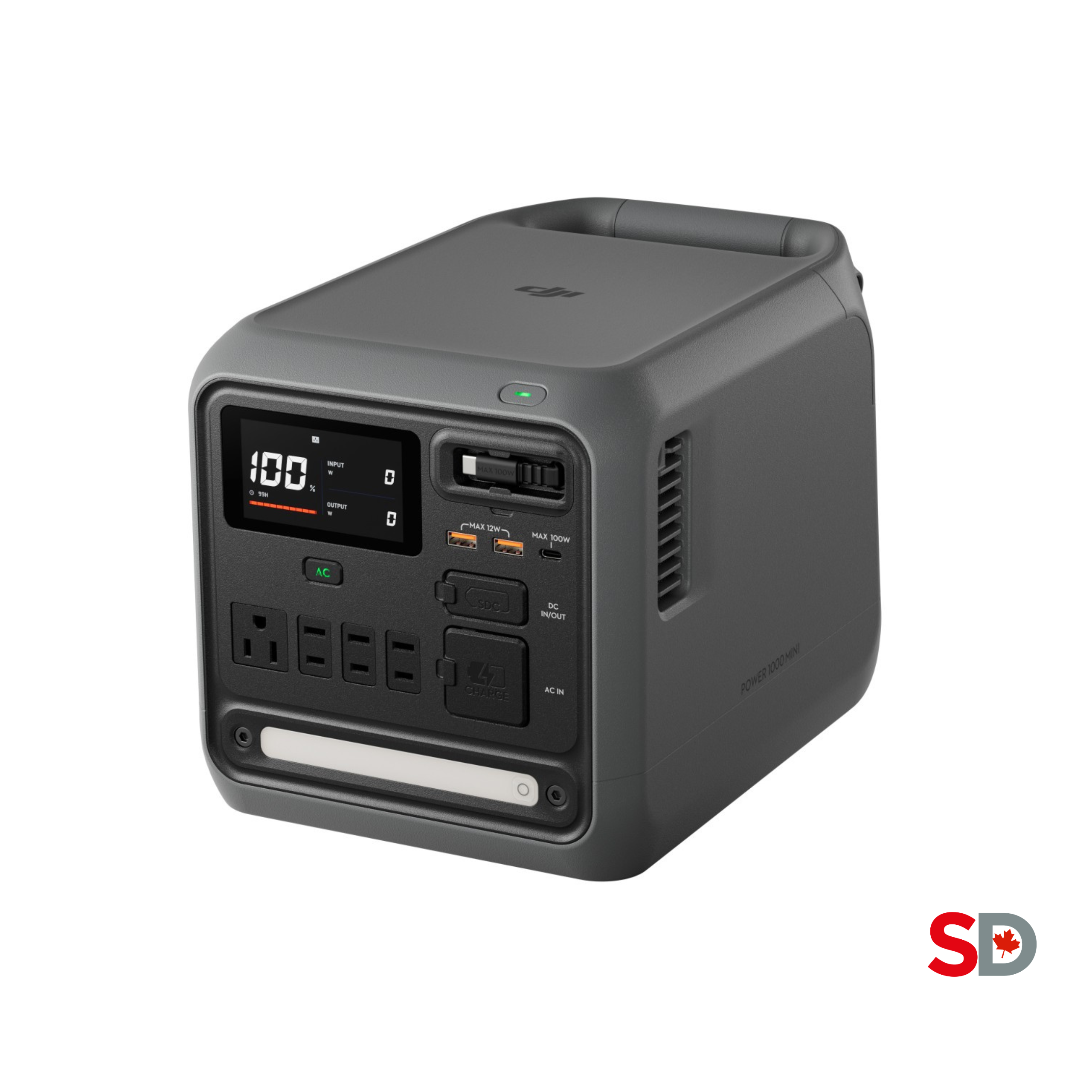
Short answer: the DJI Power 1000 Mini is a practical winter-outage battery for internet, phones, laptops, lighting and carefully verified refrigeration loads. Its 1008Wh battery is useful, but its Canadian 120V model is rated for 800W continuous AC output with a 1000W maximum. That makes it an essential-load station—not a whole-home system and generally not a space-heater solution.
Best outage roleRouter, communications, lighting and low-draw electronics
Limit to plan around800W continuous AC output
Cold-weather warningOutput capability decreases at low temperature
What to power first when the lights go out
A full battery helps only if you ration it deliberately. Start with communication and safety, then add loads one at a time after checking their labels.
Swipe the table sideways to see all columns.
| Priority | Typical examples | Why it comes first | Mini planning note |
|---|---|---|---|
| 1. Safety and communication | Phone, radio, rechargeable light, essential accessibility equipment | Information and the ability to call for help matter before convenience. | Prefer USB or other efficient outputs where supported. Medical and accessibility devices require their own approved backup plan. |
| 2. Internet | Modem, router, fibre terminal | Home internet can preserve alerts, work and Wi-Fi calling if the upstream network remains active. | Test every box in the chain. One unpowered fibre terminal can make a powered router useless. |
| 3. Food protection | Refrigerator or freezer, cycled rather than run blindly | Cold storage can become important in a long outage. | Check running watts and startup surge first. Do not assume every compressor will start on an 800W station. |
| 4. Work and comfort | Laptop, monitor, small fan, selected electronics | Add these only after critical loads are secure. | Watch the station display and avoid stacking loads close to the output ceiling. |
| Usually skip | Space heater, kettle, toaster, hair dryer, large cooking appliance | Resistance heat converts stored energy into heat very quickly. | Many common examples are around 1500W—already above the Mini's 800W continuous rating. |
The two numbers that matter
1008Wh tells you duration; 800W tells you compatibility
Capacity and output answer different questions. The Mini's 1008Wh rating describes stored energy. Its 800W continuous rating describes how much AC load the Canadian low-voltage model can sustain, while DJI lists 1000W maximum output. A device can therefore be too powerful to start even when the battery is full.
Use watt-hours to estimate duration after allowing for conversion losses, temperature and the device's changing consumption.
Check simultaneous running draw and startup surge. Do not build a plan that sits exactly at the published ceiling.
This article intentionally does not repeat a large runtime chart. Once your devices pass the power check, use the DJI Power 1000 Mini Runtime Guide to estimate hours from a measured load. Actual usable energy at an AC outlet will be lower than the nameplate capacity, and winter conditions add another variable.
Router, refrigerator, furnace and heater: four different answers
Categories are not electrical specifications. The label, manual and measured startup behaviour of the exact device are more useful than a generic online wattage list.
Router and internet equipment
Low, steady consumption makes a modem-and-router setup one of the Mini's best outage jobs. Plug in the modem, router and any fibre terminal or mesh node the connection depends on. Test the full chain before storm season and confirm that your provider's network still works during a local outage.
Refrigerator or freezer
The normal running draw may look modest, but the compressor can demand a much higher burst at startup. Find the appliance label or manual, then test from a fully charged station under supervision. If the Mini rejects the start, repeatedly retrying is not an outage plan.
Furnace and space heater
A hardwired furnace requires an approved connection arrangement and professional electrical work; this guide does not provide a DIY method. A portable electric space heater is generally a poor match because many draw about 1500W—above the Mini's continuous rating and fast enough to consume a 1kWh battery quickly.
Safety boundary: never backfeed a home panel or improvise a furnace connection. Ontario's Electrical Safety Authority says a permanent receptacle arrangement for a furnace must satisfy code requirements and requires an inspection application. Consult a Licensed Electrical Contractor about a compliant solution for your home.
Automatic switchover
What UPS mode can—and cannot—promise
DJI says the Power 1000 Mini can begin powering a connected device within 0.01 seconds in UPS mode when the station and device are connected as instructed and grid power fails. That figure was measured in a controlled laboratory environment. DJI also tells users to decide whether the mode is suitable for the particular device.
That makes UPS mode attractive for a router, modem, network storage or other modest load that you have already tested. It is not a universal guarantee for every server, medical device, motor or sensitive electronic load. Confirm the equipment maker's requirements, stay within the station's ratings, enable AC output as DJI specifies, and perform a supervised outage test before relying on it.
Practical test: fully charge the station, connect only the intended load, confirm the AC indicator is solid, then interrupt grid input while watching both the device and the station. A successful test under today's conditions still does not convert the setup into a certified life-safety system.
The −10°C specification is a boundary, not a target
DJI lists −10°C to 45°C for power supply, recharging and storage. Its support guidance also says low temperature reduces power-supply capability.

For a Canadian outage, keep the station indoors in a dry, moderate-temperature room where air can circulate around it. A freezing garage, shed or parked vehicle can fall below the stated storage range and can leave the battery cold at the exact moment you need full output. Do not block the vents, place the unit on snow or wet flooring, or move it abruptly from deep cold into a warm humid room and immediately connect loads; allow it to acclimate and make sure it is dry.
For long-term readiness, DJI recommends storing the battery around 50% to 70%, ideally about 60%, checking it every three to four months, and avoiding long storage after a complete discharge. DJI also recommends a maintenance cycle roughly every six months: discharge below 15%, wait at least two hours, then recharge to 100% in Standard Mode. Those are maintenance instructions, not a reason to leave the battery partially charged when a storm warning is imminent—top it up when you expect to use it.
DJI rates the LFP pack to retain more than 80% capacity after 4,000 cycles under its stated 25°C, Standard Mode, 400W-discharge test. Treat that as controlled-test context, not a promise that every battery in every Canadian garage will age identically.
Three recharge routes during a longer outage
Wall power is fastest when the grid returns. Car and solar input can extend a plan, but both depend on the correct accessory and real conditions.
Carbon-monoxide warning: Health Canada says not to idle a vehicle in a garage even when the garage door is open. If your charging method requires a fuel-burning engine to run, keep the vehicle outdoors, keep exhaust away from doors, windows and air intakes, and follow all vehicle and cable instructions.

Before the next storm watch
A 24-hour winter-outage checklist
- Charge the Mini and update your load list. Record the running watts and startup requirements of the exact devices you plan to use.
- Test the whole internet chain. Include the modem, router, fibre terminal, mesh nodes and any required power adapters.
- Test refrigeration separately. Start with other AC loads disconnected and watch whether the compressor starts without an overload.
- Stage safe lighting and cables. Keep the station dry, ventilated and easy to reach. Use certified cords in good condition.
- Confirm your recharge accessories. A 400W capability is irrelevant if the matching car or solar cable is elsewhere.
- Write down the no-go loads. Mark high-wattage heaters, kettles and unverified motors so nobody connects them by habit in the dark.
- Keep a separate emergency plan. Follow public-safety instructions, maintain smoke and CO alarms, and never make a consumer power station the sole plan for life-sustaining equipment.
Which DJI Power fits the plan?
Choose the Mini for disciplined essential loads; step up for higher output
The Power 1000 Mini is compelling when portability matters and the outage list stays comfortably below 800W: internet, communication, lighting, laptops and a refrigerator that you have verified. Its compact body, 11.5kg weight, built-in 100W retractable USB-C cable, LED and integrated 400W car/solar input make it easy to stage and move.
Power 1000 Mini makes sense if…
You want a portable 1kWh-class battery for a short, prioritized load list and you are willing to test compressor loads before relying on them.
Power 1000 V2 makes sense if…
Your plan includes higher-draw appliances, more simultaneous devices or future expansion. DJI rates the V2 for 2600W continuous output under its stated 25°C test conditions, but it still is not a DIY whole-home connection.
For the complete platform decision, read the dedicated Power 1000 Mini vs Power 1000 V2 comparison.
View the exact SpeedyDrone models
Product names, images and links below map directly to the matching Canadian listings. Recheck current availability before ordering.

Continue your research
Related SpeedyDrone Power guides
Winter buyer questions
DJI Power 1000 Mini winter outage FAQ
Can DJI Power 1000 Mini run a refrigerator during an outage?
Possibly, but verify the exact refrigerator's running draw and compressor startup surge. Test it from a fully charged station before an emergency, with other AC loads disconnected, because a modest running wattage does not guarantee a successful start.
Can DJI Power 1000 Mini run a space heater?
It is generally a poor match. Many portable space heaters draw about 1500W, which is above the Canadian Mini's 800W continuous AC rating. Resistance heating would also consume a 1008Wh battery quickly even at a lower setting.
Can I power my furnace with DJI Power 1000 Mini?
Do not assume a hardwired furnace can be connected directly. It needs a code-compliant arrangement sized for its running and startup loads. Consult a Licensed Electrical Contractor and do not backfeed a panel or improvise wiring.
How fast does UPS mode switch during an outage?
DJI states that the Mini starts powering a connected device within 0.01 seconds in UPS mode under controlled laboratory conditions. Compatibility is device-specific, so test the complete setup and do not treat the figure as a universal sensitive-device or medical-equipment guarantee.
Can DJI Power 1000 Mini be used or stored below freezing?
DJI lists −10°C to 45°C for power supply, recharging and storage, but says low temperature reduces output capability. Keep the station dry and, where practical, indoors at a moderate temperature instead of treating −10°C as an ideal operating or storage target.
Can I recharge it from a car during a winter outage?
Yes, with the appropriate DJI Power Car Battery Charging Cable and a compatible setup; DJI lists up to 400W from a fuel-car battery. Follow the vehicle and cable instructions, and never idle a vehicle in a garage—even with the door open—because of carbon-monoxide risk.
Will a 400W solar panel always deliver 400W in a Canadian winter?
No. The Mini supports up to 400W solar input with the appropriate DJI MC4 solar charging cable, but actual winter input depends on sun angle, cloud, snow cover, shade, panel orientation and short daylight. Treat 400W as an input ceiling, not a forecast.
How should I store DJI Power 1000 Mini between outages?
DJI recommends 50% to 70% charge for long-term storage, ideally about 60%, with a check every three to four months. Avoid storing it after full discharge, keep it within the stated temperature range, and top it up when severe weather is expected.
When is DJI Power 1000 V2 the better winter-backup choice?
Choose the V2 when your tested plan needs substantially more output, more simultaneous devices or future expansion. DJI rates it for 2600W continuous output under stated test conditions, versus the Mini's 800W continuous rating for the Canadian low-voltage model.
Primary sources
Specifications and safety references
- DJI Power 1000 Mini specifications
- DJI Power 1000 Mini support and FAQ
- Health Canada: preventing carbon-monoxide exposure
- Electrical Safety Authority: temporary furnace connection guidance
- Natural Resources Canada: electric room-heater capacity guidance
Specifications, product pages and availability can change. This guide is planning information, not electrical, medical, HVAC or emergency-services advice. Follow the instructions for every connected product and local authority guidance.
Build a realistic essential-load plan
Start with the exact devices you need to keep online, verify their running and startup demands, then check the current Canadian listing for the DJI Power 1000 Mini.
View DJI Power 1000 Mini availabilityFor fixed deadlines or setup questions, confirm current inventory and accessory compatibility with SpeedyDrone before ordering.


