


SpeedyDrone Canada · Enterprise integration
DJI Matrice 400 E-Port V2 Guide
Third-party payloads, PSDK, SkyPort V3, X-Port and Manifold 3—what each part does, and which path fits your project.
 Official DJI image
Start with the function your payload must perform, then validate the mounting, power, data path, firmware and DJI capability matrix. A connector fitting the aircraft is not the same as an approved, flight-ready system.
If your team has a custom sensor, camera, gimbal or edge-AI application, the Matrice 400 ecosystem can look like six overlapping product names. It is easier to understand as a stack: aircraft port → connection hardware → payload software → optional onboard compute. This guide is a buyer's architecture map, not a wiring diagram or substitute for DJI's current developer documentation.
First, what are the six pieces?
| Term | What it is | Decision it answers |
|---|---|---|
| E-Port V2 | Aircraft-side hardware interface | Where can the payload obtain a supported power and data path? |
| E-Port V2 Development Kit | Board, cables and adapters for prototyping | How can our engineers connect and debug custom electronics? |
| PSDK | DJI Payload Software Development Kit | How does payload software communicate with the DJI ecosystem? |
| SkyPort V3 | M400-specific quick-release adapter hardware | Do we need a detachable custom-payload connection? |
| X-Port | Standard gimbal development platform | Does the custom payload need stabilized pointing? |
| Manifold 3 | Onboard edge computer | Do the required AI or advanced PSDK functions call for DJI's compute route? |
These parts are not interchangeable. For example, buying a Development Kit does not turn a sensor into a finished payload, and a SkyPort V3 adapter is not software. DJI's PSDK overview explicitly separates the hardware options from the software interfaces.
What is E-Port V2—and what changed from E-Port?
Matrice 400 has four external E-Port V2 ports. The fourth, E4, can connect to a hub that branches into four payload ports. Counting E1–E3 plus those four branches gives an architecture of up to seven payload connections, not a guarantee that any seven devices can fly together. DJI's M400 FAQ describes the port count and expansion; the aircraft specification separately publishes a maximum payload figure of 6 kg under defined conditions.
Four native ports; E4 can branch through a hub
Conceptual topology, not a mounting or power approval. The real arrangement depends on the accessory, port, weight and aircraft configuration.
The older E-Port and M400's E-Port V2 should not be treated as the same exposed USB-C accessory socket. DJI's hardware-port comparison describes a Type-C plug for the earlier E-Port and a Type-C receptacle, improved keyed/weather-resistant design and vibration retention for E-Port V2. The direct UART pins are removed, USB 3.0 is added, and PPS and online signalling remain. DJI does not publish the aircraft's native E-Port V2 pin definition for arbitrary direct wiring; use its documented cable, adapter or gimbal route.
DJI lists 120 W continuous output capability per M400 E-Port V2 port. Its development criteria separately specify selectable voltage and current limits for the coaxial/SkyPort route. These figures are not additive permission to draw 120 W at every port or to attach a 6 kg assembly in any geometry. Work from the chosen connector's electrical specification and the whole-aircraft mass, balance and endurance budget.
The three main physical connection routes
DJI's M400 connection guide names three E-Port V2 routes. They solve different mechanical problems; each still needs an appropriate PSDK implementation and actual integration testing.
Best starting point for a fixed custom sensor or electronics prototype. The board exposes development-friendly power and communication interfaces.
For a custom payload needing a DJI-compatible quick-release attachment and connection conversion. It is hardware, not a substitute for payload software.
For a custom camera or sensor that needs a standard stabilized gimbal development platform and controlled pointing.
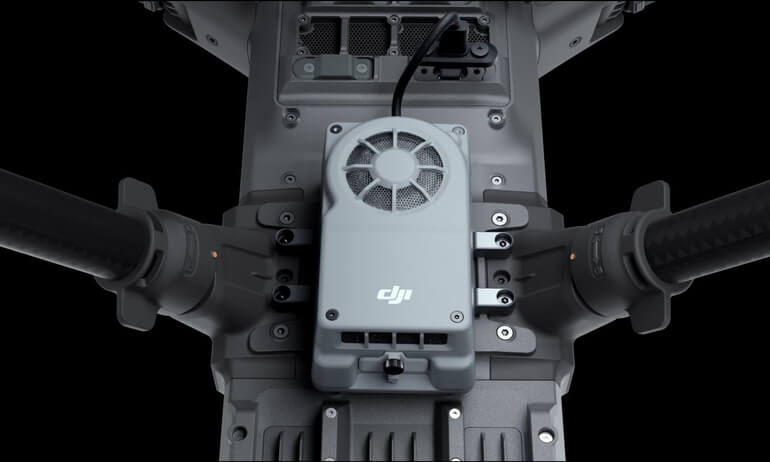
Manifold 3 is a fourth computing layer, not a fourth interchangeable mount: when the required capability calls for it, the computer connects to a supported M400 E-Port V2 port and runs its PSDK/AI application. Ask the integrator to draw the entire path from sensor to aircraft to controller and data output before ordering parts.
What does the E-Port V2 Development Kit actually do?

A prototyping tool, not a finished sensor
SpeedyDrone's DJI E-Port V2 Development Kit listing includes the development board and coaxial cable, power leads, SkyPort V3-related adapter/cable parts and X-Port adapter board/cable. It is for connecting, developing and debugging a compatible third-party payload on Matrice 400—not a promise that an arbitrary device becomes flight-ready.
The store currently marks the kit as backorder; contact SpeedyDrone for lead time before planning a development schedule. A SkyPort V3 part in this kit does not mean a complete X-Port gimbal or custom production payload is included.
The board includes a GD32F527ZMT7 MCU and 8 MB external SDRAM. DJI documents two useful starting modes: run a suitable PSDK payload application on the board's MCU, or switch its USB route to an external MCU/SoC that handles the application. The latter is appropriate when your electronics or compute requirements exceed the onboard prototype. DJI's Development Kit guide also documents the USB-to-serial bridge options and a minimum PSDK version for its example.
The board exposes 5 V, 12 V and VCC XT30 outputs, but their simultaneous use remains within the aircraft's single-channel limit. Design thermal management and enclosure protection for any production integration; DJI and SpeedyDrone both call out that a bare development board is not a finished aircraft-qualified assembly.
What is PSDK?
PSDK means Payload Software Development Kit. It is DJI's software interface for developing supported payload communication and control—not a cable, port or computer. Depending on the aircraft, connection, firmware and permissions, a PSDK design can work with aircraft information, payload status, power management, data transmission and camera or gimbal functions. The available set is conditional, not a blanket feature entitlement.
A useful rule is: E-Port V2 gives the payload a physical path into the aircraft; PSDK gives payload software a way to communicate through the supported platform interfaces. DJI's current open-capability matrix should be read feature by feature before promising a customer a function.
SkyPort V3, X-Port and older M350 payloads
SkyPort V3 is M400-specific adapter/quick-release hardware with a DJI SDK authentication chip; DJI says it is not itself compatible with Matrice 300 or Matrice 350. X-Port is the gimbal development platform for a custom payload that needs stabilized motion. A fixed environmental sensor usually does not need a gimbal merely because the aircraft supports X-Port. DJI's hardware-platform guide distinguishes those roles.
What if your team already built a SkyPort V2 or X-Port payload for M300/M350? Do not assume either universal incompatibility or plug-and-play migration. DJI's compatibility list provides M400 paths for those architectures, with accessory firmware and PSDK version requirements. Current release notes also show why a firmware-specific acceptance test matters. Confirm the exact payload, adapter, software build, physical mounting and requested function with its manufacturer or development team. For aircraft-level upgrade differences, see SpeedyDrone's Matrice 400 vs Matrice 350 RTK guide.
When do you actually need Manifold 3?
Not for every E-Port V2 payload. A straightforward custom sensor or basic PSDK function can begin on the Development Kit's MCU or another third-party platform. DJI's capability matrix says M400 third-party development platforms support basic functions, while specified advanced functions require Manifold 3; some requirements may need additional DJI permissions. Manifold 3 is therefore a feature-gate and compute decision, not a compulsory add-on to every port.
Manifold 3 is an onboard Linux computer with up to 100 TOPS of sparse INT8 compute, 16 GB LPDDR5 memory, 256 GB SSD, IP55 protection and rated power of 33 W; its listed mass is 120 ± 5 g. Those are product specifications, not a guarantee of a particular AI model's speed or field performance. On Matrice 400, DJI supports connection at E1, E2 or E3 and recommends E3—not E4. See DJI's Manifold 3 specifications.
Examples of advanced families include flight control, gimbal or camera management, and access to live camera streams. The exact function, permission and firmware combination needs a matrix check. For example, DJI's Liveview documentation says M400 stream acquisition in that module requires Manifold 3.
What does a real onboard-AI path look like?
DJI documents an H30-series camera + M400 + Manifold 3 demonstration: the computer receives camera imagery, runs an object-detection example and sends result metadata back for display in DJI Pilot. Its Liveview AI guide states the supported configuration and describes sample code. The sample proves a development route exists; it does not certify detection accuracy, unattended inspection, autonomous flight decisions or a production-ready application.
If your proposal uses the thermal-capable variant, SpeedyDrone's Zenmuse H30T listing is the exact camera product page; contact the store about its current enterprise availability. Confirm the developer example's supported camera stream and your actual H30/H30T firmware before specifying the purchase. Detection classes, false positives, site conditions and operator review belong in your acceptance plan.
Which integration path should you shortlist?
| Your requirement | Starting architecture | Verify before buying |
|---|---|---|
| Fixed custom sensor with basic status/data | E-Port V2 cable + Development Kit + PSDK | Power, physical mounting, data format and supported PSDK function |
| Detachable custom payload | SkyPort V3 route + PSDK | Adapter/cable design, latch, sealing and payload firmware |
| Custom stabilized camera or pointing sensor | X-Port gimbal route + PSDK | Gimbal envelope, balance, control APIs and mounting |
| Advanced camera/gimbal/flight functions | Manifold 3 + PSDK, subject to matrix | Exact function, permissions, firmware and port allocation |
| Onboard AI using supported DJI liveview | Camera + Manifold 3 + PSDK application | Stream support, model validation, thermal/power budget and human review |
| Existing M300/M350 SkyPort V2 or X-Port payload | Migration assessment first | Accessory firmware, PSDK version, mechanical and feature tests |
These are architecture starting points, not automatic compatibility guarantees.
Three practical architecture examples
1. Environmental sensing without a moving camera
A fixed air-quality or process sensor might use its own MCU, the E-Port V2 Development Board and an appropriate PSDK link for basic status/data. The integration team still designs the mount, enclosure, calibration, fault handling and data record. Manifold 3 is not automatically required simply because the sensor is custom.
2. Stabilized specialty imaging
A custom imaging head that must point independently of the aircraft is a more natural X-Port candidate. That changes the problem from “connect my electronics” to “develop and validate a controlled gimballed payload.” Check total mass, gimbal motion, cable routing, vibration, power and approved API behaviour.
3. AI-assisted inspection
An advanced image-analysis application may combine a supported DJI camera, Manifold 3 and a PSDK app, with results rendered for an operator. The pilot and inspection team still need a documented review workflow. A detected object is an algorithm output, not a verified defect, safe flight path or regulatory approval.
Does Matrice 400 really support seven payloads?
DJI publishes an up-to-seven connection architecture. It does not follow that seven arbitrary devices can be installed and flown at once. The 6 kg figure is likewise a conditional aircraft specification, not a per-port entitlement. A viable multi-payload design has to pass at least these checks: total and individual mass, mount and centre of gravity, clearance through gimbal and landing-gear motion, per-port and total power, data bandwidth, PSDK/firmware combinations, radio or sensor interference, thermal behaviour and measured endurance. DJI's M400 FAQ adds that teams using non-DJI payloads should obtain a payload-manufacturer test report for safe flight at low battery.
What should you prepare before contacting SpeedyDrone?
Send a concise system brief. It lets the store and your integrator separate an aircraft purchase from development hardware, a production payload and software scope.
- Exact payload model or custom-device description
- Mass, dimensions, mount position and centre of gravity
- Voltage, peak/continuous power and startup demand
- Fixed, quick-release or gimballed mounting
- USB, network or serial data requirement
- Needed PSDK functions and current software version
- Pilot 2 interaction and live video needs
- Onboard AI or decoded-stream requirement
- Existing SkyPort V2/X-Port hardware and firmware
- Number of simultaneously powered payloads
- Selected M400 aircraft and gimbal configuration
- Field environment, endurance target and acceptance test
For the aircraft, the Matrice 400 SP Plus Combo is SpeedyDrone's exact platform listing; it explicitly excludes TB100 batteries and the BS100 charging station. The Matrice 400 SP Plus Full Package lists one TB100 and one BS100 alongside the aircraft and controller, but neither listing by itself specifies your custom payload or integration work. Check the Matrice 400 collection for current configuration options, and use the Combo vs Full Package guide for the power-system buying decision.
Frequently asked questions
Does every Matrice 400 E-Port V2 payload need Manifold 3?
No. Basic PSDK payloads can use a suitable third-party development platform. DJI's M400 capability matrix requires Manifold 3 for specified advanced functions; check the exact feature and permission before designing the system.
Can I plug a serial-only sensor directly into E-Port V2?
Not as a direct legacy UART connection. DJI removed direct UART from E-Port V2, but documents USB-to-serial bridges such as FT232 and CP2102 through the Development Board.
Is the Development Kit required for every finished payload?
No. The kit is a convenient prototyping and debugging route. A production design may use a supported SkyPort V3 or X-Port path with its own engineered electronics, enclosure and PSDK implementation. Validate that exact design before flight.
Is SkyPort V3 the same as X-Port?
No. SkyPort V3 is M400-specific quick-release and connection-adapter hardware. X-Port is the standard gimbal development route for a custom payload that needs stabilized pointing.
Will my Matrice 350 SkyPort V2 payload work on Matrice 400?
Possibly, but not automatically. DJI lists a migration path for supported SkyPort V2/X-Port PSDK architectures with specific accessory firmware and PSDK requirements. Test the exact payload, mount and requested functions.
Can I install seven payloads and use 120 W from every port?
No such general guarantee follows from the published numbers. Seven describes the E4-hub connection architecture; 120 W is a per-port capability. The actual installation needs a complete mass, balance, power, clearance and endurance review.
Map your payload before ordering hardware
Send SpeedyDrone your payload model, mass, power draw, interface, current SkyPort/X-Port/PSDK versions and intended workflow. We can help identify the relevant M400, E-Port V2 Development Kit and procurement path; your engineering team or payload manufacturer must verify the final integration and flight tests.
Contact SpeedyDrone about your M400 integration →Primary technical sources
- DJI Matrice 400 FAQ and aircraft specifications: ports, payload and power context.
- DJI PSDK hardware-port guide, connection routes and compatibility list.
- DJI PSDK capability matrix, Manifold 3 specs and Liveview AI example.


