


Resource updated October 7, 2026 · Documentation-based inspection workflow guide
DJI FlightHub 2 can connect scheduled capture, mapping, analysis and notifications. A useful inspection programme also proves that the evidence is current, the finding has been reviewed and someone owns the next action.
Quick answer: Start with a defined inspection deliverable, an approved route and a compatible flight plan. Configure a Periodic Workflow with the processing and notification nodes that deliverable needs. Verify the baseline, source media and model date, then review findings before releasing consequential actions. Mapping is optional for photo comparison; scheduled Analysis Reports and manually created Defect Reports are different outputs.
This guide is for Canadian operations, asset and integration teams turning repeat drone visits into a dependable inspection record. It follows the evidence from scheduled flights to mapping, change detection, defects and notifications, including the configuration choices that can break that chain.
The examples and acceptance checks are SpeedyDrone operating recommendations, not customer deployments or results from our own field testing. Interface images are genuine DJI documentation examples. For the wider organisation and fleet structure, use our FlightHub 2 multi-site operations guide.
Navigate this resource
- Define the inspection outcome
- Check deployment and permissions
- Control schedules and route copies
- Capture, upload and process
- Choose the comparison baseline
- Review AI findings
- Preserve defect evidence and location
- Notify people and external systems
- Separate report types and dates
- Choose a practical design
- Test the failure paths
- Canadian operations and data review
- Plan ownership and procurement
- Frequently asked questions
1. Define the inspection outcome before building the workflow
Write the decision the recipient must make. “Inspect the site every week” is incomplete. A facilities reviewer may need comparable views of an asset; a project manager may need departures from an agreed baseline; a quantity reviewer may need a measured surface with supporting quality evidence. Those outputs require different capture and processing choices.
Define the site or asset identifier, required imagery, acceptable evidence age, review owner and delivery destination. Include the outcome when evidence is missing or inconclusive. This gives the team a way to distinguish a completed flight from an accepted inspection, and it prevents a successful notification from becoming the programme’s only measure of success.
Choose the simplest useful processing path. Repeat photographs can answer a visual question without a new model every visit. Mapping is appropriate when the recipient needs spatial context or measurements. AI screening is useful when it helps a reviewer find relevant observations; adding it to every mission creates extra validation work without necessarily improving the deliverable.
Keep the first pilot narrow enough to inspect every handoff. One approved route, a representative asset group and a named recipient provide a better starting point than enabling an entire fleet before the team knows what an acceptable result looks like.
2. Check the deployment, permissions and prerequisites
Confirm the exact FlightHub deployment and entitlement before treating a feature as available. DJI offers public-cloud and on-premises versions; general device support does not establish support for every automated node. In particular, the current Periodic Workflow documentation limits its Change Detection Pro node to public-version waypoint-route tasks.
Record the aircraft and dock configuration, firmware, project, plan type, processing entitlement and required storage or integration service. Make a small representative dataset available for testing. A feature name on a product page does not prove that the selected tenant, aircraft and route can complete the intended chain.
DJI’s Workflow Management guide requires a project role with the relevant automation permissions, or a Project Administrator. Give each person access appropriate to their job: authoring a route, enabling a workflow and receiving a report are different responsibilities. Identify who can stop production automation and who covers that role during an absence.
Prepare the flight plan, Analyzer and any report template before linking them in the workflow. Name these objects consistently enough to distinguish production from test configurations. Our recommendation is to keep a configuration record listing their identifiers, owner, purpose and approved revision, rather than relying on screenshots of similarly named objects.
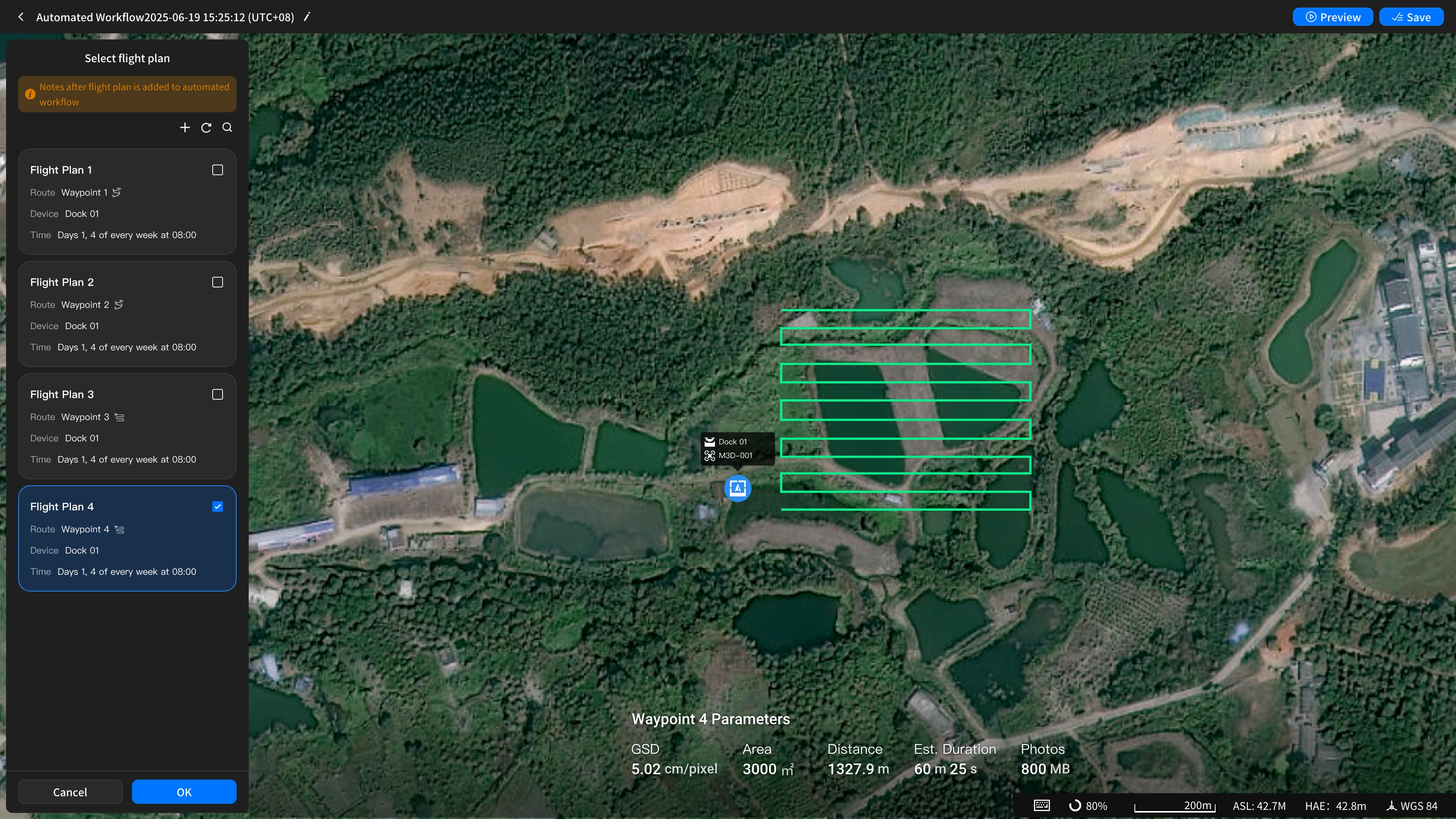
3. Use one scheduling authority and verify the copied route
A Periodic Workflow can start from a schedule or a supported OpenAPI request. DJI currently documents the external trigger as starting the configured workflow without passing external parameters downstream. Use it to launch an agreed process; do not assume an incoming asset identifier or coordinate will rewrite that process.
The linked flight plan must use the Recurring Task strategy. The Periodic Workflow guide warns against enabling both the workflow schedule and the plan’s recurrence as competing triggers. Linking also disables Media File Direct Transfer. Check the resulting timing and transfer settings rather than assuming the plan behaves exactly as it did before linking.
Route revision needs its own control. DJI’s current Single-Dock Plans guide says that selecting a route creates a plan copy. Editing the library route does not update that copy; a new plan is needed to perform the edited task. Inspect the actual route attached to production and re-link the intended replacement through a controlled change.
Record the operating time zone and test the schedule around local daylight-saving changes, maintenance periods and site shutdowns. This is an acceptance requirement, not a claim about undocumented scheduler behaviour. Treat an Immediate plan as a real launch instruction, and keep route tests within the operator’s approved conditions.
A Triggered Workflow serves a different dispatch purpose, such as responding to an alert location with a FlyTo and aircraft action. Assess that architecture separately. It is not simply the weekly inspection workflow with its calendar removed.
4. Control capture, upload and the processing branch
Comparable evidence begins with the capture procedure. Specify route coverage, camera direction, capture actions and the image quality needed for the decision. For reconstruction, plan the overlap and visible surface coverage required by the output. Document lighting, moisture, occlusion and other conditions that affect interpretation.
A dark roof patch may be a shadow or a wet surface. A missing item may simply lie outside a changed camera view. Keep the accepted reference imagery and the reasons for route revisions. When the scene or capture method changes substantially, decide whether the comparison still answers the original question before feeding it into routine analysis.
Mission status and media availability are separate checks. The plan library exposes upload progress and file counts. Confirm that the expected source files reached the intended project before treating the capture as ready for analysis. Define what happens to partial uploads, missing views and late arrivals.
Approved plan → capture → source-media check
Photo comparison
Comparable waypoint images → eligible change detection or configured screening → source-pair review.
Mapping and measurement
Suitable imagery → reconstruction → intended Analyzer or model site → measurement and quality review.
Accepted evidence → reviewed finding or report → recipient acknowledgement → follow-up
A Mapping Task provides a processing branch for orthophotos or reality models. Link its source plan and the intended Analyzer or model site, then verify where the result appears. A model generated elsewhere in the organisation does not automatically become the model used by a particular inspection or report.
Data Sync has a narrower role. Configured project media-sync rules create a sync node after flight and mapping nodes; without a rule, that node is skipped. The sync step is not a substitute for checking uploads, Analyzer association or downstream ingestion. Use our FlightHub Sync integration guide for the storage and event layer.
For each processing branch, identify the source of truth and the failure owner. A reviewer should be able to open the original mission and media, establish which processing job used them, and find the resulting model or comparison without matching files by memory.
5. Choose the baseline that answers the comparison question
Dynamic Relative Comparison uses the plan’s last successful execution as the reference. Specify Historical Batch retains a chosen earlier task. A rolling reference answers recent change; a fixed reference answers departure from an agreed starting condition. Neither choice makes the evidence automatically comparable.
After a missed inspection, show the actual reference and current capture dates. The rolling interval may be longer than the schedule suggests. A fixed baseline preserves its purpose, but it does not fill the missing observation or establish when a change occurred.
On small screens, scroll within the table to read each complete guidance column.
| Question | Rolling reference | Fixed reference |
|---|---|---|
| Recent change | Compare with the last successful capture; state both dates. | Shows cumulative departure, not only the latest interval. |
| Commissioning condition | Recent differences may miss the full departure. | Keep the accepted commissioning batch and its context. |
| Missed visit | Review the changed comparison interval. | Keep the reference but flag the evidence gap. |
| Major scene change | Review whether the previous capture remains useful. | Approve a replacement baseline when the original question no longer applies. |
Detect Changes Pro supports matching media from the same waypoint route, including wide-angle, zoom and infrared photos; panoramas are excluded. Its separate on-premises capability does not establish availability of the public-only periodic node in every deployment. Confirm the exact feature path before purchasing or configuring around it.
Retain the approved baseline’s identifier, acquisition date, route revision and reason for selection. If a replacement is necessary, preserve the previous reference and document the break in the comparison series. This avoids presenting a changed method as uninterrupted asset history.
6. Review changes before calling them defects
A detected difference is evidence to inspect. A vehicle appearing, a shifted shadow or a changed work area may be expected activity. The asset reviewer decides whether an observation is relevant, whether the image is sufficient and whether further investigation is needed.
DJI’s Detect Changes Pro guide permits editing annotations, generating or regenerating an AI report, and saving results as defects. Those actions organise evidence; they do not certify engineering condition. The current documented detector uses its default prompt, so do not assume a custom instruction can be supplied through that feature.
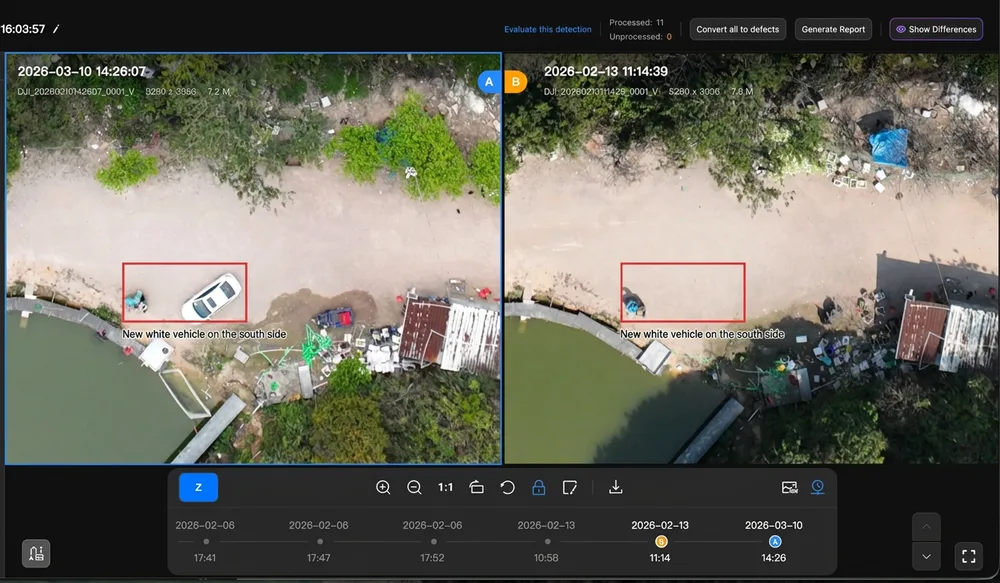
Use distinct review outcomes: accepted finding, expected change, rejected alert and insufficient evidence. Record the reason and reviewer. “Nothing accepted” should not become “the asset is safe” when coverage or image quality was inadequate.
Where VLM screening or an automatic Convert to Defect option is used, decide how generated records are separated from professionally accepted findings. Do not silently route every generated record into a consequential work order. Establish the review policy before enabling that downstream connection.
Validate with representative known changes, unchanged scenes and confusing conditions. Assess false alerts and missed findings against human-reviewed evidence, keeping the operating conditions and affected asset classes. A successful demonstration or an AI report’s wording is not a site-specific accuracy guarantee.
7. Preserve the defect’s evidence, meaning and location
A useful defect record names the asset, describes the observation and records the evidence behind its classification. FlightHub provides levels 1–5 plus an unrated state. Define what those levels mean in your organisation, including escalation and response ownership, before comparing counts across sites.
Severity and confidence answer different questions. A potentially serious observation can have weak evidence; a clearly visible cosmetic change can have little operational consequence. Keep that distinction in the review record rather than forcing one level to express both.
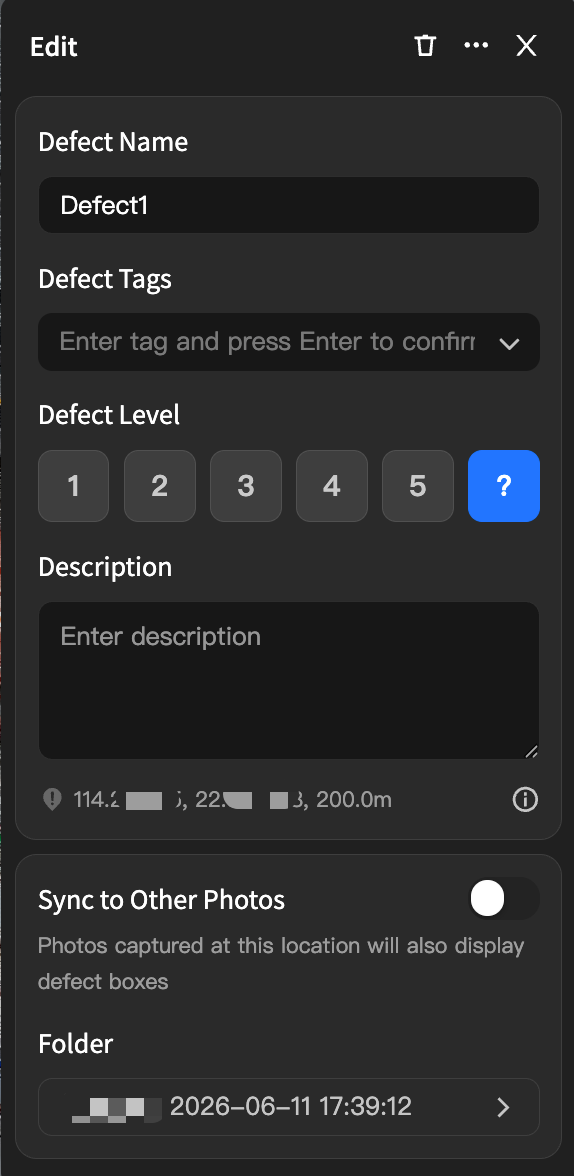
Keep the evidence attached
Preserve the original photo, capture date, relevant comparison pair, route revision, reviewer and decision. If the record is promoted into a maintenance system, retain identifiers that lead back to this evidence.
Record the model name and acquisition date used for location. Coordinates without that context can hide a change in the reconstructed surface rather than describe movement of the asset.
Keep accepted, provisional and unreviewed records distinguishable in exports. A downstream user should not have to infer approval status from the existence of a defect box.
DJI’s Defect Management guide derives location from the photo’s pose and field of view intersecting the currently displayed model. Changing that model recalculates the position. When change results are saved as defects, the Detect Changes Pro guide identifies the later image set, Set B, as the basis.
- 1. Photo and poseThe marked area and camera parameters define a viewing ray.
- 2. Displayed modelThe ray meets the reconstructed surface currently in use.
- 3. Located findingRetain the image and model context; a changed model can move the derived position.
Related-photo recommendations also depend on reconstruction and camera-pose information. Inspect the suggested views and confirm they show the relevant component. A recommendation is supporting evidence, not automatic confirmation of the original diagnosis.
8. Separate notification delivery from accepted business action
A workflow notification follows a supported upstream node’s execution. It can report that capture or processing has finished, but that event does not necessarily mean an asset specialist has approved a finding. Describe the message’s meaning explicitly to recipients.
Personnel notifications can use in-app messages, SMS or email. The relevant contact details must be bound to the organisation profile; otherwise delivery may be in-app only. Verify the actual recipient, channel and fallback in a test instead of assuming that selecting a name proves external delivery.
The periodic notification webhook sends an upstream result to a publicly reachable endpoint and has limited retries. FlightHub Sync EventAPI is a separate subscription mechanism with documented HMAC-SHA256 verification through x-dji-signature. Do not transfer its payload or authentication assumptions to a different webhook without checking the specific EventAPI reference.
For a CMMS or other business system, treat the adapter as a separate integration project. Prove the event or retrieval mechanism that carries an approved finding, map its asset identifier, and verify destination acknowledgement. The documentation does not establish a native “manual approval → notification → accepted work order” chain for every system.
- Identity
- Source project, mission, finding and destination asset identifiers; preserve the relationship between them.
- Evidence
- Capture dates, comparison reference, source photos and model context; distinguish acquisition from processing time.
- Review
- Reviewer, decision, severity, evidence confidence and any further inspection required.
- Delivery
- Recipient or system, acknowledgement, duplicate-handling rule, retry owner and failure destination.
- Closure
- Assigned action, accountable owner and the follow-up evidence needed to verify completion.
Keep duplicate delivery from creating duplicate action. Define a stable record key and how updates are applied, then test repeated and delayed messages. These are receiving-system acceptance requirements, not claims that FlightHub provides a universal deduplication or retry policy.
Secure the chosen endpoint and limit the data it receives to the agreed purpose. Validate source authentication, handle secrets appropriately and avoid exposing unnecessary imagery or personal information in routine alerts. A transport success indicator proves less than a confirmed, authorised destination record.
9. Choose the report type and check evidence freshness
Decide which document the recipient needs before promising automated delivery. Analysis Reports, change-detection AI reports and Defect Reports have different generation and review paths. Their similar names do not make their automation interchangeable.
On small screens, scroll within the table to compare the report types.
| Output | Documented path | Required distinction |
|---|---|---|
| Analysis Report | Templates support scheduled generation and automatic email delivery. | Check the intended model and acquisition date; a generation time does not prove freshness. |
| AI report | Generate from change results and regenerate after review edits. | It is not automatically an approved defect register or a maintenance acknowledgement. |
| Defect Report | Current guide supports manual creation. | Planned template or task automation is not current availability. |
DJI’s Analysis Report guide supports selected models or model-site associations and asks users to leave sufficient reconstruction time before generation. Set the template’s model, calculation rules, timing and recipients deliberately, then verify the produced document with the intended evidence.
A later report clock is only a time buffer. If reconstruction failed or the wrong model site was linked, a newly generated report may still use unsuitable evidence. Check source acquisition dates and model identity. Define who withholds, labels or corrects a stale report; this is an operating control, not an undocumented native freshness guarantee.
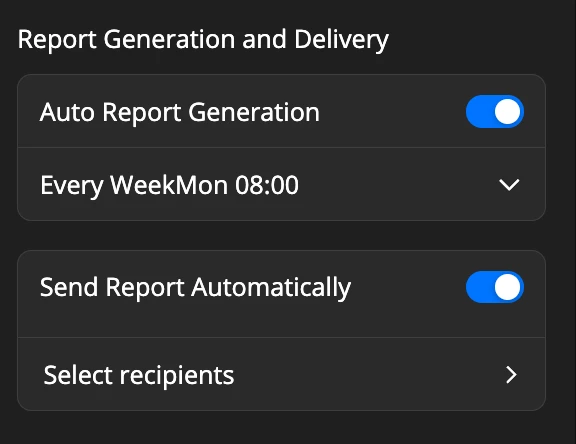
Use the right dates
Keep capture, model acquisition, processing, review and report-generation times distinct. State the actual comparison interval and any missing observation.
For a Defect Report, assign an owner to create and review it. Confirm the model context, original imagery and classification before release. Share the final document through the supported path required by the recipient.
10. Match the design to the inspection job
These are planning examples, not reported installations. Each changes the workflow according to the business question, rather than inserting every available node into one standard chain.
Construction: explain departures from the plan
Use an approved repeat route and produce the mapping output needed for context. Choose a rolling reference for recent progress or an accepted pre-construction reference for cumulative departure. Have the project reviewer separate expected works from deviations. Deliver capture dates, location context and a reviewed explanation; “AI found changes” does not tell the project team which issue needs attention.
Facilities: support a maintenance decision
Repeat the views needed to inspect the selected asset, review relevant changes and preserve original evidence. Classify accepted observations with the asset owner’s severity policy. If a maintenance platform is used, prove that approved findings reach the correct asset record. After work, collect the agreed follow-up view or physical inspection evidence. A closed ticket alone does not demonstrate the observed condition has been resolved.
Stockpiles: produce comparable quantity evidence
Capture and reconstruct the required surface, link the correct model site and apply the configured measurement/report method. Prioritise geometry, boundaries, reference surfaces and comparable dates. AI screening may add little to that question. For the detailed capture and base-plane reasoning in a separate software workflow, see our Matrice 4E and DJI Terra stockpile measurement resource; do not assume its exact controls are identical to FlightHub Analyzer.
For each example, agree the acceptance criteria and recipient before increasing frequency. More frequent capture can increase review and storage work. A useful programme balances evidence age, consequence of a missed observation and the team’s ability to act on the results.
11. Test failure paths before reducing supervision
A pilot should demonstrate the intended deliverable and make failures visible. Define acceptable outcomes before testing: correct evidence dates, required views, review status, delivery acknowledgement and a named response owner. Keep real flight testing within approved operating conditions; integration tests can use a test destination without creating live work orders.
Use workflow execution and operation records to investigate what ran and what changed. Do not assume every node has the same retry or downstream-failure behaviour. Confirm whether the actual configuration waits, stops or continues when inputs are incomplete, and make that outcome understandable to the recipient.
Acceptance checklist
- Expected capture: Confirm approved coverage and usable source files, not only a completed-flight status.
- Missed or partial visit: Establish how absence becomes visible, who responds and which successful batch the next comparison selects.
- Delayed processing: Verify model association and report behaviour when reconstruction is unavailable; identify any older evidence.
- Known changes and negatives: Review relevant changes, unchanged views and confusing conditions against labelled human evidence.
- Inconclusive imagery: Preserve an insufficient-evidence outcome and request another view instead of closing the inspection as clear.
- Unavailable recipient or endpoint: Test delivery failure, acknowledgement and fallback with the correct owner.
- Duplicate or late events: Confirm repeated delivery does not create duplicate action or overwrite newer reviewed evidence incorrectly.
- Changed configuration: Revalidate the linked plan, route, model, processing settings, permissions and adapter after an approved revision.
- Closure evidence: Show how the action and subsequent observation are linked without losing the original finding.
Record observed behaviour, evidence and unresolved defects in the pilot log. A successful scheduled run is useful, but it does not cover failure cases. Scale only the part of the workflow whose handoffs meet the agreed criteria, retaining a manual review or delivery fallback for the rest.
12. Review Canadian operating authority and data requirements
FlightHub automation does not establish permission to fly a particular mission. Transport Canada’s operation-category guidance ties requirements to the aircraft and how and where it is operated. Confirm applicable pilot, aircraft, airspace and site conditions with the accountable operator; do not infer BVLOS authority from remote-control software.
Set site-specific weather, access and maintenance procedures. Canadian winter conditions, changing daylight, site activity and connectivity can affect the capture window and evidence quality. The operating team should decide when an inspection is deferred, how missed evidence is reported and when a revised route needs renewed review.
Data handling also belongs in the deployment decision. DJI’s FlightHub 2 FAQ identifies public-cloud servers outside mainland China in Virginia, USA, or Frankfurt, Germany. That is not a Canadian-hosting promise. Confirm the actual tenant, contractual requirements, retention, access and downstream transfers before uploading sensitive site imagery.
On-premises deployment is a separate system design with its own model, infrastructure, support and feature checks. The Detect Changes Pro documentation requires an on-premises model deployment for its large-model calls. Do not assume cloud feature parity, isolation from every external dependency or compliance with a customer policy merely from the deployment label.
Limit access by role, protect integration credentials and plan removal of departing users. Review whether alerts expose unnecessary personal or site information. Our drone data-security checklist provides a broader procurement review; the actual security and operating acceptance remain the organisation’s responsibility.
13. Plan ownership, hardware and the next useful stage
Allocate responsibility for route approval, finding review, severity, integration delivery and closure. One person may hold several roles, but every handoff needs a named owner and cover during an absence. Budget for review time, data retention, connectivity, licensing, installation and ongoing maintenance alongside the capture platform.
Measure progress by completed handoffs: remote flight, repeatable capture, suitable processing, useful screening where required, structured findings, acknowledged delivery and evidence-based follow-up. This is SpeedyDrone planning guidance, not a DJI certification or scored maturity standard. A reliable measurement-reporting programme may not need screening at all.

Choose the capture platform with the workflow
DJI Dock 3 provides a FlightHub-managed remote-deployment platform. Confirm the exact aircraft, software entitlement, site installation, connectivity and operating procedure together.
The photograph is manufacturer promotional imagery from the matching SpeedyDrone listing, not a local customer installation. Explore the Dock 3 and Matrice 4D Series collection when reviewing hardware; a configuration enquiry should establish the actual supplied scope.
Bring a sample deliverable and representative data to that discussion. A clear inspection question, recipient and acceptance method help identify what to configure now, what requires custom integration and what should remain manual until validated.
Frequently asked questions
Does every automated inspection need mapping?
No. Use reconstruction when the recipient needs measurements, a model or spatial context. Comparable waypoint photographs can support a visual comparison without producing a new model for every visit. Model-based defect location does depend on suitable model and camera information. Select the processing branch from the required evidence, and test it with representative data. Adding mapping for convenience does not improve an unsuitable capture, and leaving it out does not remove the need to review image quality or comparison dates.
Can an external system start a Periodic Workflow?
Yes. DJI documents a supported OpenAPI start as well as scheduling. The current trigger starts the configured workflow without passing external parameters into downstream nodes. Verify the selected deployment, permissions and interface before expecting a request to change the route or asset selection. A location-driven dispatch requirement belongs to a separate Triggered Workflow assessment. For a fixed inspection chain, also confirm which timing mechanism owns recurrence and test duplicate requests without unintentionally launching competing production tasks.
Will editing the route library update an existing single-dock plan?
No. The current Single-Dock Plans guide says that choosing a flight route creates a plan copy, and library edits do not change that copy. Create a new plan to perform the revised task and verify the route actually linked to production. Treat replacement as a controlled change: retain the old revision, validate the new capture, review baseline compatibility and check scheduling or transfer settings. Do not assume a familiar route name proves the plan contains the latest route geometry.
What happens to the baseline after a missed inspection?
A rolling comparison uses the last successful execution, so the evidence interval can become longer than the planned visit interval. State both actual capture dates and investigate the missing observation. A fixed historical batch remains the chosen reference, but it cannot reveal when a change occurred during the gap. If the scene or route has changed substantially, approve a suitable replacement baseline and preserve the break in the series rather than presenting it as continuous comparable evidence.
Can AI findings automatically become approved maintenance defects?
Do not treat automatic storage or conversion into a defect record as professional approval. Define who reviews the source imagery, what evidence is sufficient and which outcomes require another view or physical inspection. Keep unreviewed, provisional and accepted records distinguishable before they drive consequential action. If an integration is meant to create work orders only after approval, prove that exact handoff separately. A completed analysis event and an accepted maintenance instruction have different meanings.
Can FlightHub automatically email every Defect Report?
The current guide supports manual Defect Report creation; scheduled generation and automatic sending are documented for Analysis Report templates. An AI change report is another output. Specify which document the recipient needs, who reviews it and what source dates must appear. Confirm those stages in the actual deployment before promising automatic delivery. For scheduled reports, check model identity and acquisition date as well as the report-generation time, so a newly issued document does not disguise stale evidence.
Does a webhook provide a ready-made CMMS connector?
No. It provides a technical handoff that a receiving system must interpret and accept. Confirm the event, payload, authentication, approval gate, asset mapping, duplicate handling and acknowledgement. FlightHub Sync EventAPI and periodic workflow webhooks are different interfaces; do not assume identical signatures or semantics. Treat the adapter as a separately tested integration, with a failure owner and a manual fallback. A successful send alone does not prove the correct work order was created or reviewed.
What should a pilot prove before the workflow is scaled?
Prove that the intended evidence reaches the correct recipient with accurate acquisition dates, source links, review status and accountable follow-up. Include missing capture, delayed processing, confusing images and failed delivery alongside the successful path. Record criteria and owners before testing, then retain observed results and unresolved limitations. Repeat affected checks after route, model, firmware, permission or integration changes. This guide is documentation-based design advice; it is not evidence that a particular site, tenant or operating permission has passed acceptance.
Source and scope notes
Technical claims were checked against the linked DJI manuals on October 7, 2026. The Triggered Workflow guide covers the separate dispatch architecture. Configuration, examples, review controls and acceptance criteria are SpeedyDrone recommendations. We have not tested an authenticated tenant, live flight, CMMS adapter or notification delivery for your organisation. Recheck current features, entitlement and regulatory conditions before implementation.
Plan one complete inspection workflow
Send SpeedyDrone your site type, capture frequency, required deliverable, review owner and destination system. Use those requirements to discuss the capture platform, FlightHub configuration and acceptance work before expanding the programme.


